
Principle of Least Privilege Access Control and Its Purpose
Administrative access should be the exception, not the default. The principle of least privilege access control gives each user or process only the permissions needed for its assigned tasks. That limits the reach of an account if it’s misused or compromised.
It’s sensible to give employees access to the systems and information they need for their jobs. The challenge is preventing that access from quietly expanding over time, especially when roles change or routine work is done through an administrator account. A clear access model keeps security practical without blocking legitimate work.
This article explains how least privilege works, why it is a foundation of Zero Trust, and how separate everyday and administrative accounts help put it into practice. It also covers controlled, temporary administrator access and regular permission reviews, which can reduce unnecessary exposure while keeping essential tasks moving.
Key Takeaways
- Limit each user’s and application’s permissions to what assigned tasks require, and remove access that’s no longer needed.
- Use separate everyday and administrative accounts to reduce exposure during routine work.
- See how least privilege supports Zero Trust by keeping access subject to authorization and ongoing validation.
- Control elevated access with clear role-based permissions, documented reasons, and regular reviews.
- Learn how managed IT and cybersecurity support can help organizations assess and manage access risks.
What Is the Principle of Least Privilege?
The principle of least privilege access control gives each user or process only the access needed for assigned tasks. CNSSI 4009-2022 defines this restriction as a way to limit privileges to the minimum necessary.
In the United States, NIST Cybersecurity Framework identifies limiting access to authorized users and processes under PR.AC-4. NYDFS 23 NYCRR 500 Section 500.07 requires covered entities to restrict access privileges to role-related needs; PCI DSS Requirement 7 limits access to sensitive systems and cardholder data by business need to know. HIPAA Section § 164.312(a)(1) requires technical safeguards that allow only authorized users to access electronic protected health information.
Common challenges include unclear job roles, outdated permissions, and applications with broader access than their tasks require. For example, a sales employee who retains finance permissions after changing roles has stale access. Unused application permissions can expose data or functions, increasing the risk of unauthorized access and a breach.
Definition and Terminology
Least privilege means giving a user, process, or application only the permissions needed for its authorized work. “Minimum necessary access” and “least-privileged access” describe the same security approach. For example, a staff member who needs to view a shared file may not need permission to edit or delete it. Matching permissions to actual tasks reduces unnecessary paths into a network.
An application is overprivileged if it holds permissions it doesn’t use or permissions broader than necessary. If a less-privileged permission still supports its intended function, replace the broader one with it. Understanding these terms helps teams distinguish required access from permissions that increase exposure without supporting work.
History of the Principle
The principle of least privilege was first discussed in the 1970s, as computer systems developed methods for separating user and program authority. Version 6 Unix login.c offers an early example: the program starts with super-user permissions, then relinquishes them through setuid() when they’re no longer needed.
This design principle remains important in modern security architecture. An operating-system kernel needs broad privileges because it forms the system’s core and accesses hardware. A routine application doesn’t need the same authority. Maintaining that distinction helps contain the effects of software errors, compromised credentials, and attacks.
Role-Based and Attribute-Based Controls
Role-based access control (RBAC) assigns permissions to job roles, then assigns users to roles that match their responsibilities. For example, a payroll role may access payroll records, while a general employee role cannot. RBAC makes access easier to manage, but poorly defined roles can grant excessive permissions across a department.
Attribute-based access control (ABAC) evaluates attributes such as a user’s role, location, or login time before granting access. A system might allow a finance employee to view a sensitive record only from an approved location. RBAC sets consistent permission groups; ABAC can apply more specific conditions. Both support least privilege when permissions reflect real tasks and unnecessary access is removed.
Separate administrative and everyday user accounts
Separate accounts keep routine work apart from tasks that require elevated permissions. If an everyday account is compromised, this separation can limit what an attacker can access or change.
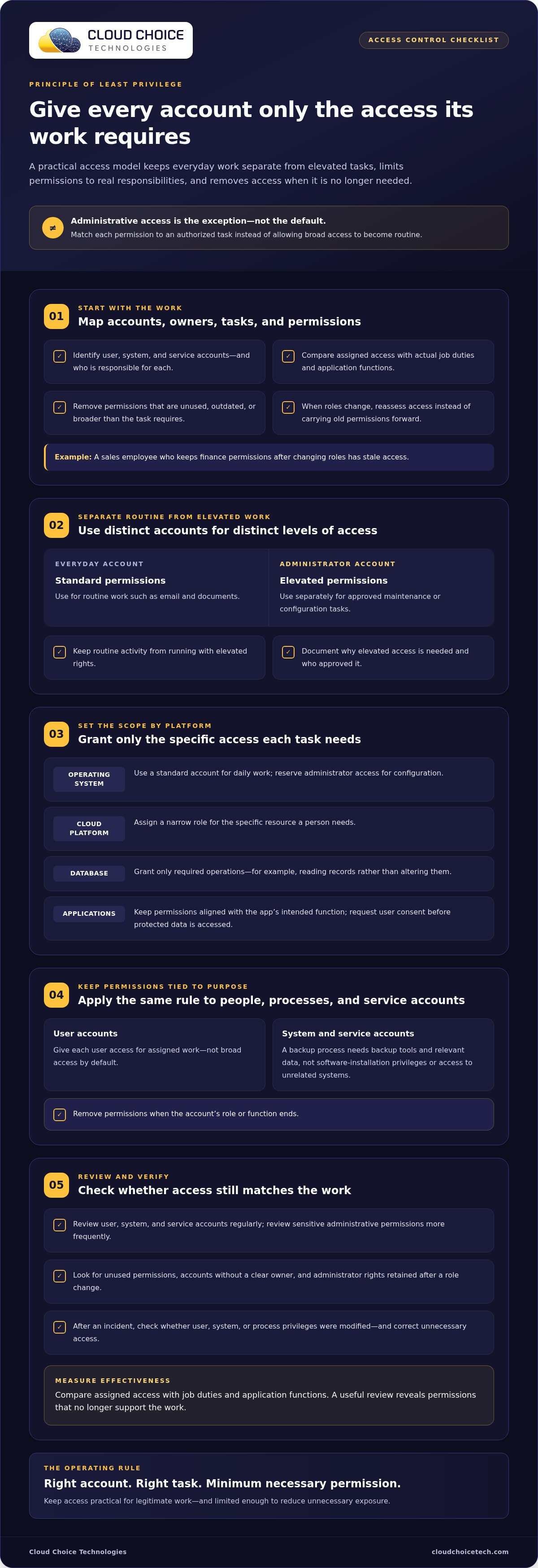
For example, an employee can use a standard operating-system account for email and documents, then sign in to a separate administrator account for approved maintenance. Cloud platforms can give read-only access to staff who only view records, while database accounts can query required tables without changing them.
User and Process Permissions
Grant each user and process only the access its work requires. Separate administrator accounts help keep routine activity from running with elevated rights, reducing the chance that malware launched from an everyday account can perform privileged actions.
Apply the same rule to system and service accounts. A backup process needs access to backup applications and relevant data, not software-installation privileges or broad access to unrelated systems. Keep permissions tied to the account’s function, and remove them when that function ends.
Applications should request a user’s consent before accessing protected data. For administrative work, document why elevated access is needed and assign it to a distinct account. This makes authorization visible rather than allowing broad permissions to become routine.
Implementation Steps Across Platforms
Implementing least privilege starts with identifying accounts, owners, and tasks, then matching permissions to those tasks. On an operating system, use a standard account for daily work and reserve administrator access for configuration. In a cloud platform, assign a narrow role for a specific resource. In a database, grant only the operations an application needs, such as reading records rather than altering them.
Next, record why each elevated permission exists and who approved it. Review user, system, and service accounts regularly; administrative permissions warrant more frequent review because of their sensitivity. The New Zealand National Cyber Security Centre advises reviewing assigned access and checking that roles grant only the permissions needed for their tasks.
Measure effectiveness by comparing assigned access with job duties and application functions. An audit can flag unused permissions, accounts without a clear owner, and administrator rights that remain after a role change. After an incident, review whether user, system, or process privileges were modified, then correct unnecessary access.
No single review interval suits every account. Review access regularly, and review administrative accounts more often. Let the sensitivity of each permission and changes to roles or systems guide the timing. A clear account inventory and approval trail make reviews easier and help identify privilege creep before it persists.
Least Privilege Access and Zero Trust: How Are They Related?
Zero Trust and least privilege address different parts of access security. Zero Trust validates an entity before granting access and continues validating it while access remains active. Least privilege limits what that authorized entity can do. Together, these practices make access depend on identity, context, and task, rather than on an assumed trusted network.
For example, an employee may authenticate successfully but still receive access only to a particular application and its required records. If the employee’s role changes, permissions should be updated to match the new work. Authentication answers who is requesting access; least privilege limits the actions available after authorization. Neither control replaces the other.
Least privilege is a foundation of Zero Trust because each access decision should remain specific. A valid account does not need automatic access to every application, file, or system. Someone who opens a customer record may need permission to view it, but not to export an entire database. That distinction reduces unnecessary opportunities for unauthorized access.
Privilege bracketing applies the same logic to elevated access: a process assumes additional privileges only when needed, then relinquishes them when the task ends. A maintenance tool, for instance, may need administrator rights to change a setting, but not for routine monitoring. Keeping privileges narrow in duration and scope limits the impact of a compromised process.
Privilege inheritance requires careful control. A process that launches another process can pass along permissions, so the child process may receive more authority than its task requires. Administrators and developers can reduce this risk by ensuring each process runs with the minimum permissions needed instead of inheriting broad access by default.
Application permissions create related escalation risks. An unused permission can enable horizontal privilege escalation, where an attacker accesses another user’s resources at a similar privilege level. A permission broader than necessary can enable vertical escalation, allowing access to higher-level functions. Remove unused permissions and replace reducible ones with narrower counterparts that preserve the application’s required functions.
Zero Trust also benefits from a smaller trusted computing base: the critical components that must operate correctly for security controls to hold. The operating-system kernel has extensive privileges because it manages core functions and hardware access. Removing unnecessary programs, accounts, and systems can reduce the number of components requiring trust and simplify monitoring.
These controls work together as an architecture. Authenticate and authorize each entity, grant only task-specific access, limit inherited privileges, and update permissions as needs change. If a process or account is compromised, tighter boundaries help contain its reach instead of allowing access to spread across unrelated applications and systems.
Controlled use of administrative privileges
Administrative access can change systems, accounts, and sensitive information, so organizations should treat it as a controlled exception. The goal isn’t to block necessary operations. It is to make elevated access specific, justified, visible, and limited to the work that requires it.
Start by documenting the reason for each administrator account and permission. The New Zealand National Cyber Security Centre advises recording the justification for administrative access and granting less access when needs are uncertain. Add permissions when a user cannot perform a required task, rather than starting with broad access that may never be needed.
Privilege creep develops when an employee changes roles but keeps earlier permissions while receiving new ones. A manager who moves into finance, for example, may retain access to systems from the former position. Review access against current duties, not copied account settings. The New Zealand National Cyber Security Centre advises against copying one user’s access to another without reviewing each permission.
Just-in-time access can further reduce exposure. Instead of leaving administrator rights active, grant them for a specific timeframe tied to a maintenance task or approved change. The New Zealand National Cyber Security Centre recommends considering this approach. When the work ends, remove the elevated permission so the account returns to its standard access level.
Administrative safeguards should cover more than the administrator’s identity. CIS Control 4 addresses the controlled use of administrative privileges. The New Zealand National Cyber Security Centre recommends logging administrative actions to a central server for analysis and alerting. Configure notifications for unexpected actions, such as changes made at unusual times, and let senior leaders review reports without granting them administrator access solely for oversight.
Access can also be limited by context. Administrators can assign privileged access based on a user’s location, company position, and login time. These conditions help distinguish routine requests from activity outside expected operations. A senior official or administrative assistant may attract targeted attention because of high access levels, making focused controls especially relevant.
Review administrative permissions more often than ordinary assigned access because their sensitivity increases the impact of misuse. Election offices should check privileges at least annually to prevent privilege creep. After an incident, review user, system, and process privileges for changes, then correct access that no longer matches approved duties. Keep the decision, approver, task, and removal point traceable.
To strengthen oversight of privileged access and related security risks, consider cybersecurity services as part of your organization’s control program.
Cloud Choice Technologies: Managed IT Services
Cloud Choice Technologies helps organizations address access-control gaps through managed IT services and cybersecurity. If administrator permissions have accumulated across user accounts, systems, or applications, a review can help identify where access no longer matches business needs.
Its cyber risk analysis can help clarify security risks and inform decisions about permissions, account oversight, and administrative access. Remote support can also help businesses address technology issues as they arise. These services are useful when internal teams need support assessing current controls or managing access-related security work.
Explore managed IT services to see how they can support your organization’s technology operations. Contact Cloud Choice Technologies to discuss your access-control needs.
Make Access Governance Part of Daily Operations
The principle of least privilege access control works best when permission decisions stay connected to how your organization operates. Treat access governance as an ongoing business process, not a one-time configuration. Clear ownership helps teams respond when responsibilities shift, new applications are introduced, or business priorities change. That steady attention keeps security controls aligned with real work rather than outdated assumptions.
A practical next step is to establish who owns access decisions, how exceptions are recorded, and how teams track unresolved permissions. These choices make security expectations clear to employees and easier for leaders to oversee. Cloud Choice Technologies supports organizations with managed IT services, cybersecurity, and remote support when internal teams need help strengthening technology and security operations.
Ready to discuss how to improve your access-control approach? Contact Cloud Choice Technologies to start a conversation. A well-governed access model gives your team a clearer foundation for secure, confident work.
Frequently Asked Questions
What Is Privilege Creep?
Privilege creep occurs when access remains active after the work that justified it has changed or ended. For example, a staff member helping with a temporary system migration might keep access to its configuration tools afterward. A useful control is to assign an owner and business reason to each elevated permission, then revisit those records after role changes, project closeouts, or departures.
Why Is Least Privilege Important for Security?
Least privilege limits the damage an account or process can cause if someone misuses it. If an attacker takes over an employee account that can only view a particular set of records, the attacker has fewer options than with broad editing and administration rights. This also helps prevent accidental changes: a user who cannot delete a critical file cannot delete it by mistake.
What Is the Principle of Least Privilege in Access Control?
The principle of least privilege access control structures access so identities can perform authorized work without unnecessary system powers. It applies to people, applications, and automated processes. For instance, a reporting tool may need permission to read selected records, but not to change customer details or create new accounts. Permissions should match the function being performed.
How Does Least Privilege Differ From Zero Trust and Role-Based Access Control?
Least privilege limits an identity’s permitted actions; Zero Trust is a security approach that evaluates access rather than assuming trust. Role-based access control is one method of assigning permissions through job roles. For example, a company could use Zero Trust to evaluate a request, a role to identify approved work, and least privilege to keep the resulting access narrow.
What Are the Security Benefits of Least Privilege Access Control?
Least privilege can reduce unauthorized access, restrict changes made by compromised accounts, and make investigations more focused. If a service account can reach only the systems it supports, unusual activity from that account affects fewer areas. Tighter permissions can also clarify expected access, helping security teams spot unusual requests and prioritize reviews of sensitive systems.