
Multi-factor authentication for business: how it works and why it matters
A stolen password shouldn’t be enough to access your business systems. Multi-factor authentication (MFA) adds another identity check, requiring two or more ways to verify a user before granting access. The multi-factor authentication for business benefits begin with this simple shift: one compromised password no longer has to mean unrestricted access.
It’s reasonable to want stronger security without making every login a burden. MFA combines something a person knows, such as a password, with something they have, such as a phone or security key, or something they are, such as a fingerprint. The right combination helps protect accounts while keeping access practical for employees.
This guide explains how MFA works, how authentication factors differ, and where MFA can strengthen protection for business accounts and data. It also covers how MFA can support compliance, why implementation choices matter, and what to consider when making it part of a broader security approach.
Key Takeaways
- MFA adds another identity check beyond a password, creating a barrier if a credential is compromised.
- Choose authentication methods based on the sensitivity of the account and the level of protection it needs.
- Plan for usability, account coverage, and recovery options so stronger sign-in controls work across the business.
- MFA can support compliance efforts, but the appropriate safeguards depend on the framework and the systems involved.
- Cloud Choice Technologies can help businesses assess cyber risk and strengthen security through cybersecurity and managed IT services.
Regulatory compliance
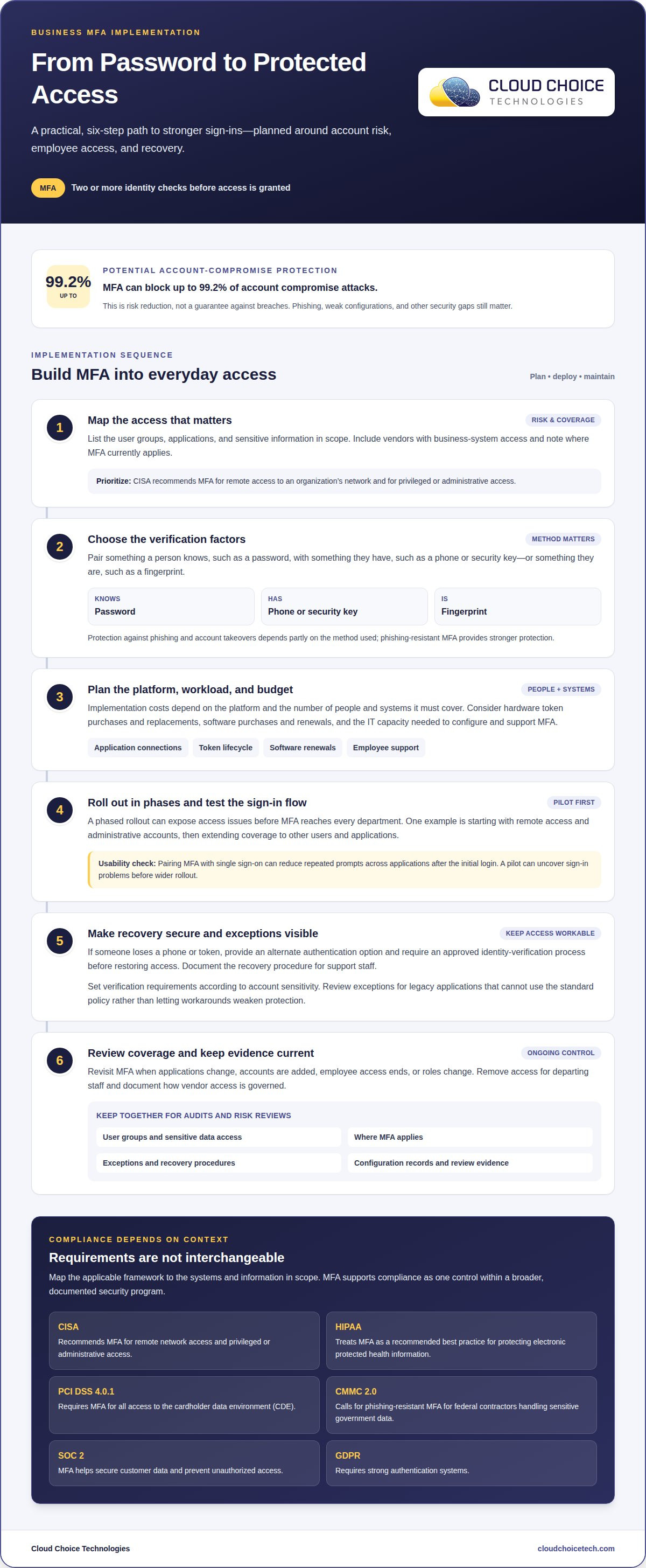
MFA can reduce credential-related risk by making a stolen password insufficient on its own. It can block up to 99.2% of account compromise attacks. These figures describe risk reduction, not a guarantee against breaches; phishing, weak configurations, and other security gaps still matter.
MFA’s protection against phishing and account takeovers depends partly on the method used. A second check can stop an attacker who has captured a password, while phishing-resistant MFA provides stronger protection. CISA and the National Security Agency identified weak or misconfigured MFA among the top ten cybersecurity misconfigurations exploited in large organizations. Correct configuration is central to both security and compliance.
Requirements differ across frameworks and the data an organization handles. CISA recommends requiring MFA for remote access to an organization’s network and for privileged or administrative access. HIPAA treats MFA as a recommended best practice for protecting electronic protected health information. PCI DSS 4.0.1 requires MFA for all access to the cardholder data environment, or CDE.
Other frameworks call for different forms of alignment. CMMC 2.0 calls for phishing-resistant MFA for federal contractors handling sensitive government data. For SOC 2, MFA helps secure customer data and prevent unauthorized access. GDPR requires strong authentication systems. These examples should not be treated as interchangeable; each organization needs to map relevant requirements to the systems and information in scope.
For an audit, connect access controls to the systems and data they protect. Record which user groups can reach sensitive information, where MFA applies, and how exceptions are handled. Keep configuration records and review evidence together so the organization can explain its controls consistently. This documentation also distinguishes a safeguard that is in place from a change that is only planned.
Cyber insurance applications and renewals can make MFA coverage relevant to risk discussions. A clear account of protected systems, excluded accounts, and outstanding exceptions helps describe the organization’s security posture. Policy terms vary, so avoid assuming MFA alone satisfies an insurer’s conditions. A cybersecurity assessment can help identify gaps between access controls, compliance priorities, and sensitive data.
Review MFA coverage when applications change, accounts are added, or employee access ends. Include vendors with access to business systems and document how their access is governed. These checks help keep compliance evidence aligned with actual access, rather than an outdated account list. MFA supports regulatory and insurance readiness as one control within a broader, documented security program.
How does multi-factor authentication (MFA) work?
An MFA sign-in asks a user to prove their identity through two or more verification methods. A password can be paired with an authenticator app, a physical token, or a biometric check. If a password is compromised, NIST explains that MFA creates a second barrier to business systems and data. That extra layer makes unauthorized access harder, but the login flow must work across the organization’s applications and users.
Implementation costs depend on the platform and the number of people and systems it must cover. Budget planning can include buying and replacing hardware tokens, as well as purchasing and renewing software. A smaller organization may need fewer licenses, while a larger workforce may require broader deployment and more support. To assess multi-factor authentication for business benefits, weigh authentication methods, account coverage, existing systems, and ongoing administration rather than assuming one cost model fits every business.
Resource needs extend beyond licenses. IT teams must configure policies, connect MFA to business applications, maintain recovery procedures, and answer employee questions. A phased rollout can limit disruption and reveal access issues before MFA reaches every department. For example, an organization might start with remote access and administrative accounts, then extend coverage to other users and applications.
Usability affects whether employees follow the intended process or seek workarounds. Pairing MFA with single sign-on can reduce repeated prompts across applications after the initial login. Set verification requirements according to account sensitivity, and review exceptions for legacy applications that cannot use the standard policy. A pilot can reveal sign-in problems before a wider rollout, helping teams address them without weakening protection.
If an employee loses an MFA phone or token, provide an alternate authentication option and use an approved identity-verification process before restoring access. Document recovery procedures so support staff can respond consistently without bypassing security controls.
Help-desk workload often rises during enrollment and when staff replace devices, forget credentials, or encounter application changes. Clear enrollment instructions and a defined recovery path can reduce avoidable support requests. Track recurring issues, such as failed prompts in a frequently used platform, and adjust configuration or employee guidance. Regular account reviews also help remove access for departing staff and update methods when roles change.
Organizations assessing multi-factor authentication for business benefits should include its ongoing operational needs alongside security goals. A sustainable plan accounts for tokens, software renewals, IT capacity, employee access, and recovery. These decisions connect login design with broader cybersecurity controls, helping an organization strengthen verification without leaving critical work dependent on one device or login method.
Knowledge-, possession-, biometric-, and risk-based methods
MFA methods rely on different evidence about a user’s identity. A password is something the user knows. A phone, hardware token, or security key is something they possess. A fingerprint or face scan is a biometric trait. Combining different categories matters: two passwords still rely on knowledge, not separate kinds of proof.
Knowledge-based checks include passwords and PINs. They’re familiar, but phishing or password reuse can expose them. Possession-based options include authenticator apps, hardware tokens, and physical security keys. A physical security key is a strong option against phishing, while hardware and cryptographic factors can mitigate unauthorized access risks for high-risk users, according to the Board of Governors of the Federal Reserve System.
Authenticator apps can generate time-based one-time passwords, or TOTP codes. The app and login platform generate matching passcodes from a shared secret and the current time. A code is typically valid for 30 seconds, then refreshes. Employees enter it during sign-in, adding a possession check without waiting for a text message. Hardware tokens can also generate codes without internet connectivity.
SMS and email codes are familiar, but weaker than stronger methods. Use them only when stronger options aren’t available, rather than treating every code as equally protective. A security key is a stronger alternative for privileged accounts, where access can expose sensitive systems. Biometrics can make sign-in convenient, but they’re usually tied to a specific device and work best alongside another method.
Risk-based, or adaptive, MFA adjusts verification according to context. A platform can consider an IP address, location, or device before deciding whether to request another check. For example, an employee signing in from a recognized device may face fewer prompts than someone attempting to log in from an unfamiliar location. This can reduce friction without removing safeguards from unusual or sensitive access.
Single sign-on can also make MFA easier to use across applications. After the initial sign-in and verification, employees can access connected applications without completing the full MFA process each time. Policies should still apply consistently, especially to privileged accounts, and additional verification can be required for higher-risk activity. This balances manageable sign-in with protection for important systems.
Choose methods by matching the proof to the risk. A password plus an authenticator app may suit routine access; a privileged account may call for a security key. Employees who use biometrics should have another factor available if they lose a device or sign in from a different one. Strong authentication works best when employees understand which method to use and the platform applies it reliably.
MFA definition and authentication factors
MFA verifies that a person requesting access is the account’s legitimate user. It adds checks to the sign-in process, but it doesn’t decide what that person may do afterward. The distinction matters: authentication establishes identity, while authorization determines which files, applications, or administrative functions the account can access.
MFA requires two or more ways to verify identity. Two-factor authentication, or 2FA, is a subset that uses two authentication steps. MFA can use more than two factors, but adding steps alone doesn’t necessarily improve the quality of verification. Repeating the same kind of check does not provide the same separation as independent evidence.
A login sequence can include several prompts without representing several distinct factors. For example, entering a password twice still relies on one kind of evidence. The key test is whether a separate factor must be satisfied before access is granted. A failed or incomplete check should leave the account unauthenticated, rather than silently treating a partial sign-in as verified.
Organizations can set the required level of verification by considering what each account can access. A general account with limited permissions has a different impact from one that can change security settings or access sensitive records. This creates a practical policy question: what verification should be required before a person reaches a particular resource? Answering it connects sign-in rules to actual business access.
Identity management also depends on accounts representing individual users. Shared accounts make it harder to determine who signed in or performed an action. Individual accounts give organizations a clearer basis for granting, reviewing, and removing access. When an employee’s responsibilities change or employment ends, their permissions can be updated without disrupting other users who once shared credentials.
Keep authentication and authorization connected, but treat them as separate controls. A successful MFA check confirms the sign-in; it should not automatically grant broad access across the organization. Permissions should reflect the user’s duties, and privileged functions should be limited to appropriate accounts. This reduces the consequences of an account being misused after authentication.
The clearest definition is also the most useful operational test: MFA requires distinct verification evidence before a user gains access, while authorization limits what happens afterward. A sound design considers the account, its permitted resources, and the identity behind each action. This helps organizations assess whether their sign-in policy provides meaningful verification, rather than merely adding extra prompts.
Cloud Choice Technologies
Cloud Choice Technologies helps businesses assess how MFA fits their security and compliance needs. If access controls span multiple applications, employee groups, or sensitive accounts, a cybersecurity assessment can help identify risks and gaps to address. Cyber Risk Analysis, Managed IT Services, and Remote Support can support a practical approach to managing authentication across business systems. The right next step depends on your current environment, access requirements, and operational priorities.
For guidance on strengthening MFA as part of a broader security approach, contact Cloud Choice Technologies.
Make MFA part of a stronger security plan
Choose an authentication approach that fits your business’s access patterns, compliance priorities, and capacity to support employees. Keep the plan current as applications, roles, and risks change. The business benefits of multi-factor authentication grow when MFA works as part of a broader security program, rather than as an isolated login setting.
Cloud Choice Technologies can help connect that planning to practical protection. Its Managed IT Services, Cybersecurity, and Remote Support support businesses managing authentication alongside daily technology needs. Whether you’re reviewing current controls or planning a more consistent approach, align security decisions with how your organization works.
Contact Cloud Choice Technologies today to discuss your business’s security needs. A clearer plan can help you move forward with confidence.
Frequently Asked Questions
How do I set up MFA for my organization?
Assign an owner for the rollout and inventory the business applications employees and vendors use. Confirm which systems can enforce the organization’s sign-in policy, and identify older applications that may need separate handling. Explain enrollment and support procedures before changing access rules. After implementation, review exceptions with application owners so temporary workarounds don’t become permanent gaps in account protection.
What Are the Benefits of MFA for Businesses?
MFA helps businesses reduce reliance on passwords as the sole safeguard for accounts. It can also support clearer decisions about which identities may access specific systems, especially when staff, contractors, and vendors have different responsibilities. For example, a company can prioritize protection for accounts that manage user access or handle sensitive records, then align access reviews with changes in those responsibilities.
What authentication methods are supported (e.g., SMS, app, biometrics)?
Business sign-in platforms may support SMS codes, authenticator apps, hardware security keys, or device-based biometrics. Available choices depend on the platform and the devices employees use. Before selecting a method, consider whether staff can use it across approved work devices and whether support can restore access securely after a device is replaced. A workable recovery path is part of the method’s day-to-day suitability.
What is MFA?
MFA is an account sign-in safeguard that requires more than one verification check before access is granted. In practice, the organization configures this requirement through the systems that manage user access. Employees then complete the configured checks when signing in. MFA applies to authentication, not every security decision: businesses still need separate policies for what an authenticated account can view or change.
What are the main benefits of multi-factor authentication for businesses?
MFA can help an organization make account security more consistent across employees, administrators, and third parties. That consistency is useful when a business reviews who can access important systems or responds to a suspected credential compromise. The benefit depends on maintaining the policy as users and applications change. Businesses should treat MFA coverage as an ongoing access-management responsibility, not a one-time configuration task.
What types of MFA are available for businesses, and how do they compare?
Businesses can choose from codes, authenticator apps, hardware security keys, biometrics, and context-aware prompts. Compare them by platform compatibility, employee access needs, and how the organization handles lost or replaced devices. A method that works well for office staff may not suit employees who regularly use different devices. For sensitive accounts, prioritize stronger verification and ensure the chosen approach can be administered consistently.