
How to Measure MSP Performance and KPIs: A Business Leader’s Guide
A full ticket queue can make an MSP look busy without proving your business is better protected or supported. To understand how to measure MSP performance and KPIs, look beyond closed tickets and ask whether service is becoming more reliable, security risks are being addressed, and technology is supporting business priorities.
It’s reasonable to expect clear evidence that your provider is meeting expectations. Yet reports often show activity without explaining its impact, and response or resolution figures can be hard to interpret without consistent definitions. A useful scorecard turns those numbers into a shared view of progress. It connects managed IT services and cybersecurity to outcomes leaders can assess and act on.
This guide shows you how to choose a focused set of measures, distinguish raw metrics from goal-oriented KPIs, and review service, security, and risk trends consistently. You’ll also see how to turn scorecard findings into specific follow-up actions with your MSP, so every review supports stronger operations, clearer accountability, and ongoing improvement.
Key Takeaways
- Learn how to measure MSP performance and KPIs with a focused scorecard tied to your business priorities.
- Choose service, security, and risk indicators that support meaningful reviews, not just fuller reports.
- Give every KPI a clear definition, data source, reporting period, owner, and agreed expectation.
- Use a five-step review process to spot trends and assign practical follow-up actions with your MSP.
- Compare providers fairly by using consistent KPI definitions, reporting periods, and expectations.
How to Measure MSP Performance and KPIs Against Business Expectations
An activity is something an MSP does. An outcome is what that work changes for your business. A count of tickets closed records activity; it doesn’t tell you whether employees regained access quickly, recurring disruptions declined, or a security concern was addressed. To judge value, connect the provider’s work to the result your organization expects.
An MSP KPI is a consistently measured indicator tied to an agreed service or business objective. A raw figure, such as the number of support requests, becomes useful only when it helps answer a decision-focused question. For a foundation on the term, see Understanding Key Performance Indicators. In practice, how to measure MSP performance and KPIs starts with agreeing on what success means, how it will be measured, and who is responsible for reviewing it.
What does MSP performance mean to a client?
From a client’s perspective, performance means dependable support, operational continuity, risk oversight, and clear accountability. Ticket volume may help explain demand, but it can’t establish service quality or prove that risk has fallen. Pair activity data with evidence relevant to the business, such as whether a disruption was resolved in line with the agreed expectation or whether identified security issues are being addressed.
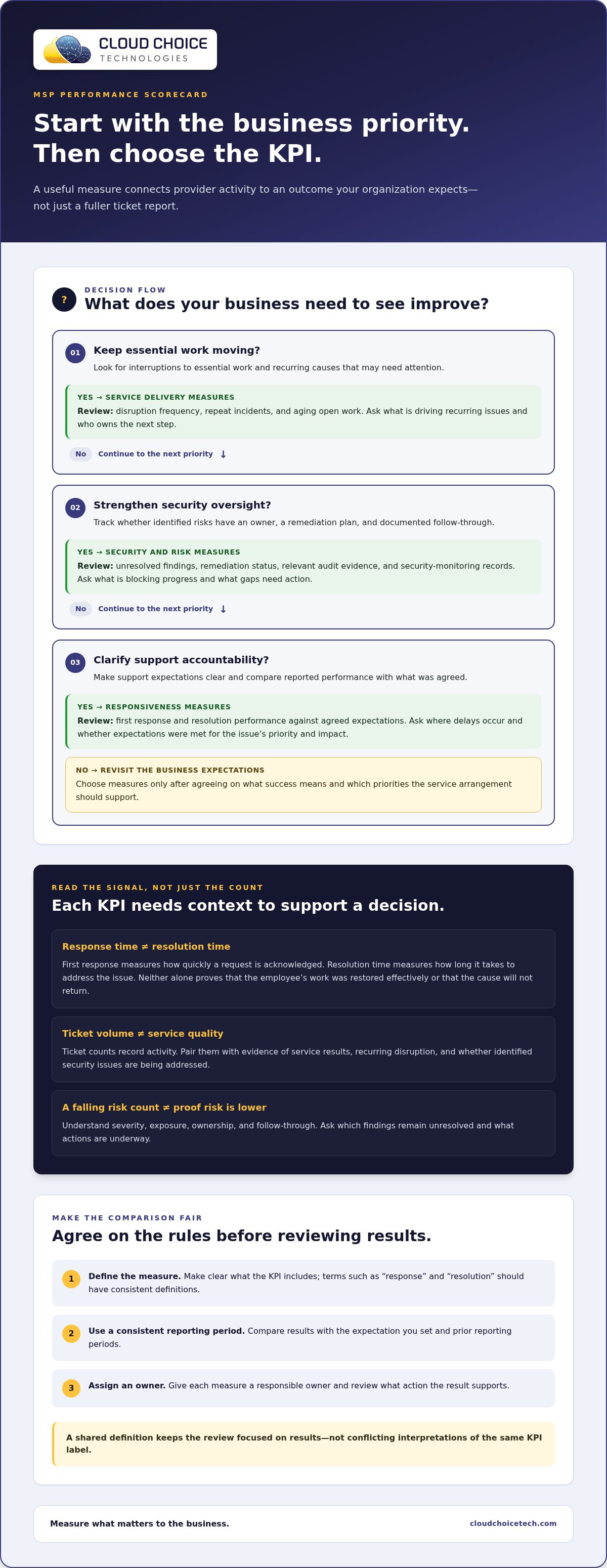
Make comparisons reliable. Define terms such as “response” and “resolution,” use a consistent reporting period, and assign an owner to each measure. Otherwise, two reports may use the same KPI label while counting different events. This shared approach keeps the conversation focused on results rather than conflicting interpretations.
Start with business goals before selecting KPIs
Begin with the priorities your service arrangement should support. These might include reducing interruptions to essential work, improving visibility into security risks, or making support expectations clearer. A broader view of how managed services support business priorities can help frame these goals alongside the managed IT services guide.
For each priority, select a small number of observable indicators and prepare a question that will guide the review:
- Keep essential work moving: Review disruption frequency and ask what recurring causes need attention.
- Strengthen security oversight: Track the status of identified risks and ask what remains unresolved.
- Clarify support accountability: Compare response performance with agreed expectations and ask where delays occur.
This scorecard evaluates an existing or prospective provider against your business expectations. It isn’t an MSP’s internal financial dashboard. Keep the focus on the service, risk, and business outcomes your organization needs to see.
Which MSP KPIs Reveal Service Quality, Security, and Business Risk?
A practical client scorecard should show more than how busy a service desk is. It should connect three areas: service delivery, security and risk, and alignment with business priorities. For every KPI, agree on what the measure includes, compare it with the expectation you set and prior reporting periods, then ask what action the result supports. Gartner’s definition of KPIs reinforces their role in evaluating progress toward objectives.
Service delivery: response, resolution, and recurring issues
First response measures how quickly the MSP acknowledges a request; resolution time measures how long it takes to address the issue. Neither alone proves that the employee’s work was restored effectively or that the underlying cause was prevented from returning. Cloud Choice Technologies’ stated commitments, “Live answers in less than 59 seconds,” “resolve most issues remotely in under 10 minutes,” and “on-site help within 4 hours,” are company-specific examples, not universal MSP benchmarks.
- First response and resolution: These show responsiveness and time to address reported issues. They don’t show whether business impact was minimized. Ask: Were expectations met for the issue’s priority and impact?
- Repeat incidents and aging work: Recurring tickets may point to unresolved causes, while older open requests can flag delays or dependencies. Neither measure explains the reason on its own. Ask: What is driving the pattern, and who owns the next step?
“Ticket volume alone can’t establish MSP effectiveness because it counts work, not whether service improved or business risk declined.”
Security and strategic measures: risk, compliance, and planning
Useful security reporting tracks whether identified risks have an owner, a remediation plan, and documented follow-through. A count of open findings can show workload, but it doesn’t establish severity, exposure, or progress without context. Ask which findings remain unresolved, what actions are underway, and when progress will be reviewed. Cybersecurity services address this work; planning and leadership measures can also show whether security priorities connect to business decisions.
- Risk remediation: Review status and follow-through, then ask what is blocking unresolved work. A falling count alone doesn’t prove risk has been reduced.
- Compliance readiness: Examine relevant audit evidence and security-monitoring records. These can show preparation and oversight, but they don’t guarantee regulatory compliance. Ask what evidence is current and what gaps need action.
- Business alignment: Review progress on agreed technology or security priorities. Completion doesn’t prove a business outcome by itself. Ask whether the work supports the intended operational need.
To apply how to measure MSP performance and KPIs consistently, keep definitions and reporting periods stable. Trends become more useful when each result leads to a clear question, owner, and follow-up action.
How to Build and Review an MSP KPI Scorecard Step by Step
A scorecard works when both sides can interpret the numbers the same way and use them to make decisions. Build it with your MSP as a shared management tool, not as a report to file away. These five steps create a practical process from business priorities through accountable follow-up.
- Define the goals. Identify the outcomes your service arrangement should support, such as dependable operations, better visibility into risk, or clearer accountability. Keep the goal specific enough to guide a review.
- Choose the measures. Select a small set of indicators that can show progress toward each goal. For every KPI, document its purpose, data source, reporting period, owner, and agreed expectation.
- Agree on definitions. Clarify what each measure includes and excludes before comparing reports. For response and resolution reporting, specify when the clock starts and stops, and how reopened or waiting tickets are treated.
- Review trends. Compare current results with the agreed baseline and earlier periods using the same definitions and data sources. A change is a prompt to investigate, not proof of its cause. Consider whether the business context or reporting method changed.
- Assign actions. For any meaningful gap or change, record the next step, its owner, the expected follow-up, and what evidence will show progress at the next review.
Set a consistent review rhythm
Choose a reporting cadence that fits the service being measured and the pace of operational or compliance oversight. A routine support trend and a significant security finding may call for different review timing. Set the period together, keep it consistent enough to reveal meaningful movement, and define how urgent issues are escalated outside routine scorecard reviews. Aligning those reviews with relevant governance practices, as discussed in this regulatory compliance IT support guide, can help keep oversight connected to the organization’s priorities.
At each review, ask the MSP to explain notable changes in terms of cause, business impact, and corrective action. If a measure improves, determine whether the improvement reflects a lasting change or a short-term fluctuation. If it declines, identify the owner and evidence needed to assess recovery. Keep decisions and open items in the scorecard record so the next meeting begins with clear accountability.
A KPI is actionable only when its owner and next step are clear. Build a scorecard that makes both visible, and use Cloud Choice Technologies' managed IT and compliance support as a starting point for a more accountable provider conversation.
Using MSP KPIs to Compare Providers and Decide Next Steps
A provider comparison is only fair when each scorecard uses the same KPI definitions, reporting periods, data sources, and agreed expectations. Otherwise, a difference in results may reflect different counting methods rather than different service performance. Apply the same criteria to every provider, then weigh the evidence against your business priorities. The process behind how to measure MSP performance and KPIs should help leaders make a clear decision, not simply rank numbers.
| Business goal | KPI | Evidence | Trend | Follow-up action |
|---|---|---|---|---|
| Restore employee productivity | Resolution time | Time-stamped ticket records and agreed definition | Compare consistent reporting periods | Review delays and document corrective steps |
| Improve security oversight | Risk remediation status | Findings, assigned owners, and remediation records | Check whether open items are progressing | Set an owner and record the next review |
| Support business priorities | Progress against agreed technology objectives | Project or planning updates tied to stated goals | Assess movement against the baseline | Revisit priorities, dependencies, or timing |
What to ask when a KPI misses its expectation
Start with the facts: What changed? How did it affect the business? What records support the explanation? For recurring service or security concerns, identify an owner, a specific next step, and the evidence that will show progress. Compare like reporting periods to distinguish a one-time fluctuation from a persistent gap. If the same expectation continues to be missed without a clear explanation or documented response, hold an improvement discussion and set a follow-up date. Persistent gaps may also warrant a broader review of whether the service arrangement still fits your needs.
Explore a performance-focused managed IT relationship
Use the scorecard to evaluate whether support is proactive, security risks receive ongoing oversight, and compliance readiness is supported by relevant evidence. Cloud Choice Technologies connects managed IT services with cybersecurity and risk oversight, and offers a Network Security Analysis promotional offer. These are useful points to consider alongside your own agreed measures, not promises of a particular outcome.
If you’re assessing your current approach, request a free complimentary IT consultation to discuss your managed IT priorities and how to evaluate performance with clearer expectations.
Make Your MSP Scorecard a Starting Point for Better Decisions
Your business priorities won’t stand still, so your performance expectations shouldn’t either. Revisit them when your operations, risks, or plans change. That keeps your scorecard useful as a decision tool, rather than a fixed set of measurements that no longer reflects what the business needs.
Knowing how to measure MSP performance and KPIs gives leaders a stronger foundation for conversations about accountability and improvement. The next step is to put that approach into practice: identify the outcomes that matter now, then build a shared process for assessing progress and deciding what happens next.
Cloud Choice Technologies can help you consider how managed IT, cybersecurity, and risk oversight fit your priorities. Request a free complimentary IT consultation to discuss your goals and take the next step toward a more confident, performance-focused IT relationship.
Frequently Asked Questions
What are the benefits of managed IT support?
Managed IT support helps businesses keep technology reliable, resolve recurring issues, and plan improvements before aging systems disrupt work. To understand how to measure MSP performance and KPIs, track whether support trends are improving, such as repeat incidents, unresolved tickets, and user-reported obstacles. Clear reporting makes it easier to connect technical work with business needs. Managed IT services can provide ongoing support and oversight for business technology.
How often should businesses review their IT performance?
Review IT performance on a regular schedule, then reassess after major changes such as a new system rollout, office expansion, or security incident. A monthly operational review can surface ticket patterns and service bottlenecks, while a broader quarterly discussion can revisit priorities, risk, and planned spending. The right cadence depends on business needs. vCIO and vCISO services can help align technology decisions with business priorities.
What are the most common cybersecurity risks for SMBs?
Common risks include phishing, stolen credentials, ransomware, unpatched software, and misconfigured access to business systems. A single compromised account can expose sensitive files or give an attacker a path into connected systems. Reduce exposure by applying security updates, limiting access to what each role needs, and training staff to report suspicious messages. Cybersecurity services can help identify risks and strengthen safeguards.
What is the impact of a data breach?
A data breach can expose confidential information, interrupt business operations, and require time-consuming investigation and recovery. The effects depend on what data was accessed, which systems were affected, and the obligations that apply to the organization. A prepared response plan should identify decision-makers, preserve relevant records, and outline how systems and data can be restored. Data backup and recovery planning supports restoration when information is lost or systems are disrupted.
What compliance requirements should my business be aware of?
Compliance requirements depend on your industry, the information you handle, and the rules that apply to your organization. Healthcare, financial, and defense-related businesses may face different expectations, so identify applicable obligations before setting controls or measuring readiness. Keep evidence of security practices, review access to sensitive information, and document risks and corrective actions. Cloud Choice Technologies provides compliance services and supports HIPAA, SEC, and CMMC readiness through audit and security-focused solutions. Compliance planning and executive technology guidance can help coordinate this work.
Is cloud computing safe for my business?
Cloud computing can be used safely when access, data protection, and ongoing security are managed appropriately. Review who can reach company files, how accounts are protected, and what recovery steps are available if information is deleted or compromised. Cloud safety also depends on configuration and employee practices, not just where data is stored. Cloud services and cybersecurity support can help address infrastructure and security needs together.