
How to assess cloud infrastructure security risks and access
A cloud infrastructure security assessment is only as useful as the environment it covers. It identifies risks, evaluates security controls and compliance needs, and turns findings into practical recommendations. A clear scope defines which cloud assets, data, and systems the assessment will examine.
It’s easy to focus on production systems and overlook connected access paths, configurations, or development environments. A thorough review looks across the environment to show where exposure may exist and which risks deserve attention first.
This guide explains what a cloud security assessment covers and how to define a focused, useful scope. You’ll learn how to inventory infrastructure, review identity and access, assess configurations and monitoring, and decide when to revisit the assessment. The result is a clearer basis for prioritizing remediation and strengthening security while keeping business needs in view.
Key Takeaways
- Set a clear assessment scope by identifying the cloud assets, environments, data, and business goals the review must cover.
- Inventory infrastructure and configurations to uncover exposure points, then prioritize remediation based on risk to valuable assets.
- Review user, role, and service permissions, enforce least privilege, and revisit access as responsibilities change.
- Align compliance checks with the requirements relevant to your organization, and document gaps alongside practical corrective actions.
- Reassess after major infrastructure changes and use ongoing monitoring to keep emerging risks visible.
What is a cloud security assessment?
A cloud security assessment identifies risks, evaluates security controls, considers compliance needs, and recommends remediation. A useful review starts with a baseline, then checks whether the organization’s actual cloud environment matches it.
-
Establish Compliance Requirements
Map the assessment to the compliance frameworks relevant to your organization, such as HIPAA, PCI DSS, or GDPR. Each framework addresses different data protection and security concerns. First identify the systems and information each applies to, then review the relevant controls.
For GDPR, include an evaluation of security controls and records of processing activities (ROPA). Trace where personal data is stored, who can access it, and which processes handle it. Record gaps as remediation tasks: comparing frameworks alone does not show that controls work as intended.
-
Set a Control Baseline
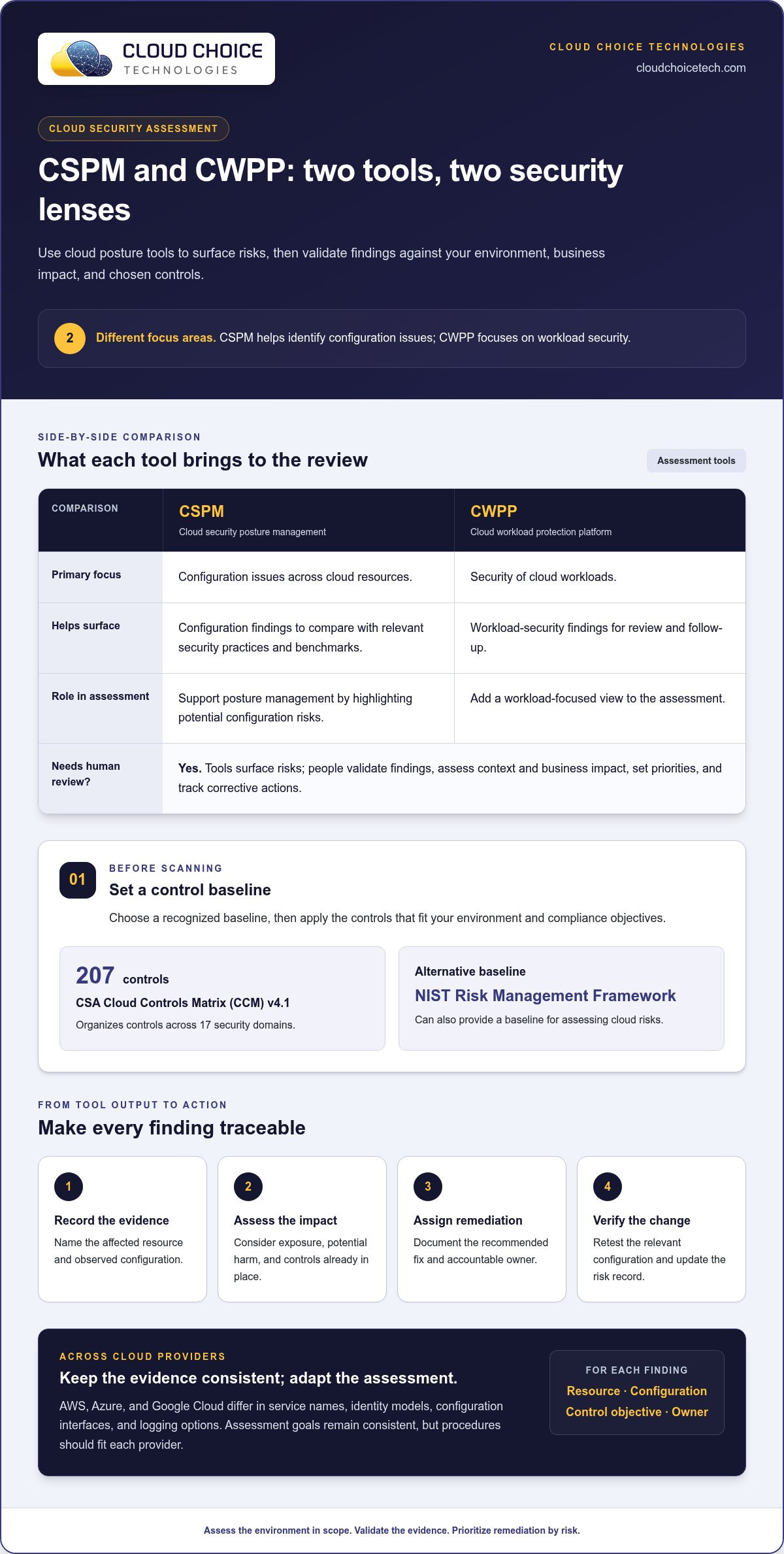
Choose a recognized baseline before testing configurations. The CSA Cloud Controls Matrix (CCM) v4.1 organizes 207 controls across 17 security domains, giving teams a structured way to assess cloud security practices. Use the controls that match your environment and compliance objectives, then record where existing configurations meet or miss them.
The National Institute of Standards and Technology (NIST) Risk Management Framework can also provide a baseline for assessing cloud risks. A baseline makes findings more consistent: instead of noting that access is “too broad,” record the affected resource, the control gap, and the change needed to address it.
-
Identify Assessment and Posture Management Tools
Combine automated scanning with expert analysis to assess cloud resources against security practices, compliance needs, and business objectives. Cloud security posture management (CSPM) tools help identify configuration issues, while cloud workload protection platform (CWPP) tools focus on workload security. Use their findings to guide remediation, not to replace a review of context and business impact.
For a baseline, compare configurations with relevant security benchmarks where appropriate. These tools support cloud security assessments and posture management by surfacing risks; people still need to validate findings, set priorities, and track corrective actions.
-
Account for Provider Differences
AWS, Azure, and Google Cloud use different service names, identity models, configuration interfaces, and logging options. Assessment goals remain consistent: map assets, examine access and controls, identify risks, and compare results with the chosen baseline. Adapt procedures to each provider instead of assuming one provider’s settings translate directly to another.
Record provider-specific evidence in a shared format. For each finding, document the resource, relevant configuration, control objective, and remediation owner. This makes results easier to compare across environments and supports follow-up reviews without obscuring differences between providers.
Cloud infrastructure risk identification
Begin by tracing how cloud assets, data, and access paths connect. For each finding, record the evidence, affected asset, business impact, priority, and remediation owner. Rank risks by exposure, potential harm, and the security controls already in place.
-
Model Cloud Threats
Map likely threats to the organization’s cloud architecture before reviewing individual findings. Trace a path from a possible source, such as an exposed service or compromised credential, to the data or system it could reach. Identify the controls that interrupt that path. For example, assess whether a misconfigured public-facing application could expose a confidential data store.
-
Map the Attack Surface
Inventory cloud resources, connections, and information assets, then identify systems that handle confidential or critical data. Include internet-facing services, internal networks, storage, and workload dependencies. CDC describes continuous discovery as maintaining a near-real-time inventory of networks and information assets while tracking critical data. Use the inventory to find overlooked assets and changing exposure.
-
Prioritize Identified Risks
Rank each risk by how accessible the weakness is, what an attack could affect, and whether existing controls reduce exposure. A misconfiguration on a system holding sensitive information may need faster remediation than a similar issue on an isolated test resource. Record the reason for each priority to support consistent evaluations and focus effort on risks with clear business impact.
- Support findings with evidence. For each configuration issue, record the affected resource, observed setting, and potential consequence. Distinguish confirmed weaknesses from possible attack paths that need testing. For example, a storage permission finding should identify the specific resource and explain what data it contains. This creates a traceable basis for each conclusion and prevents vague, unassigned remediation work.
- Turn the assessment into a risk-management plan. Include prioritized findings, affected assets, recommended remediation, accountable owners, and a way to verify each fix. Note dependencies, such as a control change that could affect an application process. After making changes, retest the relevant configuration and update the risk record. This connects evaluation to action and documents the security risks that remain.
Identity and access management
Review identities alongside cloud architecture, rather than treating them as a separate checklist. User accounts, service identities, and roles can all create access paths to sensitive resources.
-
Review Access and Identity
Compare active users, roles, and service identities with their current business responsibilities. A 2026 review across more than 680,000 cloud identities found that 99% of cloud users, roles, and services had excessive permissions, including access unused for at least 60 days. Use this finding as a prompt to inspect dormant permissions, not as a substitute for examining your own environment.
Trace each identity to the resources it can reach. For example, check whether a former employee’s account or an old application identity can still access a production database. Record the owner, business purpose, and evidence of last use for each access path.
-
Document Policies and Interview Stakeholders
Compare written access policies with actual cloud settings. Review how teams request, approve, change, and remove permissions, then note gaps between documented processes and observed practices. For example, a policy may require manager approval while a cloud role grants access without an approval record.
Interview system owners, administrators, and team leads to understand exceptions. Ask who approves elevated access and how temporary access ends. Document the answers alongside the relevant policy and role, so the assessment can distinguish approved exceptions from overlooked vulnerabilities.
-
Assess Least-Privilege Access and Authentication
Limit permissions so each identity can perform its assigned tasks without unnecessary access. Review broad roles, inherited permissions, and service accounts that can change cloud configurations. Least-privilege controls limit the reach of a compromised identity and make access decisions easier to assess.
Check whether multi-factor authentication (MFA) protects sign-ins to cloud resources. Biometrics can also help restrict access to authorized users. For remote access, assess whether zero trust network access applies granular policies and adaptive trust before allowing connections to organizational resources.
- Check that access reviews continue as roles and systems change. A role suited to one project may become excessive when responsibilities shift or an application changes. Establish a repeatable process to flag inactive accounts, changed job duties, and permissions no longer needed. Assign an owner to resolve each issue and record the change.
- Connect identity findings to practical safeguards. For each excessive permission, document the identity, affected resource, business purpose, and corrective action. Confirm that the change preserves legitimate work while removing unnecessary access. This gives administrators a clear remediation record and shows stakeholders how access policies support cloud security.
Cloud infrastructure security assessment scope
Conduct the review in sequence: define its boundaries, inventory assets, test controls, document findings, and plan remediation. For IAM, network security, encryption, logging, and backups, compare configurations and evidence with each control objective.
-
Define the Assessment Scope
Start by listing the cloud accounts, services, data repositories, and business systems in scope. Include production, development, testing, and staging environments; a test system can still expose credentials or connect to sensitive data. Note assessment objectives, regulatory needs, responsible owners, and exclusions. A written scope helps teams identify gaps without overlooking connected assets or assuming every resource serves the same purpose. For a view of cloud environments and solutions, consider the organization’s cloud services.
- Map the shared responsibility boundary for each service. Cloud providers secure the underlying cloud infrastructure, while customers remain responsible for their data, applications, and access controls. Record who manages each security measure. For example, document who configures an application’s permissions and who maintains the service itself. This helps prevent controls from falling between provider and customer responsibilities.
-
Assess Cloud Security Areas
Test IAM permissions, network exposure, encryption, logging, and backup recovery. Check whether access matches job needs, network rules restrict unnecessary connections, and encryption protocols such as TLS and AES-256 are configured properly. Confirm audit logs, alerts, and dashboards capture activity across cloud services. For backups, verify recovery tests against the organization’s recovery point objective and recovery time objective goals.
Include containers, serverless functions, and temporary resources in vulnerability reviews, not just virtual machines. Check whether workloads use hardened operating system images, secure container registries, and current software dependencies. These checks can reveal exposure across the environment, including resources that appear briefly or operate outside standard virtual-machine processes.
- Test the environment using methods that fit the agreed scope. Vulnerability assessments can identify known weaknesses, while penetration tests simulate exploitation scenarios to reveal security risks. Define permitted systems and testing boundaries first, then document evidence and any configuration changes. An assessment can identify configuration variances that may have resulted from compromise, but it is not a comprehensive cloud compromise assessment.
- Set review depth according to asset importance. Examine systems containing sensitive data and critical business functions more closely than lower-risk resources. Record findings, owners, corrective measures, and retest results. Reassess after a migration, a new vendor integration, or another major infrastructure change. Ongoing managed IT services can help maintain oversight as cloud systems evolve; for assessment support, explore cybersecurity services.
Cloud Choice Technologies: Managed IT Services
Cloud Choice Technologies can help organizations turn assessment findings into practical security work. Its Cyber Risk Analysis helps identify and prioritize risks, while Cybersecurity and Managed IT Services support ongoing attention to cloud systems and controls.
Consider this support when your team needs help interpreting findings, assigning remediation, or maintaining security practices as cloud environments change. Remote Support can assist with technical follow-through, while Compliance Services can support regulatory alignment. The right next step is to connect the assessment’s findings with the systems, data, and business processes they affect.
Contact Cloud Choice Technologies to discuss your cloud security needs.
Make cloud security part of the next change
Cloud environments evolve as teams add services, change workflows, and connect new tools. Treat each change as a reason to revisit ownership and security decisions, not as an isolated technical update. This helps keep your cloud infrastructure security assessment relevant to the systems your organization actually uses.
When findings need expert review or follow-through, Cloud Choice Technologies provides Cybersecurity, Cyber Risk Analysis, Managed IT Services, and Remote Support. These services help teams interpret risks and carry corrective work into ongoing operations while keeping business priorities in view.
Choose a practical next step: bring your current concerns, assessment findings, or cloud changes into a conversation about what deserves attention first. Contact Cloud Choice Technologies to discuss your organization’s cloud security needs and move forward with a clearer plan.
Frequently Asked Questions
What happens after the assessment?
Turn findings into a tracked remediation plan, then verify completed fixes. Assign each task an owner and priority, and record evidence of the change. For example, after restricting an exposed storage resource, retest its access settings and confirm legitimate applications still work. Update the risk record with the result. If the assessment uncovers signs of exploitation, investigate the incident separately and preserve relevant logs.
Why is continuous monitoring a best practice?
Cloud configurations and activity can change between scheduled reviews, so continuous monitoring helps teams spot suspicious behavior and new vulnerabilities sooner. Enable cloud-native logging, centralize logs securely in immutable storage, and set alerts for activity that departs from expected patterns. Monitoring complements, but does not replace, deeper assessments. Revisit the assessment after major infrastructure changes or when a significant exploit could affect your environment.
What is a cloud infrastructure security assessment?
A cloud infrastructure security assessment is a structured review of cloud resources, security controls, and risks. It combines configuration and activity evidence with analysis of business impact, then recommends corrective actions. For example, a review might connect an overly broad permission to a sensitive application and recommend a control change. It helps an organization understand its security posture, but it is not a comprehensive compromise investigation.
What systems and security controls should a cloud infrastructure assessment cover?
Include production, development, testing, and staging systems, along with cloud resources connected to them. Review identity permissions, network exposure, encryption, audit logging, alert coverage, workloads, and backup recovery. For example, include a serverless function or container that processes customer information, not just virtual machines. Confirm that dashboards and logs capture activity across cloud services, so important events are visible during the review.
Which cloud security frameworks and standards apply, such as CIS Benchmarks, NIST, and ISO 27001?
Select references that fit your organization’s regulatory commitments, data, and security objectives. The National Institute of Standards and Technology (NIST) Risk Management Framework can provide a baseline for assessing cloud risks. If your organization uses ISO 27001, include its relevant controls in the assessment scope. Map each selected reference to evidence and record gaps without assuming one framework covers every requirement.
What are common cloud infrastructure security risks and misconfigurations?
Common issues include overly permissive access, exposed storage or services, weak network rules, incomplete logging, unpatched workloads, and untested backups. A public-facing application with an unintended path to a sensitive data store is one example of configuration risk. Check virtual machines, containers, serverless functions, and temporary resources, then prioritize issues by exposure and potential business impact.