
Business password management policy: Rules for secure access
A business password management policy template should require unique passwords, multi-factor authentication, and a secure password manager. Employees generally shouldn’t be forced to change passwords every 60 or 90 days; require a reset when there’s evidence a password has been compromised. For passwords used as a single authentication factor, the National Institute of Standards and Technology requires at least 15 characters.
It’s understandable to think frequent resets make accounts safer. But a business password management policy works best when it sets clear rules employees can follow and systems can enforce, rather than relying on calendar-based changes alone.
This guide explains what a business password policy should cover, how to set MFA requirements, and how to manage password length, reuse, sharing, and resets. You’ll also find practical policy language to adapt for your organization, along with guidance on privileged accounts, employee training, and policy reviews. The result is a clearer approach to secure access, tailored to the accounts and risks your business needs to manage.
Key Takeaways
- Set clear multi-factor authentication requirements and apply them consistently to business accounts.
- Use distinct rules for privileged, service, and emergency accounts, including secure credential storage and controlled access.
- Favor password changes after suspected compromise over routine 60- or 90-day resets.
- Build the policy around password length, uniqueness, approved password managers, secure sharing, and account lockouts.
- Make the rules enforceable with login controls, employee training, and regular policy reviews.
1. Multi-factor authentication requirements and methods
Require multi-factor authentication (MFA) for business accounts, not passwords alone. MFA asks users to prove their identity with more than one factor. A password is something they know; a security key or registered device is something they have. Two-factor authentication uses two factors to add a barrier if a password is stolen.
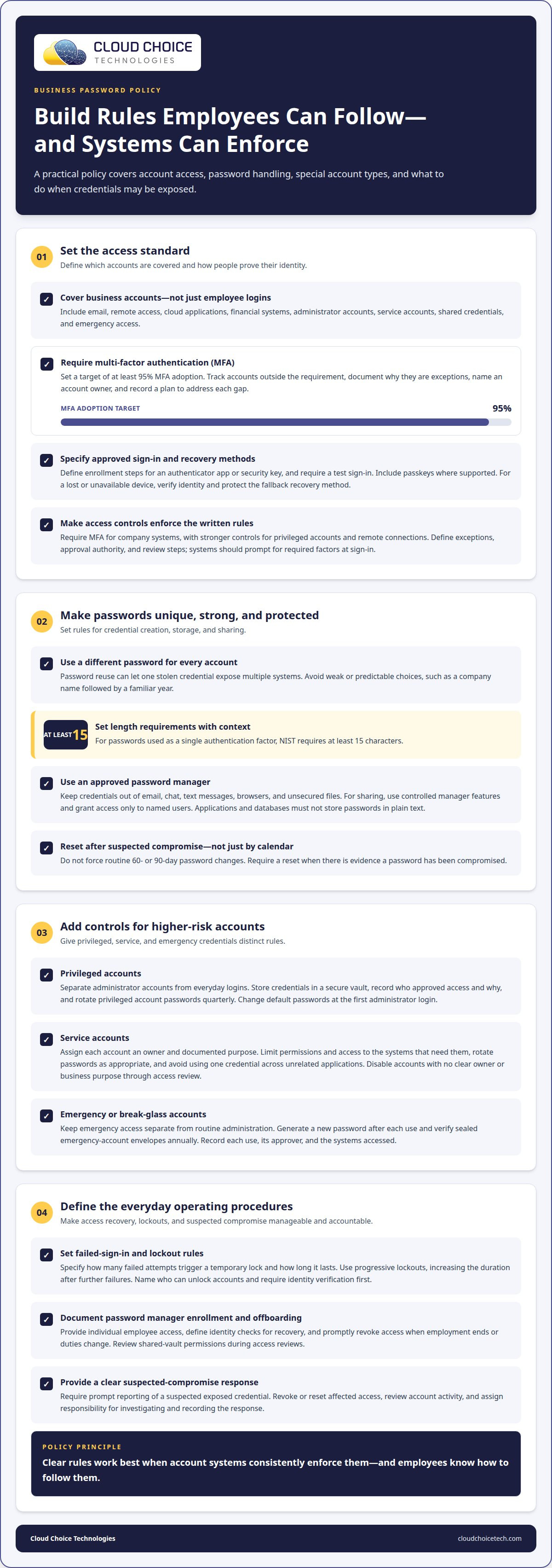
Define which accounts need MFA in the policy. Cover email, remote access, cloud applications, financial systems, and administrator accounts. Set a target of at least 95% MFA adoption, then identify any accounts that remain outside the requirement. Document the reason, the account owner, and a plan for addressing the gap.
Specify approved authentication methods and enrollment steps. For example, require users to register an authenticator app or security key, then complete a test sign-in before relying on it. Set a process for replacing a lost device that verifies the employee’s identity. A password or MFA reset should not become an easy way around account protection.
Include passkeys in the approved methods. A passkey uses a device-based credential instead of asking someone to type a password, and it can work alongside another factor. Explain which business systems support passkeys, how employees register them, and what to do if a registered device is unavailable. Protect the fallback method and limit it to legitimate account recovery.
The NIST Digital Identity Guidelines and ISO 27001 emphasize strong authentication practices as part of modern access control. Turn that principle into enforceable login rules: systems should prompt for required factors at sign-in, rather than relying on employees to remember policy language. The policy should also define exceptions, approval authority, and review steps.
Make the rules practical for different access levels. Require MFA for everyone accessing company systems, with stronger controls for privileged accounts and remote connections. For example, an administrator logging into a management console should use a separate factor, even with a unique password. Apply the same standard to staff accessing company email away from the office.
Finally, define how the organization monitors adoption and handles failures. Track enrollment against the 95% target, investigate accounts that repeatedly bypass MFA, and document approved exceptions. Tie the written rules to cybersecurity controls that enforce them at login. A policy is effective only when the account systems apply its requirements consistently.
2. What should a password policy do?
Define the policy’s scope before setting password rules. Include employee accounts, administrator logins, service accounts, shared credentials, and emergency access. Cover business email, finance platforms, remote access, cloud tools, and internal systems. Name each account owner and explain who approves exceptions. This helps prevent overlooked systems from escaping the organization’s password security procedures.
Require unique passwords for separate accounts. Reusing an email password for finance software, for example, means one stolen credential could expose several systems. Weak or predictable choices, such as a company name followed by a familiar year, also make accounts easier to compromise. Shared accounts add another risk: activity is harder to trace to an individual employee.
Store credentials in an approved password manager, not in email, chat, text messages, browsers, or unsecured files. For secure sharing, use the manager’s controlled sharing feature and grant access only to named users. Applications and databases must not store passwords in plain text. These controls keep credentials out of ordinary messages and files.
Separate privileged accounts from everyday employee logins. Require administrators to check credentials out of and back into a secure vault, and rotate privileged account passwords quarterly. Change default passwords at the first administrator login. Record who approved access and why. This creates a traceable record when someone uses elevated permissions to change a system.
Give each service account an owner, documented purpose, and limited permissions. Rotate service account passwords as appropriate, and restrict access to the systems that need them. Avoid using one service credential across unrelated applications. If an account has no clear owner or business purpose, disable it through the organization’s access review procedure.
Keep emergency, or break-glass, accounts separate from routine administration. Generate a new password after each use, and verify sealed emergency-account envelopes annually. Record every use, who authorized it, and which systems were accessed. These steps preserve emergency access while making unusual activity visible for review.
Set account lockout controls for repeated failed sign-ins. State how many failed attempts trigger a temporary lock and how long it lasts. Use progressive lockouts, increasing the duration after further failures. Also define who can unlock an account and how staff verify an employee’s identity before restoring access.
Password manager procedures should cover enrollment, recovery, and offboarding. Give employees individual access, define identity checks before recovery, and promptly revoke access when employment ends or duties change. Review shared-vault permissions during access reviews. A clear recovery process helps employees regain legitimate access without weakening controls for other accounts.
Document procedures for suspected compromise, too. Require employees to promptly report a suspected exposed credential, then revoke or reset affected access and review account activity. Assign responsibility for investigating the incident and recording the response. These steps make password controls actionable across employee, privileged, service, and emergency accounts.
3. Should employees change passwords every 60 or 90 days?
For most employee accounts, avoid automatic 60-day or 90-day password changes. NIST SP 800-63B-4 advises against periodic changes without evidence of compromise. Frequent resets can encourage predictable variations, such as adding a new month or number. Instead, require an immediate reset when an account is suspected of compromise.
Password length and uniqueness offer a stronger foundation than calendar-based rotation. NIST SP 800-63B-4 requires passwords used as a single authentication factor to contain at least 15 characters, according to the National Institute of Standards and Technology. Set a minimum that fits the system, and block employees from reusing passwords across accounts.
Complexity should make passwords difficult to guess, not difficult to manage. A password manager can generate random, unique credentials instead of predictable substitutions, such as replacing “a” with “@.” Encourage memorable passphrases when employees must create passwords themselves. Don’t rely on a single symbol rule to compensate for short or reused credentials.
Privileged and service accounts need separate rotation rules from ordinary employee accounts. For example, rotate privileged passwords quarterly and service account passwords after 30-90 days. Change an account credential sooner after suspected exposure, a role change, or access removal. Keep each trigger in the written policy, so staff know which procedure applies.
Align the password policy with the obligations that apply to your organization. NIST, PCI-DSS, HIPAA, GDPR, SOX, and state privacy laws are not interchangeable checklists. Identify the relevant framework, contract, or business requirement for each system. Then document which password controls address it and who approves exceptions.
For PCI-DSS systems, distinguish access to cardholder data from access to unrelated business accounts. In HIPAA environments, document how account controls support access to protected health information. GDPR and state privacy laws call for attention to protecting personal data. SOX-related systems may require clear accountability for financial access. These examples guide control mapping, not blanket legal conclusions.
Keep evidence that shows the policy is implemented, not merely approved. Record the policy version, approval date, covered systems, exceptions, and review decisions. Access logs, password-manager settings, and records of compromised-account resets can help demonstrate how controls operate. Store evidence with the relevant system or control documentation for efficient review.
Review password rules when systems or applicable obligations change. A new finance platform, payment workflow, or privacy requirement may affect account scope or access controls. Record the reason for each policy update and notify affected employees. This keeps recovery procedures, password requirements, and compliance evidence aligned with the systems your business actually uses.
4. Password policy template for businesses
A useful password policy turns security guidelines into rules employees and systems can follow. Adapt this business password management policy template to your organization’s accounts, then assign an owner for approvals, exceptions, and annual review. The policy should name covered systems, define approved credential methods, and explain what happens when an account is compromised.
Purpose and scope: State which employees, contractors, administrators, applications, and service accounts must follow the policy. Include email, finance systems, remote access, and cloud services. Assign responsibility for maintaining the document and require senior management approval before rollout.
Password creation and storage: Require unique credentials for every account and use an approved password manager. The National Institute of Standards and Technology requires passwords used as a single authentication factor to contain at least 15 characters. Screen new passwords against known breached-password databases, and prohibit personal details or predictable patterns.
Sharing and access: Prohibit sending credentials through email, chat, or text. Require secure sharing tools when credentials must be shared, and prohibit saving passwords in browsers or unsecured apps. Give each employee individual access to the password manager, restrict shared-vault permissions, and remove access during offboarding or role changes.
Compromised accounts and recovery: Require users to report suspected exposure and promptly change affected passwords. Define identity verification for resets, such as an approved IT support procedure. Administrators must change default passwords at first login. Document who investigates the incident, revokes access, and records remediation.
Training and review: Explain the rules before rollout and train employees to use the approved manager. Set an adoption target of at least 90%, then track progress and password reuse during audits. Senior management should review and update the policy annually, or when systems or business requirements change. Store the approved version securely and share it with everyone who accesses network systems.
Business password managers differ in price and available features, so compare plans against your organization’s access needs. Evaluate secure sharing, administrative oversight, recovery procedures, and adoption reporting rather than choosing on price alone.
Use this template as a starting point, then align each rule with the systems it must govern. For help implementing password and access controls across business systems, managed IT support can help keep the written procedures connected to day-to-day technology management.
Cloud Choice Technologies
Cloud Choice Technologies helps businesses put password policy requirements into practice through access controls. When rules need to work consistently across employee accounts, business systems, and remote access, Managed IT Services and Remote Support can support day-to-day implementation. Cybersecurity and Cyber Risk Analysis can help identify password-related gaps and determine which controls need attention.
This support is useful when a policy exists on paper but account practices remain inconsistent, or when a business is reviewing access risks and strengthening security procedures. The goal is to connect written requirements with the systems and processes employees use, while keeping the approach aligned with your organization’s needs.
Contact Cloud Choice Technologies to discuss your password policy and access security needs.
Make secure access part of daily operations
A password policy is more effective when employees can apply it consistently and account controls support it in practice. Treat your business password management policy template as a working document: assign responsibility for updates, communicate changes clearly, and revisit procedures when your systems or business needs change.
If putting these rules into practice raises questions about access controls, account oversight, or employee support, Cloud Choice Technologies can help through Managed IT Services, Cybersecurity, and Remote Support. Start with a focused discussion about where your current processes need attention and how to make the policy workable for your organization.
Contact Cloud Choice Technologies to discuss your password management policy and take a practical next step toward more consistent access security.
Frequently Asked Questions
What should a password policy do?
A password policy should turn access expectations into consistent decisions employees can follow. It clarifies who may approve exceptions, how suspected exposure is reported, and what happens when someone changes roles. For example, an employee moving into finance may need different system access, while their former permissions should be removed. Clear ownership and documented exceptions help keep decisions consistent across departments.
Can this template be used for CMMC, NIST 800-171, SOC 2 or cyber insurance?
Use the template as a starting point, not proof that your organization meets CMMC, NIST 800-171, SOC 2, or cyber insurance requirements. Identify which obligations apply to your systems, then map the policy’s controls and supporting evidence to them. NIST 800-171 alignment is one reason organizations may prepare or review a password policy. Document gaps and assign owners before presenting the policy as part of a compliance review.
How long should a business password be?
For a password used as a single authentication factor, NIST SP 800-63B-4 requires at least 15 characters. Apply the requirement to each system that accepts passwords, and make sure password fields can handle the required length. For example, a login form that truncates a longer password could undermine the rule. Use unique credentials for separate accounts, and use a password manager to create and retain them securely.
Need Help Implementing the Policy?
Yes. Cloud Choice Technologies can help businesses assess how their written access rules relate to their technology environment. Cybersecurity services and cyber risk analysis can support identifying security gaps and prioritizing controls. This can be useful when a policy is drafted but responsibilities, account coverage, or implementation steps need clearer alignment. The next step is a conversation about your organization’s access security needs.
Should employees change passwords every 60 or 90 days?
Generally, don’t require routine 60- or 90-day changes without evidence of compromise. NIST SP 800-63B-4 advises against periodic password changes in that situation. Require a reset when a credential is suspected of exposure or compromise, and make reporting straightforward. For a business system with separate administrative and employee accounts, document which response process applies to each account type.
What should a business password management policy include?
Include the policy’s scope, account responsibilities, password requirements, approved storage and sharing practices, access recovery, suspected-compromise reporting, and exception approval. Add an owner, an approval record, and a review process so employees can identify the current version. For example, a short onboarding reference can point staff to the full policy and explain how to report an access problem.