
Business IT Support for Local Companies and Their Help Desks
Outsourced IT support and managed IT services are not opposites: outsourcing describes who provides support, while managed services describe an ongoing, proactive approach. When choosing a business IT support company near me, focus on what happens between help desk requests, not just who answers them. A provider may resolve issues as they arise, manage technology continuously, or combine both models.
Fast help matters when systems fail, but reliable support also depends on clear service coverage, prevention, and a recovery plan for disruptions to data or systems. This article compares outsourced support with managed services, explains what to look for in help desk support, and outlines how to assess backup and disaster recovery planning. You’ll also find questions to clarify support scope and coordination, plus practical criteria for deciding which approach fits your business. The goal is to judge whether a support model can keep employees working and help your business recover when technology problems arise.
Key Takeaways
- Separate outsourced support from managed services by identifying whether you need issue-by-issue help, ongoing IT oversight, or both.
- Define how employees submit help desk requests and what clear communication and escalation should look like.
- Assess backup and disaster recovery plans by focusing on how business data and systems can be restored after disruption.
- Match support coverage to your business’s industry, size, technology needs, and the way your team works.
- Compare the scope of local IT services, including remote support, cybersecurity, and cyber risk analysis.
Outsourced IT support versus managed IT services
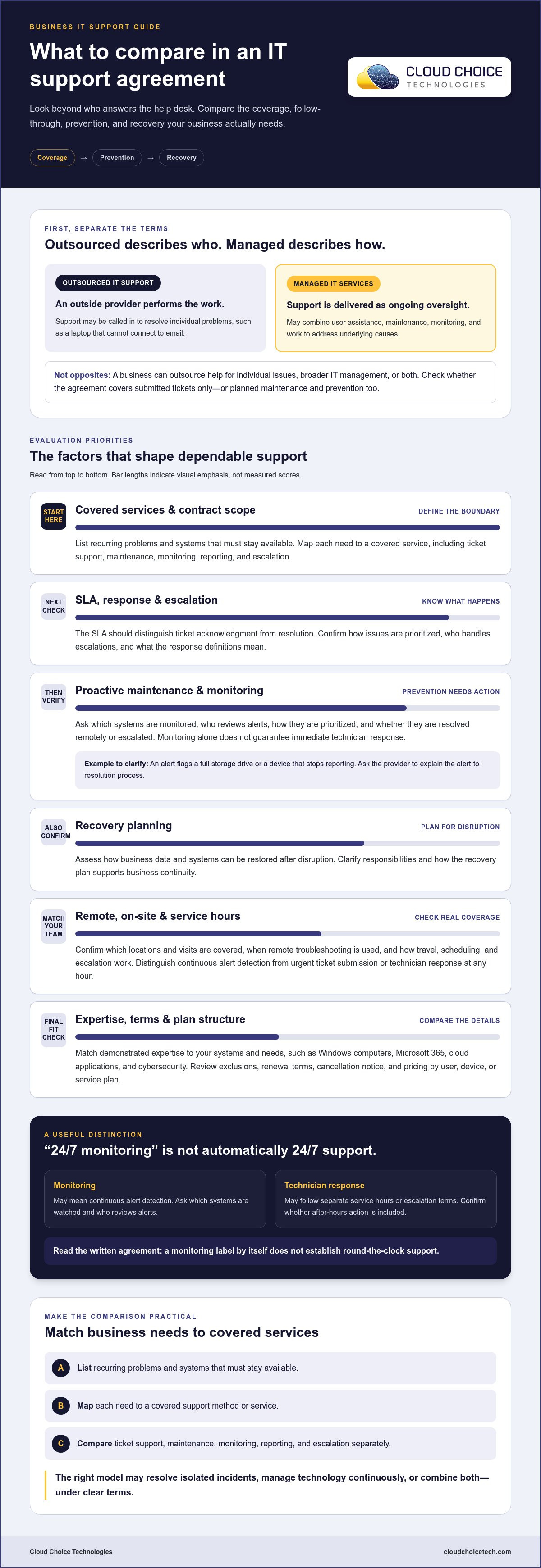
Check the contract’s covered services, service-level agreement (SLA), response definitions, exclusions, renewal terms, and cancellation notice. The SLA should distinguish acknowledgment from resolution. Cancellation terms should explain notice requirements and what happens to accounts and records.
Outsourced IT support describes who performs the work: an outside provider rather than in-house staff. Managed IT services describe how support is delivered: ongoing oversight that can combine user assistance, maintenance, and monitoring. A company can outsource help for individual problems or broader IT management through a managed services agreement.
For example, a growing business might call an outside technician when a laptop cannot connect to email. That is outsourced, issue-based help. With managed IT services, providers may also track recurring login failures, review device health, and address underlying causes. Ask whether the agreement covers only submitted tickets or also planned maintenance and prevention.
Proactive monitoring can flag a full storage drive or a device that stops reporting. A defined response should follow: who reviews the alert, how it is prioritized, and whether it is resolved remotely or escalated. Monitoring alone does not mean a technician will act immediately. Ask the provider to explain the alert-to-resolution process with an example, such as an employee losing access to a shared file.
Managed services also involve managing business information and services. Establish who maintains an accurate list of user accounts, devices, business applications, and support contacts. When an employee changes roles, a documented process helps update access and support records. Clarify how the provider communicates changes, records completed work, and coordinates with internal staff responsible for business systems.
Third-party profile managers need clearly defined access and responsibilities. If an agency manages a Google Business Profile, identify who owns the account, who can make changes, and how access is handled when the relationship ends. Businesses can connect a Google Business Profile to Google Analytics. Document account ownership and management duties so an outside manager is not the only person able to maintain business information.
Ask what “24/7 monitoring” means in the written agreement. It may describe continuous alert detection, while technician response follows separate service hours or escalation terms. The SLA should specify how critical alerts are handled, which systems are monitored, and whether after-hours action is included. Don’t treat a monitoring label as proof of round-the-clock support.
Use a practical comparison before choosing: list recurring problems, identify systems that must stay available, then map each need to a covered service. Compare ticket support, proactive maintenance, monitoring, reporting, and escalation separately. That reveals whether a provider can resolve isolated incidents, manage technology continuously, or support both needs under clear terms.
Business IT support and help desk services
A help desk handles employee issues; broader IT support can cover systems, devices, and security. Compare how each provider responds, what it supports remotely, and whether on-site work is included.
Local On-Site Coverage
Physical access may be necessary when a technician needs to work on a computer, network equipment, or office connection. Ask which locations and visits the service agreement covers, and whether remote troubleshooting comes first. A failed laptop login, for example, may be resolved remotely, while a damaged network connection could require an on-site visit. Clarifying the distinction sets realistic expectations and keeps support steps clear.
Map your office locations, equipment, and recurring problems before comparing providers. Match each need to a support method, such as remote access for software configuration or an on-site visit for equipment that cannot be reached remotely. A service-area map alone does not explain coverage terms. Review how travel, scheduling, and escalation are addressed in the agreement.
Service Area and 24/7 Support
Service areas can differ between remote help desk coverage and in-person visits. Confirm that every office address falls within the stated on-site area, especially if employees work across locations. Ask what “24/7 support” means in practice: continuous monitoring, a way to submit urgent tickets, or technician response at any hour. These are different services, so compare each term separately.
Cloud and hosted services add another support boundary. For example, an employee may report an issue with Microsoft 365, while the underlying service is hosted externally. Clarify whether the help desk diagnoses account access, device settings, and connectivity, and how it escalates platform-wide disruptions. A defined process helps employees know where to report problems and supports smoother handoffs.
Reviews, Response Times, and Expertise
Compare reviews for specific details about communication, follow-through, and recurring support issues, rather than relying on star ratings alone. Ask how the provider measures response time and whether the SLA distinguishes ticket acknowledgment from resolution. Check expertise against your actual environment, such as Windows computers, Microsoft 365, cloud applications, and cybersecurity needs.
How do local IT companies compare on reviews, response times, and expertise? Read recent customer feedback for repeated patterns, compare the written SLA, and match demonstrated expertise to your systems. A clear example of handling a similar computer or security issue is more useful than a general capability claim.
Pricing by User, Device, or Service Plan
Support plans may charge per user, per device, or by defined service scope. Per-user pricing can align with employee support, while per-device pricing follows the computers and other covered equipment. A service plan may bundle support tasks. Price depends on the case and is given after a quote request; user and device counts, coverage, and included services shape the quote.
Do local IT companies charge per user, per device, or by service plan? All are possible billing structures, and the agreement should define what each covers. Compare included help desk work, supported devices, cybersecurity, and exclusions. Use that scope to assess whether managed IT services align with your support needs.
Supported industries and business sizes
Choose support that fits your organization’s workflows, systems, and risk profile. A small accounting office, a manufacturer, and a healthcare practice can face different technology demands, even when they use similar computers and cloud applications.
Business size shapes support needs, but headcount alone doesn’t show the workload. A growing organization with remote employees may need consistent account setup, device support, and access controls. A smaller office using specialized software may need focused application troubleshooting. Before comparing providers, list your locations, user roles, essential systems, and recurring issues. This gives each provider a practical view of the environment and helps expose support gaps.
Organizations with compliance responsibilities should connect technical support with internal procedures. Identify the sensitive information your business handles, who needs access, and how access changes when roles change. Then map those needs to permissions, security controls, and documentation. For example, a healthcare practice may need to limit access to patient-management tools according to job responsibilities. Coordinate technology decisions with compliance leads: IT support can assist with controls, but it does not replace legal or regulatory advice.
Industry-specific support starts with the systems employees use to serve customers and complete essential work. A manufacturer may rely on production applications and connected equipment. An accounting firm may depend on secure document access and tax software. A medical office may need stable scheduling and patient-management systems. Ask how providers troubleshoot comparable workflows, manage application dependencies, and escalate disruptions. Relevant experience matters more than a broad industry list.
Across the United States, business requirements can vary by industry, location, and operating model. A professional-services firm with distributed staff may need secure access to shared files, while a warehouse may prioritize dependable inventory systems and device connectivity. Treat these as prompts, not assumptions about your organization. Identify critical tasks, seasonal demands, and the technology employees need at each site. Use that inventory to assess whether support can adapt as operations change.
- Small offices: Define support for employee accounts, computers, and core applications.
- Growing organizations: Include repeatable onboarding, permissions, and device setup.
- Multi-site businesses: Specify support responsibilities for every office and remote workforce.
- Regulated organizations: Align access controls and support records with internal procedures.
A scalable arrangement should account for new users, systems, and locations. Ask how support responsibilities change when your organization adds an application or opens another office. Clear processes for access, device configuration, and employee onboarding help prevent technology changes from disrupting essential work.
What services do local business IT support companies offer?
Service scope can range from help desk assistance to broader technology management. Compare the tasks covered, such as resolving computer problems, securing accounts, maintaining networks, and restoring business data. A clear scope shows which issues the provider handles and which require another specialist.
Daily support may include employee assistance, device setup, software troubleshooting, account access, and network maintenance. A new employee, for example, may need a configured laptop, access to shared files, and secure account credentials. Check whether these tasks fall within ongoing support or require separate project work. Clarify how employees submit requests and receive updates.
Security services can include reviewing cyber risks, protecting devices, monitoring security alerts, and helping organizations respond to incidents. A phishing email, for instance, may call for employee guidance and a review of account security. Ask how security work connects with regular IT support to avoid a gap between fixing a technical issue and addressing its security cause.
- Help desk and remote support: Troubleshoot login, email, software, and computer issues.
- Network and device management: Maintain business connectivity and supported equipment.
- Cybersecurity: Address risks involving devices, accounts, email, and suspicious activity.
- Backup and recovery: Plan how to restore files or systems after disruption.
- Cloud and hosted systems: Support business applications, account access, and connectivity.
Backups and disaster recovery serve different operational needs. A backup stores a recoverable copy of business information; recovery planning describes how systems and work resume after an outage or data loss. Identify essential files, responsible staff, and the steps needed to restore access. Ask how backup activity is reviewed and recovery procedures documented.
Cloud support also needs defined boundaries. If employees use Microsoft 365, clarify who handles account access, email configuration, device connections, and service disruptions. The provider should explain how it distinguishes a local computer problem from an issue affecting a hosted application. That distinction helps route the request to the right support path.
Project work may include network changes, office technology moves, or system rollouts. Separate planned tasks from routine help desk coverage in the agreement. A business opening an office, for example, should define responsibilities for connectivity, device setup, and employee access before operations begin.
Use your list of essential systems and recurring issues to compare service scope. If ongoing support and maintenance fit your needs, review managed IT support options and compare their stated coverage with your requirements.
Cloud Choice Technologies: Managed IT Services
Cloud Choice Technologies helps businesses address ongoing IT needs through managed services and remote support. Turn to its team when recurring technology issues, limited internal capacity, or unclear security priorities make day-to-day operations harder to manage. Managed IT services provide a path to ongoing support, while cybersecurity and cyber risk analysis help organizations identify and address security concerns. These services can be relevant when choosing between reactive troubleshooting and broader IT oversight. Consider the systems your team relies on, the problems that return, and the risks that need attention. That context helps shape a practical discussion about the support your business needs. Contact Cloud Choice Technologies to discuss your business IT support needs.
Set a Clear Path for Your Business IT
Choosing a business IT support company near me means deciding how technology should support your next stage of work. Start with the outcome you need: fewer recurring interruptions, stronger security oversight, or support that adapts as your organization changes. Define what success looks like for your team and which technology concerns need attention first.
Cloud Choice Technologies provides Managed IT Services, Cybersecurity, and Remote Support. These services help businesses address ongoing technology needs, strengthen security, and get assistance with technical issues. A focused conversation can start with your priorities, current challenges, and the systems employees rely on. From there, you can explore an approach aligned with your operational needs.
Take the next step when you’re ready to discuss support for your business. Contact Cloud Choice Technologies to start the conversation and move forward with greater clarity.
Frequently Asked Questions
What business IT support companies are near me?
Nearby options depend on your location and the kind of business support you need. Compare providers serving business environments, rather than residential customers, and narrow your search by needs such as cybersecurity, employee support, or compliance. Cloud Choice Technologies supports businesses nationally. Compare each provider’s service model and coverage with your organization’s locations, systems, and support requirements.
Which IT support providers serve businesses in my city or ZIP code?
Search using your city or ZIP code, then confirm the provider serves your business address and supports your type of organization. A nearby office does not necessarily mean on-site service is available there. Cloud Choice Technologies provides national support, so businesses can consider its services without relying on a local office address. Compare remote assistance and in-person support coverage separately.
Do nearby providers offer 24/7 help desk and on-site support?
Some providers offer continuous help desk availability or on-site support, but those terms differ by agreement. Check when employees can submit requests, when technicians respond, and whether urgent issues follow a separate process. Also distinguish 24/7 monitoring from 24/7 help desk access. Cloud Choice Technologies does not describe its support as 24/7, so review the service scope rather than assuming round-the-clock coverage.
What cybersecurity, backup, and disaster recovery services do local IT providers include?
Service plans vary, so compare which security protections, backup tasks, and recovery responsibilities are included. Cloud Choice Technologies offers Cybersecurity and Backup & Data Recovery. For a useful assessment, identify essential business files, applications, and access accounts, then determine how each would be protected and restored after an incident. Clarify whether recovery planning and testing are part of the service agreement.
What questions should I ask before hiring a business IT support company?
Ask which systems and employee issues the agreement covers, how requests are prioritized, and how work is documented. Clarify account ownership, escalation paths, exclusions, renewal terms, and cancellation requirements. Ask how the provider would handle a problem affecting a critical business application. These details help you compare actual responsibilities rather than broad descriptions of support.
Are local IT support companies experienced with my industry and compliance requirements?
Compare each provider’s knowledge with your organization’s systems, workflows, and compliance needs. Cloud Choice Technologies offers compliance services and supports readiness related to HIPAA, SEC, and CMMC. Readiness support is not a guarantee of compliance. Identify applicable requirements with your compliance leads, then assess whether the provider’s services can support your organization’s technical controls and documentation needs.