
Supplementing an Internal IT Team with an MSP for Specialist Expertise
An MSP should strengthen an internal IT team, not replace it. Supplementing an internal IT team with an MSP adds specialist expertise and operational support while the people who know the business continue guiding technology decisions.
It’s reasonable to worry that an outside provider could blur ownership or sideline in-house staff. A well-defined partnership does the opposite: it gives internal IT more capacity to focus on business priorities, while the MSP fills specific support gaps.
This article explains how co-managed IT works, which responsibilities each side can own, and how to tell when an MSP is complementing rather than replacing your team. It also covers decision-making, reporting, and when extra expertise can help with security, compliance, routine support, or major technology changes. The goal is a practical, coordinated model that strengthens coverage without surrendering control.
Key Takeaways
- Identify specialist gaps and routine workload that an MSP could support, freeing internal IT to focus on business priorities.
- Co-managed IT may not fit when responsibilities, decision-making, or communication can’t be clearly defined.
- Set clear ownership for support, security, approvals, and reporting so both teams know how work moves forward.
- Look for signs of a collaborative partnership, including respect for internal expertise and support that adapts to changing needs.
- Explore how managed IT, remote support, cybersecurity, or cyber risk analysis can address specific team needs.
Access to specialist expertise without added headcount
An MSP can provide specialist expertise and operational support without adding another full-time employee. Common services include help desk support, network management, cybersecurity, cloud migration, backup, and data recovery.
Specialized IT Expertise
Specialized IT expertise brings in skills for systems or risks that an internal team doesn’t handle every day. A network specialist, for example, can investigate recurring connectivity problems, while a cybersecurity specialist can assess security gaps. This provides deeper technical knowledge when a project or complex issue exceeds the team’s current expertise.
An MSP can also support leadership decisions by evaluating software options, reviewing technology performance, or advising on infrastructure changes. Internal staff contribute their knowledge of business priorities and existing systems, helping specialists tailor recommendations to real operational needs rather than treating technical challenges in isolation.
Operational Support
Operational support covers repeatable IT work that keeps systems and employees functioning. An MSP can handle routine user support, infrastructure monitoring, and maintenance while internal IT focuses on business-specific needs. For example, the MSP might resolve a recurring access issue and share its findings if the problem requires deeper knowledge of company systems.
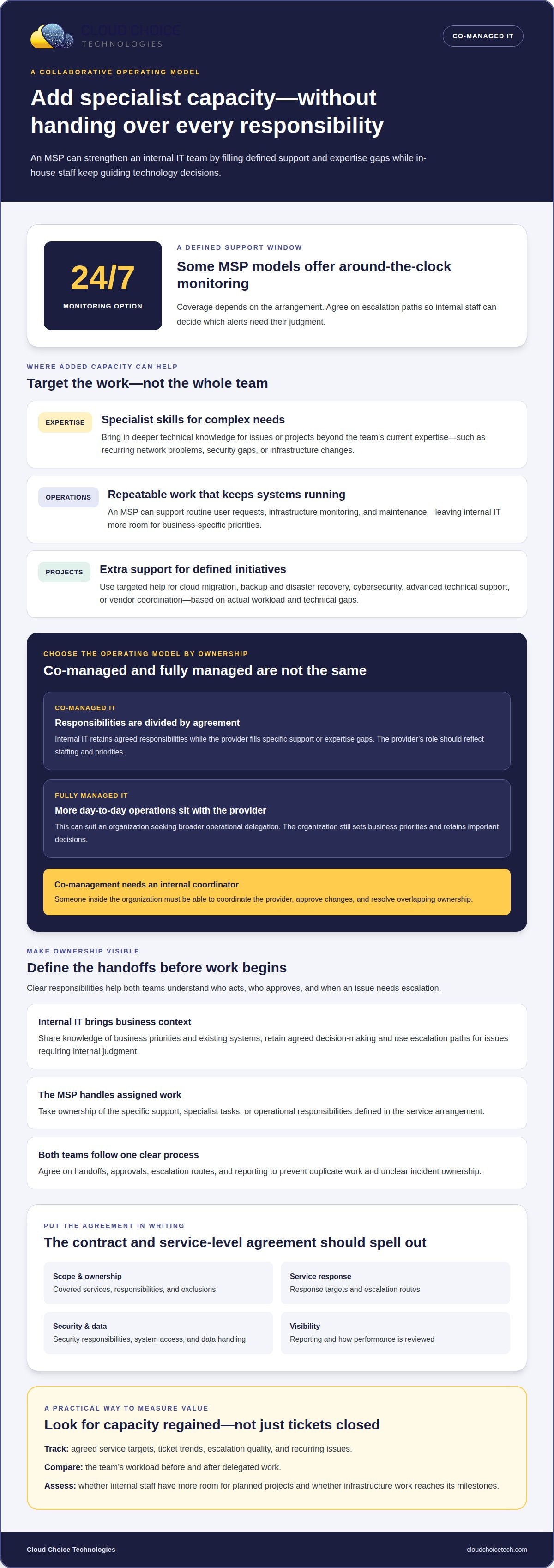
Some MSP models offer around-the-clock monitoring, including 24/7 coverage. That can help organizations identify system or security issues outside normal business hours, depending on the arrangement. Internal staff can use agreed escalation paths to decide which alerts need their judgment. Clear handoffs prevent routine tickets from consuming the same attention as a critical outage.
Supplemental MSP Services
Supplemental MSP services extend an internal team’s capacity in defined areas. A co-managed arrangement may include help desk coverage, advanced technical support, network management, cybersecurity, cloud migration, backup and disaster recovery, or vendor coordination. Choose the mix based on actual workload, technical gaps, and projects, rather than duplicating work the internal team already manages.
For example, internal IT might retain control of daily priorities while an MSP supports a cloud migration or strengthens cybersecurity practices. Compliance expertise can also provide technical support related to business requirements. This targeted approach adds specialist skills when needed without shifting every responsibility outside the organization or adding permanent headcount.
Can an MSP Get Your Company’s IT to the Next Level?
Yes, when the service model addresses a defined capacity or expertise gap. The right arrangement depends on how much control internal IT wants to retain and which responsibilities need outside support.
Co-Managed and Fully Managed IT
Co-managed IT divides agreed responsibilities between an internal team and a managed service provider. Fully managed IT places more day-to-day operations with the provider. The distinction matters: the provider’s role should match the organization’s staffing and priorities.
Co-management may not fit if nobody inside the organization can coordinate the provider, approve changes, or resolve overlapping ownership. It can also create friction when internal staff and the provider follow different processes without a clear escalation path. A fully managed arrangement may suit a company seeking broader operational delegation, but the organization still sets business priorities and retains important decisions.
Complex Infrastructure and Service Costs
Managed services support complex infrastructure by assigning recurring operational tasks and specialized work to a defined provider team. This can help organizations manage interconnected networks, cloud systems, security tools, and business software that require coordinated oversight.
A managed service can also make IT spending easier to plan by grouping agreed work into a recurring service model. The arrangement depends on its scope, the users and systems covered, and the assigned support responsibilities. Procurement support can clarify software renewals, vendor responsibilities, and dependencies, so internal IT knows who handles each issue and where costs may change.
MSP Selection and Contract Terms
Evaluate an MSP by matching its relevant experience, technical expertise, references, and security practices to your organization’s needs. Ask how it works with an internal IT lead, coordinates with vendors, protects system access, and escalates issues that require business context.
A contract and service-level agreement should define covered services, ownership, response targets, escalation routes, reporting, security responsibilities, data handling, and exclusions. Clear terms help internal staff know who acts during an outage or security incident. Key risks include excessive system access, weak account controls, unclear incident ownership, and mishandled sensitive information.
Before signing, ask which tasks the provider owns, how changes are approved, what security practices govern access, and how performance is reported. The answers should match the written contract terms.
Performance and Value Measurement
Measure performance against agreed service targets, ticket trends, escalation quality, and recurring issues. Review whether the provider handles assigned work according to the agreed process and gives internal IT enough information to take over complex cases.
Value also shows in capacity regained: compare the team’s workload before and after delegation, then assess whether staff can advance planned projects. For example, track whether routine support takes less internal time while infrastructure work reaches its milestones. Managed IT services can be one option when an organization needs structured support alongside its internal team.
Defining responsibilities between internal IT and an MSP
Internal IT brings business context and familiarity with company systems, while an MSP adds defined operational support and specialist capacity. Clear ownership is essential: otherwise, monitoring, cybersecurity, and employee requests can fall between the teams.
Role Coordination and Communication
Role coordination assigns each task to an accountable team member and sets a clear escalation route. This prevents duplicate work and helps urgent issues reach someone with the right authority.
For example, internal IT can set priorities, approve architecture changes, and serve as the main contact. The MSP can handle agreed monitoring or support tasks, then escalate issues that require company-specific judgment. A responsibility matrix should name the owner, approver, and escalation contact for each function, making the partnership easier to manage day to day.
Onboarding works best as a defined sequence. First, both teams agree on the service scope and document the systems involved. Then they share relevant system information, set access permissions, and establish escalation routes and communication channels. Finally, they set a reporting schedule so the internal lead can review progress and address gaps before responsibilities drift.
Reports and dashboards should go to the internal IT leader first, giving that person context before findings are shared with executives. For a security alert, the MSP can provide investigation details while internal IT coordinates decisions shaped by business operations. This handoff preserves accountability and gives the right people access to useful technical findings.
Choosing an IT Support Model
Choosing between an MSP and internal IT means matching each responsibility to the skills, context, and coverage your organization needs. This helps determine whether to keep a task in-house, delegate it, or share it.
Internal professionals understand company systems, users, culture, and priorities. An MSP adds external technical capacity for work such as infrastructure monitoring, cybersecurity, backups, cloud services, or IT planning. A team with strong internal knowledge might keep architecture decisions and approvals in-house while delegating repeatable support work.
If you’re considering supplementing an internal IT team with an MSP, start by identifying the specific work that needs added capacity. A cybersecurity skills gap, for example, may call for targeted outside expertise while internal staff continue directing business decisions. The goal is to close a defined gap, not duplicate existing roles.
Document the arrangement in the contract and service-level agreement. Specify provider-owned functions, how responsibilities can change, incident escalation routes, and the reporting the provider supplies. Review these terms as the organization grows to keep coverage aligned and reduce competing instructions or unclear accountability.
Signs an MSP will supplement rather than replace an internal team
A cooperative MSP makes its role clear in daily processes, respects the department’s business knowledge, and adds capacity where the team needs it. Look for these signs in conversations, proposed workflows, and early service delivery.
- It defines added capacity. The provider identifies specific gaps, such as cybersecurity analysis or support during a demanding project, instead of proposing to take over every IT function. Its plan shows how the addition supports existing staff.
- It preserves internal decision-making. Internal IT retains authority over priorities, approvals, and architecture. For example, the provider can investigate a network issue and share findings, while the internal lead decides whether a change fits business needs.
- It fits existing processes. The MSP agrees how tickets enter the workflow, who handles each category, and when an issue returns to internal IT. A clear escalation path avoids employees receiving conflicting instructions.
- It checks for tool overlap. Before introducing monitoring or security software, the provider reviews what the company already uses. The proposal explains whether a tool complements, integrates with, or replaces an existing system, and why.
- It reports to the internal lead. Service updates and dashboards go to the designated IT contact first. That person can interpret results using company context and communicate relevant findings to leadership.
These expectations belong in the written scope, not just in a sales discussion. For example, the agreement can name provider-owned tasks, the internal team’s approval authority, and the contact for a high-priority ticket. Vague ownership can lead staff to duplicate work or assume the other team is responding.
Watch how the partnership handles a real initiative. During an office expansion, for instance, the MSP might coordinate its assigned technical tasks while internal IT aligns timing with employees and business operations. A useful partner shares progress, flags dependencies, and gives internal staff enough detail to make informed decisions. It works with the department rather than bypassing it or treating its knowledge as an obstacle.
Review the arrangement when the organization’s needs change. A new system, shifting workload, or cybersecurity concern may call for different coverage. The provider should discuss adjustments with internal IT, explain their effect on existing tools and responsibilities, and document agreed changes. This keeps support aligned while preserving the internal team’s role.
If you’re ready to define the right support boundaries, explore proactive IT management as a way to add structured support around your existing team.
Cloud Choice Technologies
Cloud Choice Technologies helps organizations define where an MSP can add expertise and support without displacing internal IT. Its managed IT support can complement an existing team with practical operational assistance, while cybersecurity and cyber risk analysis address security concerns that need focused attention.
Turn to an MSP when workload is stretching internal staff, specialist skills are needed, or responsibilities between in-house IT and an outside provider need clearer definition. Remote support can address technical issues while internal staff retain business context and decision-making authority.
Contact Cloud Choice Technologies to discuss how managed IT support can work alongside your internal team.
Set Your Team Up for the Next Stage
Turn the idea of supplementing an internal IT team with an MSP into a focused business decision. Start with the most pressing issue: recurring support demands, a specialist skill gap, or a security concern. Then identify what your internal team should continue to own and what additional support would help it move forward.
A practical discussion can connect those priorities to an appropriate support model. Cloud Choice Technologies offers Managed IT Services, Cybersecurity, and Remote Support to address different needs while your organization defines clear roles for internal staff and external support.
You don’t need to redesign the entire IT function to make progress. Start with the need limiting your team today, then use it to guide a focused conversation about support, responsibilities, and next steps.
Discuss a support model for your IT team and take the next step with confidence.
Frequently Asked Questions
Does the provider work inside your tools?
An MSP can work within an organization’s existing tools when the shared workflow defines access and responsibilities. For example, both teams can use one ticket queue, assign ownership by issue type, and record updates in the same system. Before granting access, define user permissions, approval limits, and account-removal procedures. This keeps work visible and controlled without giving every technician unrestricted access.
How Would I Know If I Need an MSP in Addition to My IT Team?
Look for a sustained mismatch between incoming work and the team’s capacity to complete it. Review open tickets, recurring issues, delayed internal projects, and postponed work. If routine requests repeatedly displace planned improvements, outside capacity may help. A specific skills gap, such as reviewing a security design, can also signal a need for specialist support.
How are escalations handled?
Escalations should follow a documented route based on issue type, urgency, and decision authority. A common software access problem, for example, might stay in the support queue, while a suspected security incident should promptly reach designated security and business contacts. Record actions taken, current impact, and the next owner in the ticket. This helps the receiving team continue without restarting the investigation.
MSP vs Internal IT: Which Support Model Actually Works Better Today?
Neither model is universally better. The right fit depends on which work needs direct business context and which benefits from outside capacity. Internal IT can focus on business-specific decisions while an MSP provides defined operational or specialist support. A company that wants to retain hands-on technology leadership may prefer shared responsibilities; one seeking broader delegation may choose a more provider-led structure.
What is an MSP?
An MSP, or managed service provider, is an external company engaged to manage or support specified technology functions. The scope may cover ongoing IT operations, particular systems, or specialist work, as set out in an agreement. For example, a business might assign routine infrastructure monitoring to an MSP while keeping application decisions with its own staff. The provider’s duties depend on the agreed scope.
How do you determine which IT tasks to outsource to an MSP versus keep in-house?
Assess each task by its repeatability, required expertise, business impact, and need for internal knowledge. A standardized monitoring task may suit outside support, while a decision affecting a unique business process may stay with internal staff. Consider access to sensitive information and who must approve changes, then assign an owner to every task. Revisit the division when systems or priorities change.