
Securing Business VoIP: A Practical Buying Guide for 2026
What if the weakest point in your phone system isn’t the platform, but one of the connections around it? Securing business VoIP systems means looking beyond the software to the accounts, devices, network, staff practices, and support that keep calls moving. Reviewing those pieces together helps you protect communications while preserving the flexibility your team depends on.
It’s reasonable to want clear answers: How could calls or messages be exposed, and what happens if access is compromised or service is disrupted? The right safeguards aren’t just a list of features. They include practical controls, clear oversight, and a response plan that fits your organization’s IT environment.
This guide explains the main security considerations and offers a straightforward framework for comparing phone systems, providers, and support. You’ll learn how to assess the full call path, distinguish useful capabilities from meaningful protections, and plan for continuity. It also covers how managed IT and cybersecurity can support communications, and how a free Network Security Analysis with a technology assessment and white-hat testing can help identify broader network considerations.
Key Takeaways
- Assess the full call path, including accounts, devices, mobile use, networks, and call handling.
- When securing business VoIP systems, review user permissions and device and network safeguards as connected parts of your wider IT environment.
- Start your buying evaluation by mapping users, call flows, reporting needs, and the communications your business needs to keep available.
- Consider how ongoing managed IT and cybersecurity oversight can support your phone system beyond its built-in features.
- A free Network Security Analysis with a technology assessment and white-hat testing can help identify wider network considerations.
Why securing business VoIP systems means looking beyond phone features
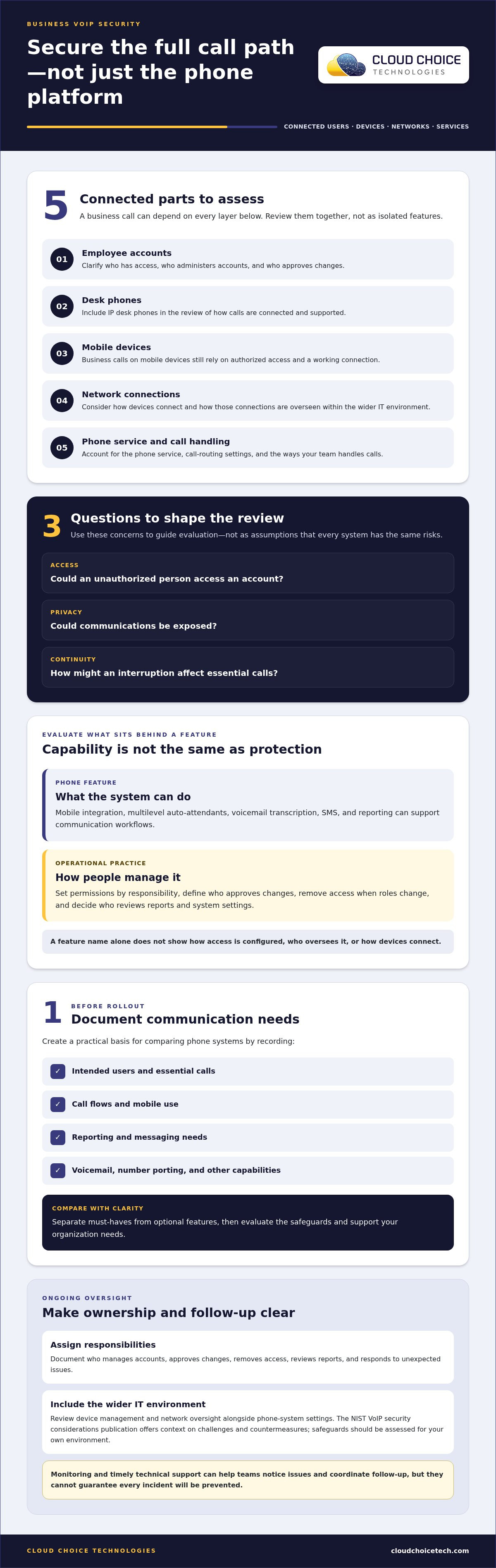
Business VoIP delivers voice communications through internet-connected systems and services. A desk phone is only one part of the picture: calls may also rely on employee accounts, mobile devices, network connections, call-routing settings, and the phone service itself. VoIP security means protecting communications across connected users, devices, networks, and services. That’s why securing business VoIP systems calls for a broader review than comparing features alone. Auto-attendants, SMS, and voicemail transcription can improve how teams communicate, but their presence doesn’t tell you how access or the supporting environment is managed. Compare business phone systems against both your communication needs and your security requirements.
Which parts of a business VoIP system should buyers assess?
Map the components involved in your organization’s calls: employee accounts, IP desk phones, mobile devices, network connections, and phone-service components. For example, one employee might place calls from a desk phone while another takes business calls on a mobile device. Both rely on authorized access and a functioning connection to the phone service, but the details of each setup can differ. Reviewing VoIP vulnerabilities can also help explain why the connected environment matters.
What concerns should shape a secure phone system decision?
Consider whether an unauthorized person could access an account, whether communications could be exposed, and how an interruption might affect essential calls. These are questions to guide your evaluation, not assumptions that every system faces the same risks. Clarify who administers accounts and permissions, who approves changes, and how access is removed when someone’s role changes. When responsibilities are split across internal staff and service teams without clear ownership, routine changes and oversight can become harder to coordinate.
Separate the convenience a feature provides from the practices that support secure use. Reporting, for example, may help review phone activity, but it doesn’t determine who can access accounts or how devices connect. Look at the phone system as part of the wider IT environment, where network and device safeguards support communications without acting as standalone guarantees. A free Network Security Analysis, which includes a technology assessment and white-hat testing, can help identify broader network considerations.
How business VoIP security depends on accounts, devices, and oversight
Security depends on how a phone system is administered after setup, not just on what its feature list promises. A practical distinction: a phone feature offers a capability; an operational practice determines how people configure, manage, and review it. Securing business VoIP systems therefore involves clear account ownership, appropriate permissions, and ongoing attention to the devices and network that support calls.
How do phone features and account access affect security?
Assign access according to each employee’s responsibilities. Someone who answers calls may need different permissions from a person who administers users or changes call settings. Decide who approves account changes, removes access when roles change, and reviews who can manage system settings. Document those responsibilities so employees know where to direct requests and issues.
Mobile integration can extend business calling to employees’ devices; a multilevel auto-attendant can direct callers through menu options; and reporting can provide visibility into activity. These capabilities can support communication workflows, but their names alone don’t tell you how access is configured or who reviews the resulting information. Include configuration and administration in your evaluation of business phone systems.
Why should buyers include network and IT oversight?
Phones and mobile devices connect to the wider IT environment, so their security review should consider how devices are managed and how network connections are overseen. The NIST VoIP security considerations publication provides a foundational discussion of VoIP security challenges and countermeasures. Use it as context for assessing your own environment, rather than assuming one safeguard fits every organization.
Ongoing monitoring and timely technical support help teams notice issues, review system activity, and coordinate follow-up. These practices can strengthen oversight, but they can’t guarantee that every incident will be prevented. Set clear expectations for who reviews reports, handles account changes, and responds when calls or devices behave unexpectedly. For a broader view of how security fits into the IT environment, explore business cybersecurity solutions alongside your phone-system plans.
How to evaluate and secure a business VoIP system before rollout
A structured buying process makes it easier to compare calling features with the safeguards and support your organization needs. Before rollout, document how employees will use the system and who will oversee it. This gives your team a practical basis for comparing business phone systems and assessing how each fits your IT environment.
- 1. Document communication needs. List intended users, essential calls, call flows, mobile use, and reporting needs. Note whether your team relies on messaging, voicemail, number porting, or other capabilities. Separate must-haves from optional features before comparing systems.
- 2. Review account administration. Decide who will create and remove accounts, assign permissions, and manage call-routing settings. Include mobile device integration in the review, and define who owns these tasks as employee roles change.
- 3. Assess network and device readiness. Identify the phones and mobile devices that will connect, along with the network connections they depend on. Have qualified technical staff review deployment-specific considerations before relying on the system for essential communications. Don’t treat a single setting or feature as a complete security measure.
- 4. Compare support and continuity. Evaluate how technical questions, account changes, and service issues will be handled. Identify the communications your business needs to maintain and decide how your team would respond if calls were interrupted. Include ongoing oversight in the comparison, not just setup and features.
- 5. Plan setup and regular review. Record intended users, permissions, call routing, and the process for account changes. After launch, revisit user access, reports, connected devices, support needs, and system changes as your business evolves.
These steps turn “secure” from a broad promise into practical review points. They also help teams avoid choosing features without assigning responsibility for configuration and ongoing oversight. Cloud Choice Technologies offers a free Network Security Analysis that includes a technology assessment and white-hat testing. The analysis can help identify wider network considerations as you plan or review a phone-system rollout.
How managed support can help secure business VoIP over time
A phone system can offer useful features and still leave questions about who manages accounts, connected devices, network dependencies, and technical issues. Treating communications as part of the wider IT environment helps assign those responsibilities clearly. It also gives your team a practical way to review changes as business needs evolve, rather than treating security as a one-time setup task.
When can managed support help with business VoIP?
Coordinated support can make it clearer who handles phone settings, account changes, network concerns, and troubleshooting. If a user can’t access a phone or calls aren’t routing as expected, defined support responsibilities give employees a clear path to help and enable the right technical staff to investigate. Managed IT services can support the wider environment that business communications depend on, alongside appropriate cybersecurity oversight.
What can Cloud Choice Technologies bring to a phone system decision?
Cloud Choice Technologies provides Business Phone Systems with advanced IP desk phones, SMS and text messaging, voicemail with AI transcription, mobile device integration, multilevel auto-attendant, and reporting. Match these capabilities to how your team communicates, then consider how the system fits with your accounts, devices, network, and support responsibilities. Features help calls flow, but they don’t replace ongoing IT and security oversight.
Business phone services typically save more than 30% compared with current service. Weigh that potential alongside the system’s fit, support needs, and role in your wider technology environment, rather than making cost the only measure.
Cloud Choice Technologies also offers a free Network Security Analysis that includes a technology assessment and white-hat testing. It can help assess broader network considerations as you plan or review your phone system, without serving as a guarantee of security.
Make your next VoIP decision with confidence
Securing business VoIP systems starts with looking beyond the feature list. Assess how accounts, devices, networks, and call handling work together, then clarify who will manage access and respond to technical issues. A practical rollout plan and regular review help keep those responsibilities visible as your communication needs change.
Cloud Choice Technologies’ Business Phone Systems include calling, messaging, voicemail, mobile integration, and reporting features. Consider them as part of your wider technology environment, alongside managed IT and cybersecurity support. A free Network Security Analysis, which includes a technology assessment with white-hat testing, can help identify broader network considerations.
Request a free Network Security Analysis as a practical next step toward more informed phone-system planning. The results can help your team assess network considerations and plan its review.
Frequently Asked Questions
Is a business VoIP system secure?
A business VoIP system can be secured, but no platform is automatically immune to risk. Protection depends on how accounts are managed, devices and network connections are maintained, and the service is configured and overseen. Evaluate those elements together rather than judging security by a feature list alone. Securing business VoIP systems is an ongoing process, with responsibilities and safeguards reviewed as staff, devices, or call flows change.
Can a business VoIP system be hacked?
Yes, unauthorized access or weaknesses in connected accounts, devices, and networks can put a VoIP system at risk. Depending on the circumstances, communications could be exposed or service disrupted. That possibility doesn’t mean every system faces the same level of risk. Review how access is controlled, who administers accounts, and how concerns are escalated so your organization can make informed decisions without relying on alarmist assumptions.
How do I secure a business VoIP system?
Start by documenting users, permissions, call flows, mobile use, and the communications your business needs to keep available. Assign clear responsibility for account changes and administration, then review the connected phones, mobile devices, and network environment. Set expectations for support and regular review of system activity. Have qualified technical staff assess deployment-specific details, and revisit your approach as business needs or system configurations change.
Does a business VoIP system need a separate security review?
Not necessarily. VoIP security can be included in a broader review of business accounts, devices, networks, and technology oversight, as long as the phone system receives specific attention. Identify the components and people involved in calls, and consider how changes or issues will be managed. Cloud Choice Technologies’ free Network Security Analysis includes a technology assessment with white-hat testing to help assess wider network considerations.
What should I look for when choosing a secure business phone system?
Compare how well the system fits your call flows, mobile use, messaging, voicemail, reporting, and number-porting needs. Also consider account administration, connected-device and network readiness, continuity needs, and who will handle technical support and ongoing oversight. Cloud Choice Technologies’ Business Phone Systems include features such as IP desk phones, voicemail with AI transcription, SMS and text messaging, mobile integration, and reporting. Features matter, but so does their management.
Can managed IT support help protect business VoIP?
Yes. Managed IT support can help coordinate phone-system responsibilities with broader account, device, network, and technical support practices. It can also provide a clearer path for addressing questions or issues as they arise. This support strengthens oversight, but it can’t guarantee that incidents will be prevented. Pairing managed IT with cybersecurity helps keep communications in view as part of the organization’s wider technology environment.