
Scaling IT Infrastructure for Business Growth: 2026 Guide
What if your next growth milestone exposes a weakness you could have addressed earlier? Scaling IT infrastructure for business growth isn’t a one-time upgrade. It’s a staged capability that prepares systems to handle new demands without turning bottlenecks, downtime, or security gaps into costly distractions.
Expansion brings real pressure: more people, more devices, more data, and more systems to manage. You’re right to ask which investments matter first and how to protect day-to-day operations while making changes. This guide explains how to assess infrastructure constraints, prioritize upgrades around business needs, and plan for growth while keeping technology secure and manageable.
We’ll look at the systems most likely to strain, how to sequence improvements, and how IT project services can support planned technology changes. A free Network Security Analysis can also provide a practical starting point for understanding security needs as you prepare for growth.
Key Takeaways
- Scaling IT infrastructure for business growth means matching technology capacity and management to changing business demand, not simply buying more equipment.
- Assess current bottlenecks separately from forecasted needs so urgent constraints and future improvements receive the right priority.
- Develop capacity, access controls, security, support, and recovery together to keep expanding systems manageable and resilient.
- Use a staged roadmap to connect business plans with technology decisions, project work, and reviews of the outcomes.
- A free Network Security Analysis can help identify security needs as you plan infrastructure changes.
What Does Scaling IT Infrastructure for Business Growth Actually Mean?
Scaling means matching technology capacity and management to changing business demand. It doesn’t mean buying equipment whenever work slows down, or replacing every system in one sweeping project. A scalable approach identifies what needs to change, when it needs to change, and how each adjustment affects the rest of the business.
Infrastructure scalability is the ability to support changing business demand through coordinated technology capacity and management, without relying on constant redesign or emergency fixes. This idea aligns with the broader concept of scalability in computing, where a system adapts as its workload changes. For a business, the workload includes more than processing needs. It also includes user access, data flows, applications, and the support processes that keep work moving.
That’s why scaling IT infrastructure for business growth is a planning challenge, not just a purchasing decision. A new application may depend on reliable connectivity, current user permissions, and a support process that can resolve access issues. If one part lags, the rest can feel slower or harder to manage.
Which business changes put pressure on IT infrastructure?
Hiring adds accounts, devices, and support requests. Higher workloads can increase demand on networks, shared files, and business applications. New software introduces fresh access and management needs, while expansion can add sites, remote users, or dependencies between systems.
Small changes can compound. If new employees arrive before account setup is standardized, teams may rely on manual fixes or inconsistent access. Managed IT services can help maintain oversight as systems and support needs change.
What are the signs your infrastructure is not keeping pace?
Recurring performance complaints, capacity limits, and manual workarounds are prompts to investigate, not automatic proof that a particular upgrade is needed. Track when issues occur, which users or applications are affected, and whether the problem repeats as workloads rise.
Repeated troubleshooting may point to an underlying capacity or management issue, especially if the same task keeps interrupting staff or support teams. Look for patterns across systems and processes before choosing a fix. The right response could involve adjusting how a system is managed, improving a process, or planning a targeted technology change.
How Scalable IT Infrastructure Connects Capacity, Security, and Continuity
Adding capacity solves only one part of the growth challenge. More users, devices, and systems also create more access points to manage, more support needs, and more dependencies to understand. IT infrastructure and business operations are closely connected: networks, applications, storage, and user devices work together to keep daily tasks moving. A growth plan should account for how changes in one area affect the others.
Standard processes make expansion more consistent. Define how new accounts are set up, how devices receive approved configurations, and how users get access to the systems their roles require. This reduces reliance on one-off decisions and gives support teams a clearer way to manage changes. Ongoing monitoring and managed IT services can help maintain oversight as systems and workloads evolve.
How should capacity and systems fit together as demand grows?
Two common approaches are vertical and horizontal scaling. Vertical scaling adds capacity to an existing system, while horizontal scaling distributes workloads across additional systems. Neither is automatically the right choice. The decision depends on the workload, system dependencies, and business requirements.
Assess the full chain: network performance, storage needs, application demands, and the devices employees use to access systems. For example, adding users to a business application may increase storage and network demand while also requiring consistent account setup. Cloud services and infrastructure can be one part of the design, but moving a system to the cloud isn’t a universal fix. Match each option to the needs of the business and the systems it depends on.
Why must security and recovery scale alongside capacity?
As users and connected systems increase, consistent security oversight becomes more important. A new account or application should fit established access and security processes instead of creating an exception that’s easy to overlook. For related guidance on cloud environments, see the managed cloud security services guide.
Recovery planning is also part of operational continuity, not a task to postpone until after an outage. Identify which systems and data support essential work, then plan how the business would restore access if a disruption occurred. Capacity, access, security, support, and recovery should move forward together. That coordination makes scaling IT infrastructure for business growth more deliberate, while helping teams manage change without assuming any single upgrade will solve every issue.
How to Build a Practical IT Infrastructure Scaling Plan
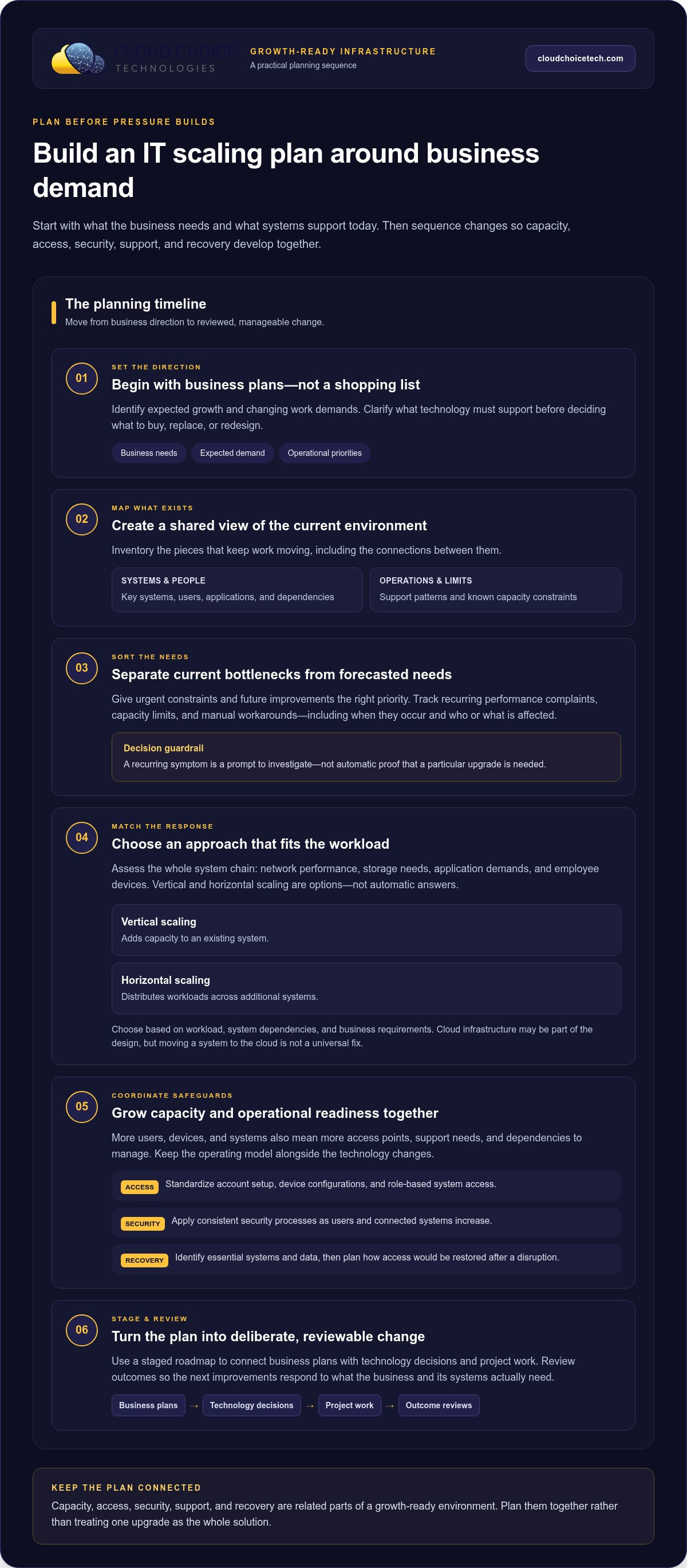
A useful scaling plan starts with business direction, not a shopping list. Document current systems and expected demand before deciding what to change. That gives leaders a shared view of what supports operations now, what growth will require, and where a gap could interrupt work. For scaling IT infrastructure for business growth, separate issues that need attention now from forecasted needs and longer-term improvements.
How do you assess current infrastructure and forecast demand?
Begin with an inventory of key systems, users, applications, dependencies, support patterns, and known capacity constraints. Connect that picture to the business plan: expected hiring, workload changes, new applications, or expansion each raise different technology questions. For example, planned hiring may require more than devices. Consider account setup, application access, network demand, and the support process for new employees.
Identify risks and operational dependencies before choosing an upgrade or migration. Note which systems rely on one another, where recurring issues occur, and what work would be affected if a system became unavailable. IT consulting services can help businesses assess technology needs and plan decisions around their growth goals.
How should you prioritize and phase infrastructure changes?
Turn findings into a sequenced roadmap. Rank proposed work by operational need, security relevance, dependencies, and business timing. Address immediate constraints first, schedule forecasted capacity needs around expected demand, and reserve longer-term improvements for planned review. A phased approach lets teams coordinate changes and limit unnecessary disruption, without assuming every project will follow the same schedule.
- Set business priorities. Define the planned changes in staffing, workload, applications, or operations.
- Assess current systems. Record infrastructure, dependencies, recurring support issues, and constraints.
- Forecast needs and risks. Translate business plans into capacity, access, and continuity requirements.
- Prioritize and group work. Organize related network upgrades, cloud changes, and system implementations into manageable projects.
- Assign ownership and review outcomes. Track practical measures such as recurring performance issues and support demand, then use results to adjust the next phase.
For network expansion and technology updates, IT Project Services can support planned implementation. A free Network Security Analysis can also help clarify security needs as the roadmap takes shape. Before scheduling each phase, map which teams rely on affected systems and share the scope of the change with them, so implementation planning reflects day-to-day operations.
How Managed IT and Planned Projects Support Sustainable Business Growth
Growth doesn’t require replacing every system at once. A more manageable approach combines ongoing oversight with targeted projects, so technology changes can follow business priorities instead of reacting to every new demand. For businesses scaling IT infrastructure for business growth, this balance helps keep day-to-day systems and longer-term plans in view.
Cloud Choice Technologies provides managed IT that includes monitoring and full management of IT systems. Help desk support can also give employees a clear path for technology issues, reducing the need for internal teams to coordinate every request themselves. As users, applications, and systems change, ongoing management helps leaders maintain visibility into what’s working and what may need attention.
When can managed IT support a growth plan?
Managed IT can support a plan when existing systems need consistent oversight as the business changes. Monitoring helps surface issues for review, while full systems management supports the ongoing work of maintaining technology. Help desk support addresses employee needs as they arise. Together, these functions can ease internal coordination, but they don’t replace planning: leaders still need to connect technology decisions to operational priorities.
For broader context on the role of managed support in security and scalability, see the executive guide to managed IT services. Strategic planning then turns business intentions into a sequence of technology decisions. Project work can put those decisions into action through network expansion, system updates, or new-facility buildouts, with the scope organized around the business need rather than a sweeping overhaul.
What is a low-friction first step toward readiness?
Start by understanding the current security picture. Cloud Choice Technologies offers a free Network Security Analysis that includes a technology assessment and white-hat testing. The findings can help inform priorities and identify areas to examine as part of a growth plan. An assessment provides useful input for decision-making; it isn’t a guarantee that every risk has been found or that future incidents will be prevented.
Use those findings alongside business plans to decide which concerns need attention first and which can be addressed through later planning or project work. That creates a practical starting point without requiring an immediate, organization-wide technology change. Request the free Network Security Analysis to begin assessing security needs as you plan for growth.
Make Your Next Technology Decision with Confidence
Growth plans can change, and your technology roadmap should be flexible enough to change with them. Set a clear owner for infrastructure decisions, then revisit priorities when hiring plans, workloads, or business direction shift. That keeps scaling IT infrastructure for business growth tied to real operational needs instead of assumptions or rushed purchases.
You don’t need to solve every future challenge today. Start with one informed next step: understand where security needs attention, then use that insight to guide planning. A deliberate approach gives your team room to move forward while keeping technology decisions connected to business priorities.
Request your free Network Security Analysis and take a confident first step toward growth-ready IT.
Frequently Asked Questions
Is scalable IT infrastructure only necessary for large businesses?
No. A small business can face new technology demands after hiring, adding a business application, or handling more customer information. The appropriate scale depends on the work systems need to support, not the organization’s size. For example, a growing team may need a consistent way to provision accounts and manage access before it needs a major infrastructure expansion. Start with the changes your business expects and assess what those changes require.
How do I know when my business needs to scale its IT infrastructure?
Recurring complaints, user delays, capacity limits, or workarounds can be reasons to investigate. Track when and where issues occur, which applications or teams are affected, and whether support requests cluster around the same task. This evidence helps distinguish an isolated problem from a pattern worth addressing. Before scaling IT infrastructure for business growth, compare those findings with upcoming changes so you can prioritize the constraint most likely to affect work.
Can a business scale its IT infrastructure without replacing everything?
Yes. A review may show that existing systems still meet some needs while a specific connection, process, or application requires attention. For example, a business might retain a useful system while planning a targeted update to how users access it. The right sequence depends on technical dependencies and business priorities. Map what must remain connected during each change, and avoid replacing a working component simply because another part needs improvement.
What should an IT infrastructure growth plan include?
A practical plan should name the business change behind each proposed technology decision. Record who owns the decision, which systems or teams it affects, what needs to happen first, and how the business will judge whether the change helped. Include a review point after implementation so teams can capture issues and adjust future work. Revisit the plan when hiring, applications, or operational priorities shift, rather than treating it as a fixed checklist.
How does cloud computing help scale IT infrastructure?
Cloud computing can support specific business needs, such as shared files, Exchange email, virtualization, or online backup. Its suitability depends on how a system is used, what it depends on, and how the business needs to manage access and information. Assess each workload on its own merits. Moving one service may fit while another remains better suited to its current setup, so avoid treating cloud adoption as an all-or-nothing decision.
What happens if a business delays infrastructure planning?
Delaying planning can leave less time to compare options when a business change or system constraint needs attention. That doesn’t mean a failure is inevitable, but decisions made under pressure may be harder to coordinate with other work. Keep a simple record of system dependencies, recurring issues, and upcoming business changes. Reviewing those notes regularly helps leaders spot decisions that need attention before they become urgent.