Managing IT for Multiple Business Locations: Key Challenges
What if the biggest challenge of managing IT for multiple business locations isn’t fixing problems, but preventing each office from becoming its own technology island? Consistent systems, reliable connectivity, clear security practices, and coordinated support help keep every location on the same playbook. When one site struggles, the effects can reach employees and customers across the business.
It’s understandable to focus on keeping each location running. But effective multi-location IT also depends on coordinating technology decisions, service standards, and security across the organization. A provider should be able to explain how it manages these moving parts and responds when a location needs help.
This article covers challenges that can disrupt multi-location operations, practical ways to maintain consistent services and products, and what to look for when evaluating IT providers. You’ll get a clearer framework for assessing whether a provider can support your locations with dependable, coordinated IT.
Key Takeaways
- Standardize core systems, policies, and operating processes while allowing location-specific procedures where business needs differ.
- Centralized monitoring and clear technology decision-making can improve visibility across sites and help teams address issues consistently.
- Align cybersecurity controls and customer service practices so each location delivers a dependable experience.
- Evaluate IT providers by how clearly they explain their support model, monitoring approach, security practices, and ability to coordinate across multiple locations.
- Cloud Choice Technologies’ Managed IT Services, Remote Support, Cybersecurity, and Cyber Risk Analysis can help address different parts of multi-location IT operations.
How Can an IT Provider Help Maintain Consistency Across Multiple Locations?
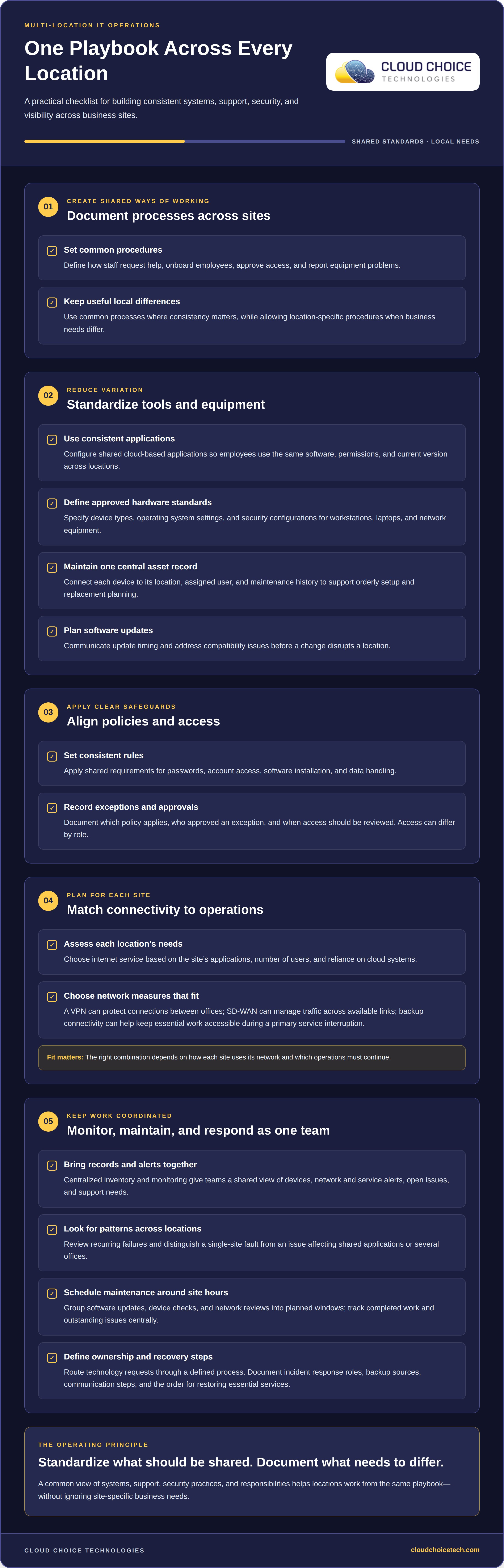
An IT provider starts by documenting how each location works. For example, shared procedures can define how staff request help, onboard employees, approve access, and report equipment problems. The provider maps differences between sites, then creates common processes where consistency matters. A location might retain a distinct inventory workflow while following the same company-wide rules for account security and support requests. Managing IT for multiple business locations starts with clear responsibilities.
Standard tools make those processes easier to follow. A provider can configure cloud-based applications so employees use the same software, permissions, and current version across locations. With a shared platform for email, file access, and collaboration, staff can access approved work tools from each office. The provider can plan each software update, communicate its timing, and address compatibility issues before the change disrupts a location. Cloud services can support this approach when applications need to be accessible across sites.
Hardware standards reduce variation, too. A provider can define approved device types, operating system settings, and security configurations for workstations, laptops, and network equipment. When a new office opens, these specifications give technicians a repeatable setup. A central asset record can link each device to its location, assigned user, and maintenance history. This makes replacement planning more orderly than relying on separate spreadsheets at each office.
Policies need the same structure. An IT provider can apply consistent rules for passwords, account access, software installation, and data handling, while documenting exceptions for specific roles or locations. A manager, for instance, may need different application access from a front-desk employee. Clear records show which policy applies, who approved an exception, and when access should be reviewed.
Connectivity requires a plan for each site. An IT provider can recommend internet service based on each location’s applications, number of users, and reliance on cloud systems. A VPN can protect connections between offices, while SD-WAN can manage traffic across available links. Backup connectivity can help keep essential work accessible during a primary service interruption. The right combination depends on how each site uses its network and which operations must continue.
Consistent management of IT across multiple locations also depends on coordinated maintenance. Providers can group software updates, device checks, and network reviews into planned windows, scheduling them around each location’s operating hours. A central record tracks completed work and outstanding issues, giving managers a shared view across sites.
What Are the Biggest Challenges of Managing Multiple Business Locations?
Separate systems can hide what is happening across a growing business. If each office tracks equipment in its own spreadsheet, leaders lack one reliable source for asset ownership, software versions, and open issues. A centralized inventory gives operations teams a shared view of devices and support needs. It can show which location has outdated equipment, missing records, or unresolved requests before those gaps complicate expansion. Managing IT for multiple business locations requires visibility that reaches beyond each office’s local records.
Limited visibility makes it harder to spot patterns. A network problem reported at one branch may point to a wider issue affecting shared applications. Centralized monitoring brings device, network, and service alerts into one view. A managed service provider can review these signals, identify recurring failures, and coordinate responses across locations. Consistent records help distinguish a single-site fault from an issue affecting several offices.
Without clear ownership, each location may make technology decisions independently. One manager might adopt a different application while another changes access settings or buys equipment outside company standards. An IT provider can help centralize decisions by documenting approved systems, routing requests through a defined process, and explaining the operational impact of proposed changes. Leaders can then weigh shared needs against each location’s requirements.
Outages and recovery create another challenge. An IT provider can coordinate incident response across locations, identify affected systems and sites, and prioritize restoration based on business needs. A documented disaster recovery plan can define recovery roles, backup sources, communication steps, and the order for restoring essential services. Data backup and recovery planning helps prepare for system restoration after disruption.
Centralized IT management connects these responsibilities. A provider can maintain shared records, monitor systems, coordinate support, and help leadership assess technology decisions against business priorities. As a company expands, the same governance process can account for each new office, its users, equipment, and applications. This gives decision-makers a clearer view of each location’s needs and where to direct resources. For organizations managing IT across multiple business locations, clear decision ownership helps prevent local changes from creating wider operational problems.
Consistency in Services and Products
Customers should receive the same core service whether they visit a downtown office or a suburban branch. A shared service catalog can define what each location offers, how staff handle common requests, and which options vary by site. For example, a repair business might standardize appointment booking and service descriptions while adapting pickup arrangements to each location. Clear product specifications and approved substitutions also help maintain consistent quality and customer expectations.
A checklist turns standards into repeatable daily work. At a retail location, it might cover opening procedures, register access, inventory updates, and customer returns. Managers can use the same checklist across locations and record exceptions, such as a product being temporarily unavailable at one store. This maintains consistent core processes without ignoring local conditions.
Cybersecurity controls should be consistent, too. Each location needs clear rules for account access, device use, software, and handling customer information. For example, a staff member who changes branches should retain only the access required for the new role. Central oversight can help apply security updates and identify differences, such as outdated software or unnecessary account permissions at one office.
Brand experience depends on more than logos and signage. Standardize what customers encounter, including service descriptions, appointment messages, signage, and how staff explain delays. A shared script can guide employees through a common issue, such as explaining a backordered item. Local teams can still respond naturally, while central guidance helps maintain the same basic promise at every branch.
Customer service needs clear ownership and consistent follow-through. A shared process can define where staff record a complaint, who handles escalation, and how the customer receives updates. If a customer starts a return at one location and completes it at another, employees need access to the same case details. A centralized record reduces repeated explanations and helps managers identify recurring service problems across locations.
Review standards whenever a service changes or a new location opens. A practical review compares the service catalog, staff checklists, security controls, and customer communication templates. If a new branch introduces a different process, leaders can decide whether it meets a genuine local need or creates an avoidable inconsistency. This keeps the customer experience aligned as the business grows.
Evaluating Multi-Location IT Providers
Start by testing whether a provider understands the differences between your locations. Ask how its support model handles a shared software issue affecting every office versus a local network failure at one branch. A strong evaluation connects both scenarios to clear ownership, escalation steps, and updates for affected employees. The provider should explain how it coordinates support across sites, as described in its approach to multi-location IT support.
Next, examine what the provider monitors and how it reports results. Request a sample report showing open incidents, recurring problems, security findings, and work completed across sites. If one office repeatedly loses access to a shared application, for example, the report should make the pattern visible and show what action followed. Review response targets, escalation contacts, maintenance responsibilities, and reporting expectations in the proposed service agreement.
Security needs its own practical review. Ask how the provider identifies differences in account access, device settings, software updates, and data handling across locations. A compliance discussion may include SOC 2 as a consideration, but the useful test is whether the provider can explain how its controls align with your business needs. For a regulated company, request a clear account of how compliance tasks, evidence, and unresolved gaps are managed.
Compare staffing models against the work your organization needs. In-house IT can offer close knowledge of daily operations, while a managed service provider can centralize ongoing support and monitoring. A hybrid model may suit an organization where internal staff coordinate locally and an outside team manages specialized or recurring tasks. Choose based on coverage, expertise, decision ownership, and how well the model addresses your challenges, not simply the number of offices.
Finally, use a consistent evaluation process. Ask each provider to describe how it would onboard a new branch, document systems, handle a site outage, and coordinate recovery. Compare the answers against your priorities, then examine the proposed responsibilities, reporting, and service boundaries. Clear explanations matter more than broad claims. Managed IT services can bring support and oversight under a coordinated model, while leadership retains visibility into decisions that affect every location.
Cloud Choice Technologies
Cloud Choice Technologies helps businesses coordinate IT support and security across their locations. Its services can be useful when employees have inconsistent support experiences, leaders need better visibility into technology risks, or offices face different technical challenges. Start with the operational issue: which teams are affected, what work is disrupted, and whether the concern involves ongoing support, security, or both.
Managed IT Services can help businesses coordinate support for users and systems across offices. Employees can bring technical issues into a shared support process instead of relying on separate local arrangements. This helps leaders understand recurring needs and plan support as the organization changes. Each location’s systems and operating requirements remain important to how support is coordinated.
Remote Support can help employees with suitable user or system issues without requiring an in-person visit for every problem. For example, an employee who cannot access a work application may be able to get help remotely. This gives distributed teams a way to address appropriate technical issues while distinguishing them from situations that require attention at the location.
Cybersecurity and Cyber Risk Analysis can help businesses organize their view of security concerns across offices. Cybersecurity focuses on protecting business technology, while Cyber Risk Analysis can help identify potential weaknesses and inform priorities. Differences in access practices between locations, for example, may warrant review. This work helps leadership understand where security attention is needed and how concerns affect business operations.
These services address related but distinct needs. A company experiencing recurring support disruptions may need coordinated IT assistance; one assessing its security posture may benefit from cybersecurity support or risk analysis. Information about affected locations, business systems, and operational impact helps focus the discussion. That way, the support plan can address the actual need instead of assuming every office has identical technology requirements.
If your organization is considering coordinated IT support or security across its locations, contact Cloud Choice Technologies to discuss your needs.
Frequently Asked Questions
How can an IT provider track assets across multiple locations?
An IT provider can maintain a centralized asset register and reconcile it against devices detected on the network. Useful records include a device identifier, assigned employee, location, operating system, and status, such as active, stored, or retired. For example, a laptop returned by a departing employee should be marked available only after access is removed and its condition recorded. Regular reconciliation helps uncover missing devices and records that no longer reflect actual use.
What IT management strategies can a provider implement for businesses with multiple locations?
A provider can establish change control, documented escalation paths, access reviews, and a technology roadmap tied to business priorities. Before a company opens a branch, for example, the provider can coordinate account creation, application access, security configuration, and support ownership in one implementation plan. Regular leadership reviews can then surface unresolved risks and upcoming decisions. The strategy should define who approves changes and how teams assess their effects on shared systems.
How can an IT provider centralize IT support and network management across multiple business locations?
A provider can route requests through one support process and associate each issue with its location, affected service, and business impact. For network management, it can keep diagrams and configuration records in a shared operational repository, helping technicians understand how each site connects to common systems. When a problem arises, this context helps distinguish a local fault from a shared service issue and direct investigation to the right equipment or connection.
What IT infrastructure and equipment can an IT provider recommend for each business location?
Recommendations depend on each site’s users, applications, physical layout, and reliance on network access. A small office using cloud applications may need a different network design from a site hosting local business systems. Providers can assess workstations, wireless access points, switches, firewalls, and power protection against those needs. They can also consider equipment support and replacement, then document the approved configuration for future openings or upgrades.