How to Secure Company Data in the Public Cloud from Misconfiguration and Ransomware
Misconfiguration can expose company data even when the cloud platform itself is secure. Knowing how to secure company data in public cloud environments means protecting the information, accounts, and settings your organization controls, not relying on the provider alone.
It’s reasonable to expect a trusted cloud platform to protect your business, but security also depends on how you classify data, control access, and keep safeguards current as threats change. A clear plan brings these responsibilities together and reduces gaps that ransomware or unauthorized access could exploit.
This article explains how to secure company data in public cloud environments through data classification, access controls, and encryption. It also covers misconfiguration, ransomware, backups, and threat monitoring, so you can assess what effective protection involves and when professional security support may help.
Key Takeaways
- Understand how cloud provider responsibilities and your organization’s data protection duties fit together.
- See how data classification helps align access permissions with the sensitivity of information.
- Learn why encryption must protect data when it is stored and when it moves between systems.
- Recognize how misconfigurations, excessive permissions, and ransomware can expose sensitive data.
- Explore how professional cybersecurity and risk analysis support a more consistent approach to cloud protection.
What Is Cloud Data Protection?
Cloud data protection combines safeguards that preserve sensitive information, keep it accessible, and support applicable privacy requirements. In public cloud environments, providers secure the services they offer, while customers remain responsible for protecting their data and configuring their environments.
Cloud Compliance Requirements
Cloud compliance requirements connect sensitive data handling to relevant privacy rules and security standards. They matter because the information type and people affected shape the safeguards a company needs. The National Institute of Standards and Technology says NIST SP 800-144 addresses security and privacy concerns in public cloud offerings. The International Organization for Standardization says ISO/IEC 27017 provides cloud-service security guidance and specifies security measures for providers and customers.
For example, the General Data Protection Regulation applies to organizations handling EU residents’ personal data, wherever those organizations are located. The Health Insurance Portability and Accountability Act governs protected health information for healthcare providers, health plans, and related entities. Start by identifying your data categories, applicable requirements, and the controls each category needs.
Evaluating Provider Compliance
Evaluating a cloud provider’s compliance means reviewing whether its documented controls support your company’s obligations. A provider’s certifications or audit materials do not automatically make your own environment compliant. Review the service scope, security measures, data-handling practices, and responsibilities described in provider documentation, then compare them with your internal policies and applicable standards.
Security audits can reveal gaps between documented controls and actual configurations. Assess how the provider supports access restrictions, data protection, breach response, and backups. Confirm that the review covers the specific cloud service and information you use, not just the provider as a whole. This evidence can help clarify which duties remain yours.
Security Tools and Managed Services
Cloud security tools provide technical capabilities, while managed security services add professional oversight and operational support. The right combination matters because tools alone do not ensure that alerts are interpreted or controls maintained. Tools can support configuration reviews, access monitoring, and detection; managed services can help operate those controls and respond to findings.
Cost varies with the tools selected, coverage, and level of ongoing support, so there is no single useful comparison figure. Compare the capabilities and service scope against the company’s data, cloud environment, and internal capacity. A provider creating a public cloud data security plan should first identify sensitive data, map responsibilities, prioritize risks, select controls, and define how reviews will be maintained.
Monitoring and Incident Response Controls
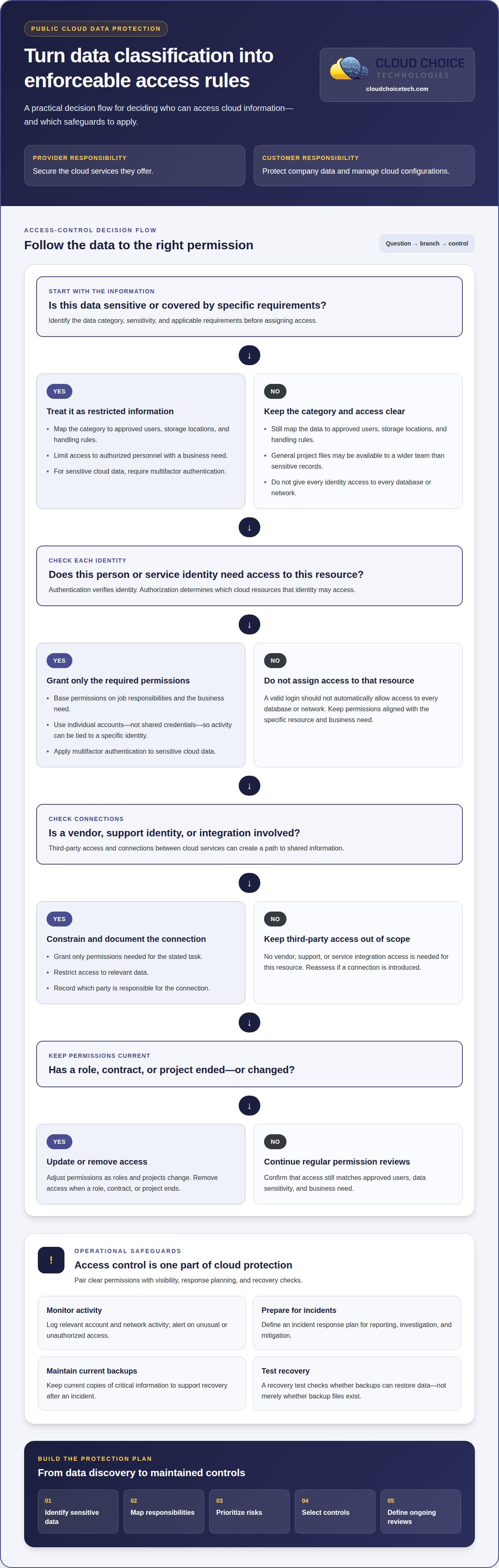
Cloud monitoring and incident response controls help detect unusual activity and guide action during a security event. Implement logging for relevant account and network activity, alerts for unusual or unauthorized access, and an incident response plan that covers reporting, investigation, and mitigation.
Under the shared responsibility model, cloud providers protect the services they offer, while customers protect their data and manage their configurations. To secure cloud backups, maintain current copies of critical information and test that recovery works. A recovery test shows whether backups can restore data after an incident, rather than merely confirming that backup files exist.
Data classification and access control
Classification identifies what information you hold in cloud storage and how sensitive it is. Access controls determine which identities can use each resource. Together, these decisions create practical boundaries across cloud environments and turn shared responsibility into clear permissions.
Data Classification and Permissions
Data classification groups information by type, sensitivity, and applicable requirements. It matters because a public brochure and customer records should not have identical permissions. To secure company data in public cloud environments, map each category to approved users, storage locations, and handling rules. For example, restrict sensitive financial records to finance staff, while allowing a wider team to access general project files.
Match permissions to the business need for each data category. Limit access to sensitive information to authorized personnel, then review permissions as roles and projects change. A classification label is useful only when cloud technologies enforce it through permissions, sharing settings, and safeguards on connected systems.
Identity and Access Management
Identity and access management links each person or service identity to authentication and authorization controls. Authentication verifies identity; authorization determines which cloud resources that identity may access. The distinction matters because a valid login should not automatically grant access to every database or network.
For sensitive cloud data, require multifactor authentication and assign permissions based on job responsibilities. Use individual accounts rather than shared credentials so activity can be tied to a specific identity. Review permissions regularly and remove access when a role, contract, or project ends. These controls reduce unauthorized access without blocking legitimate work.
Third-Party Access and Integrations
Third-party access includes vendor accounts, support identities, and integrations between cloud services. Each connection can create a path to shared information. Grant only the permissions required for the stated task, restrict access to relevant data, and record which party is responsible for the connection.
When securing company data in public cloud environments, include third-party identities and integrations in access reviews. Assess what information each integration can read or change before enabling it. For example, a reporting tool may need read access to selected records, not permission to modify an entire storage environment. Remove unused accounts and permissions, and address gaps between connected systems.
These controls also clarify cloud responsibilities: providers secure the services they offer, while customers protect their data and manage access configurations. A sound review covers identities, classified information, integrations, and resources shared across connected systems.
Public cloud data protection and encryption
Encryption protects information in transit, at rest, and while it is processed by cloud infrastructure. A complete plan combines encryption with controlled keys, secure connections, and clear policies.
Encryption at Rest and in Transit
Encryption at rest protects stored data, while encryption in transit protects information moving between systems. Both matter because sensitive files can be exposed in storage or during transfer. NIST recommends AES encryption for data at rest, and AES-256 is widely used to protect cloud data. Transport Layer Security (TLS) commonly encrypts data in transit; TLS 1.3 or higher is recommended for cloud environments.
Before data enters cloud storage, you can encrypt it and use secure connections to transfer it between environments. These measures help prevent unauthorized parties from reading intercepted or exposed data. Encryption does not replace access controls: a person or service with valid permissions may still access information through the cloud service.
Encryption for Data in Use
Encryption for data in use aims to protect information while applications process it, rather than only during storage or transfer. It matters for sensitive workloads that must be computed on without unnecessarily exposing information. Assess whether your cloud service and workload support protections for active processing, then account for their limits in your security policies.
For example, a database may be encrypted at rest and connected over TLS, yet still need protection while an application reads records. Reduce exposure by limiting which processes and identities can handle them. Treat encryption in use as one layer of the wider architecture, not a substitute for authentication, authorization, or secure application design.
Customer-Managed Keys and Rotation
Customer-managed keys let an organization control key settings through a cloud provider’s key-management capabilities. Because access to the key affects who can decrypt protected data, define which identities may use or administer keys. Separate those permissions where practical, and document how key access supports data recovery.
Key rotation replaces a key with a new one according to your organization’s policy. Plan rotation around the cloud service’s supported process, data dependencies, and recovery needs. A key change must not strand encrypted files or interrupt applications. Keep key-access logs and test that authorized workloads can still decrypt data after rotation.
Core Data Protection Practices
Core practices combine encryption, restricted access, secure transfer settings, and recoverable backups. No single control protects every point in a data lifecycle. Apply encryption to stored and transferred data, protect keys, review configurations, and match safeguards to the sensitivity of the information.
To secure company data in public cloud environments, establish policies for encryption, key access, and rotation; verify secure connections between systems; and test backup recovery. Review cloud infrastructure and integrations for gaps, then correct disabled encryption or exposed data paths. These steps help keep protection consistent across storage, transfer, and processing.
Cloud security threats, including misconfiguration and ransomware
Misconfiguration and ransomware can turn cloud access into a route to breaches and data loss. The 2026 State of the Cloud Report ranked security second among organizational cloud challenges, behind managing cloud spend.
Cloud Misconfiguration Risks
Cloud misconfiguration occurs when settings expose data or services beyond their intended audience. It matters because a public-facing resource with excessive permissions can reveal sensitive data without exploiting a software flaw. About 81% of organizations have neglected public-facing assets susceptible to threat infiltration and exploitation. A focused review identifies exposed assets, tests their access settings, and corrects errors promptly.
Misconfiguration can include disabled encryption, versioning problems, or permissions that grant broader access than necessary. In hybrid environments, information and resources shared between connected systems can create additional security gaps. Review newly created cloud assets and monitor accounts for unusual or unauthorized access. Correct settings to close exposures, then keep monitoring to help detect repeat errors.
Ransomware Threats
Ransomware is malicious software that can block access to files or systems and disrupt operations. In cloud environments, attackers may exploit compromised accounts or weak configurations to reach sensitive data. A cloud-based firewall can help detect and stop malware used to exfiltrate data, but you also need current backups and a defined response for each incident.
Human mistakes can contribute to exposure: 47% of IT professionals in a cited report identified business-user mistakes or negligence as the main cloud data security challenge. Clear permissions, threat awareness, and monitoring are therefore important alongside technical defenses. For a ransomware incident, the response plan should cover reporting, investigation, mitigation, and recovery using recoverable backups.
Prevention requires coordinated controls, not a single security product. Organizations should implement regular misconfiguration reviews, monitor cloud accounts, and maintain recoverable copies of critical information. The 3-2-1-1-0 backup rule calls for three data copies on two different media, including one offsite and one offline or immutable copy, with recovery verified without errors.
Security teams should also account for newly created data assets, emerging threats, and changing attack methods. For example, when an organization adds a cloud application, its access paths and monitoring coverage should be reviewed. A documented incident process helps teams act consistently, limit data loss, and restore operations. Cybersecurity services can support a coordinated approach to identifying and addressing these risks.
Cloud Choice Technologies
Cloud Choice Technologies helps businesses assess cloud risks and strengthen safeguards for company data. Its Managed IT Services, Cybersecurity, Remote Support, and Cyber Risk Analysis support different needs, from ongoing technology oversight to a focused review of security concerns. The right starting point depends on your cloud setup, the information it holds, and the gaps you need to address.
Turn to professional support when your team needs a clearer view of cloud security responsibilities, access controls, or misconfiguration risks. Cloud Choice Technologies’ Cybersecurity services include cyber risk analysis to help identify vulnerabilities and prioritize risks across your business environment. This is especially useful when cloud services have expanded, systems connect across a hybrid environment, or existing controls need a structured review.
Cloud Choice Technologies can connect risk findings with practical IT and cybersecurity support. Managed IT Services provide ongoing oversight of business technology, while Cybersecurity addresses threats such as ransomware, unauthorized access, and data breaches. Remote Support provides technical assistance without requiring an in-person visit. The right combination depends on your needs and the scope of the work.
To make an assessment useful, be ready to explain which cloud services you use, what sensitive data you store, and which business processes rely on it. Existing security policies, access arrangements, third-party integrations, and known concerns can also provide context. These details help focus the discussion on risks, priorities, and support that fits your environment.
Cloud security is not a single configuration change. It requires attention to technology, people, access, and risks that evolve as systems change. If you need help evaluating your company’s cloud security, contact Cloud Choice Technologies to discuss a Cyber Risk Analysis and the next step.
Frequently Asked Questions
What Is Public Cloud Security?
Public cloud security is the set of controls that protects data, accounts, applications, and infrastructure hosted by a cloud provider. It covers more than the provider’s platform: a company must also govern its cloud configurations and how employees and connected services use them. For example, a secure cloud application can still expose information if storage permissions allow unintended access.
What is cloud privacy?
Cloud privacy concerns how personal or confidential information is collected, used, shared, retained, and accessed in cloud services. It asks whether information is handled for appropriate purposes and whether access and retention match company policies and applicable privacy obligations. For example, a business should know which cloud applications hold customer records and which teams or connected services can use them.
How can a provider classify data and control access in AWS, Azure, and Google Cloud?
The same governance approach can be applied across AWS, Azure, and Google Cloud: identify data types and sensitivity, then map roles to approved resources. Use each environment’s identity and permission controls to separate user access from application access. For example, a reporting integration may need access only to the records it uses. Review permissions after role changes, new integrations, or cloud migrations.
How can a provider prevent cloud data leaks using DLP, data masking, and tokenization?
Reduce data-leak exposure by combining data loss prevention (DLP), masking, and tokenization with access controls. DLP policies can detect or restrict sensitive information moving through defined channels. Masking hides selected values in displays or test datasets, while tokenization substitutes a token for a sensitive value. For example, a support screen may show only part of an account identifier. Test business workflows to ensure the controls do not disrupt authorized use.
Which U.S. laws and regulations govern company data stored in public cloud, such as HIPAA, GLBA, and state privacy laws?
Applicable requirements depend on the data, organization, and people affected, not simply where cloud hosting is located. HIPAA governs the privacy and security of protected health information and applies to healthcare providers, health plans, and related healthcare entities. GLBA and state privacy laws may also be relevant. Identify the information and business activities involved, then map applicable requirements to cloud controls and compliance processes.
What are the most common public cloud data security risks and misconfigurations?
Common risks include publicly exposed storage, overly broad permissions, disabled encryption, weak account protections, and poorly governed integrations. Ransomware and compromised credentials can also expose sensitive data or disrupt operations. For example, a new cloud application with broad access to shared records may create an unintended pathway. Review new assets and changes, monitor for unusual access, and ensure critical data can be recovered from tested backups.