
Endpoint Detection and Response (EDR): How It Works
Blocking a threat is only half the job. Endpoint detection and response (EDR) monitors activity on computers and other devices, looks for suspicious behavior, and helps security teams investigate and respond. This guide explains endpoint detection and response (EDR) in plain language, from the data it collects to the actions it can take when it finds a potential threat.
It’s reasonable to expect security software to stop malicious activity before it disrupts work. But prevention alone can miss suspicious behavior that emerges after a threat reaches a device. EDR adds visibility into endpoint activity, helping teams spot warning signs and respond with more context.
This guide explains how EDR detects and investigates suspicious activity, what response may involve, and how EDR differs from related security tools. It also shows how EDR can strengthen a broader cybersecurity approach and support business operations.
Key Takeaways
- Understand how endpoint monitoring helps surface suspicious activity that prevention tools may miss.
- See how collected device activity gives security teams context to investigate potential threats.
- Learn how automated responses, such as isolating a compromised device, can help limit further impact.
- Compare endpoint tools by their role: prevention, detection and response, identity protection, or broader security coverage.
- Recognize when managed IT and cybersecurity support can help turn endpoint alerts into coordinated action.
What is endpoint detection and response (EDR)?
EDR monitors endpoint activity, analyzes signals for threats, and supports investigation and response. It helps security teams connect suspicious events on devices with actions that can contain malware or limit its spread.
EDR Fundamentals and Operation
Endpoint detection and response (EDR) is security technology that collects endpoint activity, analyzes it for suspicious behavior, and supports investigation and response. It matters because security teams need context about what happened on a device, not just an alert that something may be wrong.
EDR products may cover workstations, servers, and, in some cases, mobile or IoT devices. Supported operating systems vary, so an organization’s device inventory and platform compatibility determine which endpoints can receive protection.
For example, EDR can record process executions, network connections, user access, and file activity. Analysts can use those details to trace a suspicious file’s origin and interactions, then determine whether it replicated or caused other changes.
Automated Response and Security Integrations
Automated response uses rules or customizable playbooks to take defined actions when EDR identifies a threat. Depending on the settings, a system can isolate a compromised endpoint to help prevent malware from spreading while the security team investigates.
EDR can also integrate with SIEM systems, which bring security events together for analysis, and SOAR tools, which coordinate response workflows. Threat intelligence feeds add information about known indicators, helping analysts assess whether a file or connection matches a recognized threat.
These connections make alerts more useful. For example, a suspicious endpoint connection can be assessed alongside related security events and handled through a response workflow rather than as an isolated notification.
Threat hunting adds a proactive layer: analysts search collected endpoint data for signs of malicious activity that automated alerts may not have surfaced. They can compare observed behavior with documented adversary techniques in MITRE ATT&CK, then investigate related events across affected devices.
AI-assisted analysis is an emerging direction for EDR. It can help sort patterns across large volumes of endpoint data, while human analysts assess context and decide what action fits the incident. EDR can also connect with broader security operations tools as organizations extend protection across cloud, network, and remote environments.
EDR’s data collection raises privacy, security, and compliance considerations. Endpoint logs may contain user activity, file details, and access records, so organizations should define who can view them, how long they’re retained, and how access is protected. Clear policies help align monitoring with business needs and applicable compliance obligations.
How EDR detects and investigates suspicious endpoint behavior
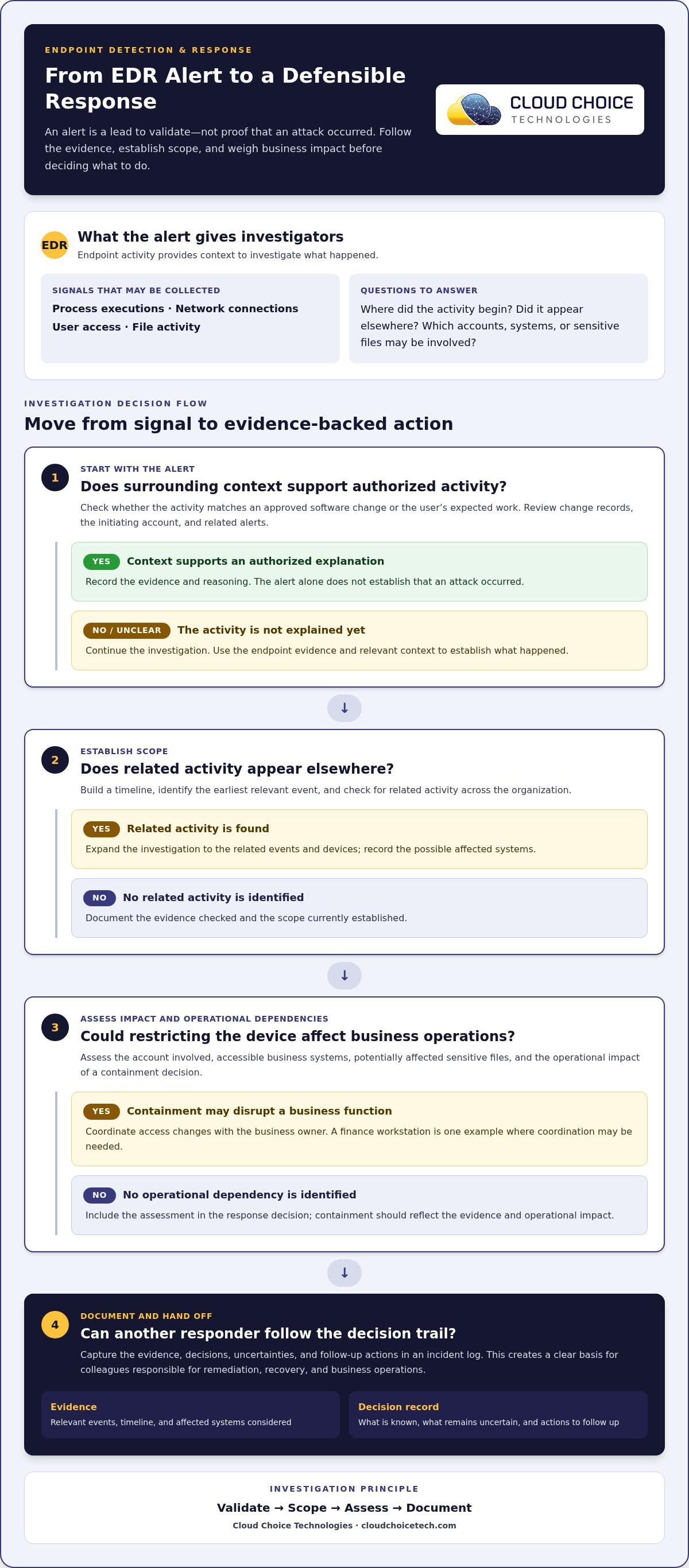
This is endpoint detection and response (EDR) explained from an investigator’s perspective: an alert starts a process of checking evidence, establishing scope, and deciding what action fits. Security teams must distinguish a genuine incident from authorized activity that only looks unusual.
Endpoint Monitoring and Threat Detection
Detection gives analysts a lead to validate, not an automatic verdict that an attack occurred. They compare the alert with surrounding context, such as whether the activity matches an approved software change or a user’s normal work.
For example, an unexpected scheduled task appearing after a software update calls for a different assessment than the same task appearing without an approved change. Analysts can check change records, the initiating account, and related alerts. Threat intelligence may help assess a file or destination, but the organization’s own context helps determine whether the activity is legitimate.
Investigation Using Endpoint Telemetry
Investigation turns an initial alert into a documented account of what happened and what may be affected. Analysts establish a timeline, identify the earliest relevant event, and check whether related activity appears elsewhere in the organization.
They also assess impact: which user account was involved, what business systems were accessible, and whether sensitive files may have been affected. These questions connect technical activity to business consequences. Analysts can record evidence, decisions, and open questions in an incident log, giving colleagues a clear basis for follow-up instead of relying on memory or disconnected alerts.
Ransomware and Compromised-Device Investigations
In a ransomware case, investigators need to determine whether suspicious file changes are isolated or part of a broader incident. They assess how the activity began, whether it continued, and which systems or business functions may be affected.
Containment decisions should reflect that assessment and the operational impact of restricting a device. A finance workstation, for example, may require coordination with its business owner before access changes. Analysts then document their findings, what remains uncertain, and appropriate remediation actions. That record supports a consistent handoff to the people responsible for recovery and business operations.
For endpoint detection and response (EDR) explained as a practical investigation, the key is a defensible decision trail:
- Validate: Compare the alert with approved changes and expected activity.
- Scope: Establish the earliest relevant event and possible affected systems.
- Assess: Determine potential business impact and operational dependencies.
- Document: Record evidence, decisions, and follow-up actions.
This approach helps security teams make response decisions based on evidence and business context. A clear investigation record also makes it easier to identify unresolved questions, coordinate next steps, and explain why an alert was treated as an incident or benign activity.
EDR definition and purpose
EDR’s broader purpose is to help an organization make informed decisions about endpoint risk and security priorities. Its value isn’t limited to technical teams. Leaders can use endpoint findings to understand which business processes depend on devices, which systems need stronger safeguards, and how security decisions affect daily work.
That perspective starts with business context. A workstation used for routine administration may have different operational importance from a device that supports financial workflows or accesses sensitive company data. Assigning endpoints to owners and business functions helps teams prioritize reviews and coordinate changes with the people responsible for those workflows.
EDR also gives organizations a basis for evaluating security coverage over time. A new department, acquired system, or shift to remote work can change which devices access business resources. Comparing endpoint records with the device inventory can help identify mismatches, such as a device without a clear owner or a platform that needs a separate security review.
Its purpose can be viewed through several organizational outcomes:
- Risk prioritization: Direct attention toward devices that support important business processes.
- Clear ownership: Identify who can assess operational impact and coordinate decisions about a device.
- Coverage review: Compare known business endpoints with the devices represented in security records.
- Policy improvement: Use recurring findings to inform access rules, device practices, and security planning.
These benefits make endpoint information useful beyond a single security event. If repeated findings involve the same department or workflow, leaders can review whether existing practices create avoidable exposure. The purpose isn’t to interrupt routine work automatically, but to give the organization a clearer basis for balancing security with operational requirements.
EDR also fits within a broader cybersecurity program. Organizations can consider how endpoint risk relates to access controls, employee practices, and business priorities, rather than treating each device as an isolated technical concern. A structured cybersecurity approach can help connect those priorities to wider security planning.
Ultimately, EDR supports better-informed decisions about where endpoint risk intersects with business operations. It works best when technical findings have clear ownership, business context, and a place in ongoing security planning.
How an EDR security solution is a game-changer in cybersecurity?
Security tools differ in the evidence they use, the systems they cover, and who operates them. Comparing those roles helps an organization build a coordinated approach instead of expecting one product to address every security need.
EDR Compared with Antivirus and EPP
Antivirus, EPP, and EDR address related endpoint risks, but their value appears at different points in security operations. Antivirus is often the familiar first layer for recognizing malicious files; EPP groups endpoint prevention controls; EDR adds investigative context when teams need to understand activity on a device. Product capabilities can overlap, so compare actual coverage rather than relying on category labels.
Consider a business evaluating an endpoint security refresh. Its team can map each current control to practical questions: Does it block a known malicious file? Does it provide information to review activity after an alert? Can the team connect device findings to an incident record? The answers reveal whether products complement one another or leave a gap. A useful comparison also considers platform compatibility, alert detail, and how security staff will use the findings.
Look at the work each tool supports:
- Antivirus: Does its file-focused protection fit the organization’s existing endpoint controls?
- EPP: Do its prevention capabilities match the devices and threat controls in scope?
- EDR: Can analysts use its investigation evidence within their incident workflow?
These questions help teams evaluate tools by operational fit rather than assume a newer label replaces every existing control.
EDR Compared with SIEM and XDR
SIEM, XDR, ITDR, and MDR differ in scope or operating model, so start the comparison with the organization’s security workflow. SIEM helps teams analyze events from multiple sources; XDR can correlate activity across security layers. ITDR focuses on identity-related threats, while MDR describes managed detection and response delivered by security specialists.
For example, an organization investigating a potentially compromised account may need identity evidence alongside endpoint findings. A SIEM can help analysts examine events from different systems, while XDR can connect related signals across covered layers. MDR answers a separate question: who performs monitoring and response? These capabilities may coexist, but their value depends on integrations, data quality, and clearly assigned responsibilities.
Before selecting or expanding a toolset, document which events need correlation, which teams own investigations, and where handoffs occur. This makes overlaps visible and helps determine whether the priority is broader event analysis, identity-focused visibility, or operational capacity. A cybersecurity approach should fit the organization’s actual risks and response workflows, not simply add another dashboard.
Cloud Choice Technologies: Managed IT Services
Cloud Choice Technologies helps businesses connect endpoint security concerns with practical IT and cybersecurity support. Turn to its managed IT services when device oversight and day-to-day technology support need a coordinated approach. Its cybersecurity and remote support offerings can help address operational security needs, while Cyber Risk Analysis can help clarify where an organization should focus attention. This is especially relevant when EDR alerts need to fit into a broader view of business risks, processes, and compliance priorities. The right next step is a conversation about your environment, current endpoint protections, and the issues your team needs to resolve. Contact Cloud Choice Technologies to discuss your organization’s IT and cybersecurity needs.
Make endpoint security part of your next IT decision
With endpoint detection and response (EDR) explained in practical terms, the next step is deciding how endpoint alerts fit your organization’s security responsibilities. Clarify who reviews alerts, who can authorize isolation, and how your team will coordinate investigations with daily operations. These decisions help turn security tools into a workable response process.
Cloud Choice Technologies provides Managed IT Services, Cybersecurity, and Remote Support for businesses aligning technology support with security needs. Its Cyber Risk Analysis can help clarify organizational priorities. Focus on the gaps you want to address, such as unclear alert ownership or endpoint risks that need closer review.
Bring your questions and current priorities to the discussion. Contact Cloud Choice Technologies to explore a practical next step for your business.
Frequently Asked Questions
How does EDR work?
EDR builds a timeline of activity on covered devices so analysts can understand how a suspicious event unfolded. For example, if a user opens an unexpected attachment, investigators can review related file, process, and connection events to assess whether the activity spread or affected other systems. That timeline helps distinguish an isolated alert from an incident requiring coordinated action across the organization.
What should you look for in an EDR solution?
Look for coverage that fits your organization’s device types and operating systems, along with investigation details your security team can use. Check whether the solution connects with existing security tools, supports response actions suited to your processes, and presents alerts clearly enough to prioritize. Also assess access controls for collected data, retention settings, and how analysts can review events. These criteria help match capabilities to your operating environment.
How is EDR different from antivirus?
Antivirus primarily detects or blocks malicious files, while EDR gives security teams tools to examine endpoint activity beyond a file alert. For instance, after antivirus blocks a suspicious download, EDR can help investigate related process or connection activity on the device. This distinction matters when a threat involves behavior that one file detection doesn’t explain. Organizations commonly use prevention and investigation capabilities together.
What is the difference between EDR, EPP, and XDR?
EPP focuses on preventing threats at endpoints; EDR monitors endpoint activity and supports investigation and response. XDR correlates security signals across layers such as endpoints, networks, email, and cloud environments. For example, an organization investigating a suspicious email and device alert may use XDR to connect those signals. The tools address different scopes, so compare their coverage and integrations rather than treating their names as interchangeable.
Why is EDR important?
EDR matters because endpoint prevention alone cannot provide complete protection or explain every suspicious event. If an employee reports unusual device behavior, security teams can use endpoint records to investigate what happened and determine whether other systems need attention. This visibility supports informed containment and remediation decisions. Its practical value depends on monitoring relevant devices and having a process to review alerts and act on findings.
Do I need both EDR and EPP?
Many organizations benefit from using EPP and EDR together because their functions complement each other: EPP focuses on prevention, while EDR adds monitoring and response capabilities. A combined platform may include both, so separate products aren’t always necessary. Consider endpoint coverage, existing security controls, and how your team handles alerts. The goal is to close prevention and investigation gaps without creating overlapping tools that nobody reviews.