
Cost of IT Downtime Calculator for Business: Estimate Your Exposure in 2026
What does one hour of IT downtime actually cost your business, and which parts of that estimate can you verify? A cost of IT downtime calculator for business is most useful when it reflects your operations, not a dramatic industry average. Lost revenue, affected staff time, and recovery expenses can add up differently for every organization.
It’s reasonable to question whether a calculator overstates the impact or leaves out costs. Make the assumptions visible: define what stopped, identify the people and work affected, and separate documented expenses from estimates. This article walks through those steps for complete outages and slow systems that prevent work from getting done.
You’ll work through practical inputs for lost contribution, employee productivity, and recovery, then learn how to interpret the result and decide what to review next. Cloud Choice Technologies offers a free Network Security Analysis to help identify security risks to consider. It can inform planning, but no analysis can guarantee that downtime won’t occur.
Key Takeaways
- Define downtime by identifying the systems, functions, and users affected, including situations where slow performance disrupts work.
- Use a cost of IT downtime calculator for business to organize company-specific inputs and estimate the impact on your operations.
- Separate lost business contribution, affected labor, and recovery expenses to show what you can measure and avoid counting the same impact twice.
- Turn the estimate into an action plan by ranking critical systems and reviewing monitoring, escalation, backup, and recovery arrangements.
- Cloud Choice Technologies offers a free Network Security Analysis to help assess security risks, not to guarantee against downtime.
What Does IT Downtime Cost a Business? Define the Loss Before You Calculate
IT downtime is any period when a business system or service can’t support the work it is intended to enable. It may be a complete outage, such as staff losing access to a core application, or degraded performance that slows a function or group of users enough to interrupt work. Designing systems for high availability aims to minimize downtime. To estimate its business impact, first define what stopped and who or what depended on it.
Revenue at risk isn’t automatically revenue lost. If a team can complete delayed orders later, record the interruption as deferred work rather than assuming every affected sale disappeared. A missed transaction that can’t be recovered may represent a direct loss. A cost of IT downtime calculator for business should make these distinctions clear. Treat its result as a planning estimate, not a prediction or guaranteed loss.
Which business costs belong in a downtime estimate?
Begin with costs you can connect to the incident: affected employee time, measurable output that wasn’t recovered, incident response, and recovery expenses. Add customer or contractual impacts only when your records support them. Keep harder-to-quantify effects, such as possible reputational harm or future changes in customer behavior, separate from direct costs. This makes it easier to see which figures come from business records and which depend on assumptions.
Why downtime impact differs from one business to another
A brief interruption in one application may have limited impact if staff can use another process. A disruption to a system that supports essential operations can stop work across dependent teams. Consider how many users are affected, whether the interruption occurs during business hours, which other systems rely on the unavailable service, and whether a workable alternative exists. Industry averages can offer context, but they can’t account for these company-specific factors.
For a practical estimate, define the affected work, then record what was delayed, what was permanently lost, and what it took to respond and recover. Note your assumptions so you can revise them as better information becomes available. Cloud Choice Technologies offers a free Network Security Analysis to help assess security risks that could contribute to disruption. It can inform planning, but it isn’t a guarantee against downtime.
How to Calculate the Cost of IT Downtime Without Double-Counting
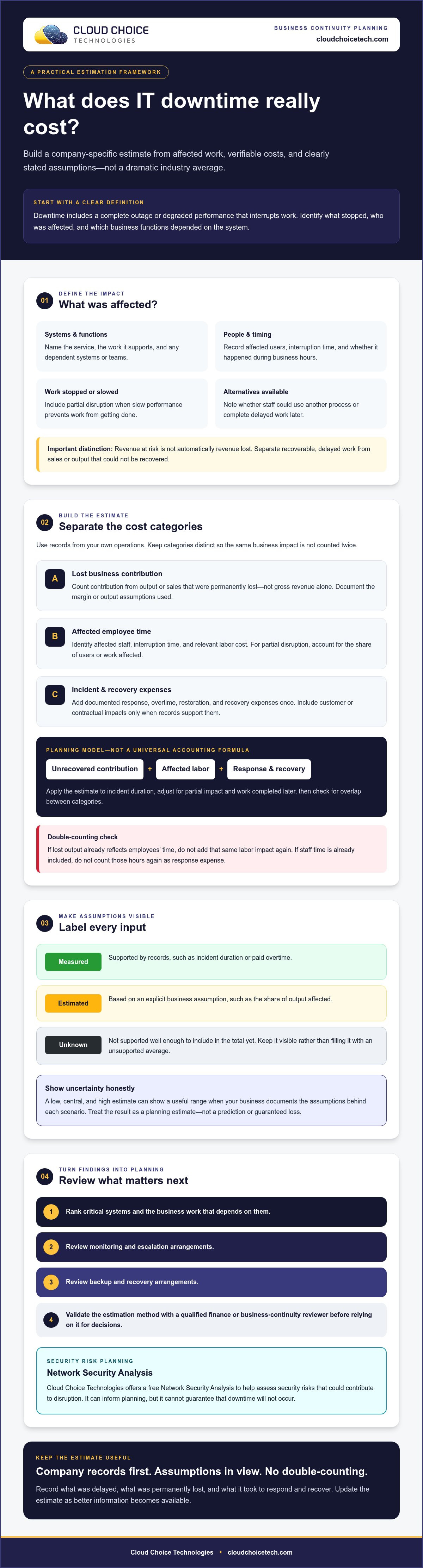
A useful estimate separates three categories: business contribution that was lost and can’t be recovered, labor affected by the interruption, and incident or recovery expenses. This cost of IT downtime calculator for business framework is a planning model, not a universal accounting formula. Match each figure to your records, state your assumptions, and have a qualified finance or business-continuity reviewer validate the method before relying on it for decisions.
Build a defensible cost-per-hour estimate
Start with the affected function’s operating hours and a relevant measure of revenue or output. Use company records to estimate contribution, not gross revenue alone. Revenue counts sales; contribution reflects the portion retained after variable costs. Document the source of your margin or output assumptions.
Estimate labor separately by identifying affected staff, interruption time, and relevant labor cost. Avoid adding employee labor costs to lost contribution when your contribution estimate already captures those employees’ lost output. For a partial disruption, adjust for the share of users or work affected instead of treating it as a complete outage.
Estimate the total cost of one downtime incident
Apply the hourly estimate to the incident duration, adjusting for partial impact and work completed later. Add documented incident expenses once, such as response costs, overtime, restoration, or recovery expenses. Check that the same item hasn’t been counted in two categories. If staff time is already included in labor impact, for example, don’t count those hours again as a response cost.
Label every input:
- Measured: supported by records, such as incident duration or paid overtime.
- Estimated: based on an explicit business assumption, such as the share of output affected.
- Unknown: not yet supported well enough to include in the total.
A low, central, and high estimate can show a useful range when your business supplies and documents the assumptions behind each scenario. Keep unknowns visible rather than filling them with unsupported industry averages. This makes the estimate easier to review and update as better information becomes available.
For another input into operational risk planning, Cloud Choice Technologies offers a free Network Security Analysis. Explore business cyber risk analysis to assess security risks that could contribute to disruption.
How to Use a Business IT Downtime Cost Calculator
You don’t need an interactive tool to build a useful estimate. A spreadsheet or worksheet can organize the inputs, show how each assumption affects the result, and make scenarios easier to compare. A cost of IT downtime calculator for business should capture the interruption’s scope, duration, and financial impact without concealing uncertainty behind a single number.
What information should you enter into the calculator?
Create a row for each affected system or business function. Record what you can verify, and identify estimates and unknowns separately.
- Incident scope: affected systems, number of users, disrupted functions, and dependencies on other systems.
- Timing: outage duration, business hours affected, and the operating schedule of the impacted team.
- Business inputs: affected employee count, relevant labor costs, and company records for lost contribution or output.
- Adjustments: available workarounds, work recovered later, recovery work, and documented response expenses.
Don’t assume every user loses a full shift or that all delayed work is permanently lost. If staff complete some orders after a system returns, record that recovered activity and estimate only the remaining impact.
How should you interpret the calculator result?
Show separate outputs for estimated cost per hour, cost per incident, and a user-defined planning period. For a planning-period estimate, state how often you expect an incident and the period covered. Present those assumptions alongside the result rather than treating the total as a forecast.
An assumptions panel should identify each input’s source and mark it as measured, estimated, or unknown. A clearly hypothetical example might model a partial interruption affecting a specified group of users during business hours, with some work completed later. Its figures would illustrate the worksheet only, not represent an industry benchmark or a prediction for your company.
Compare scenarios consistently. Change one assumption at a time, such as the number of affected users or the amount of work recovered, to see what drives the difference. Revisit the worksheet when systems, staffing, dependencies, or recovery arrangements change. Cloud Choice offers a free Network Security Analysis to help assess business security risks. Request a free Network Security Analysis to discuss risks relevant to your environment.
Reduce Future Downtime: Turn Your Estimate into a Business Action Plan
Your estimate is most valuable when it informs what happens next. Use the scenarios in your cost of IT downtime calculator for business to identify where an interruption would have the greatest operational impact, then connect each risk to a practical action. The goal isn’t to promise zero downtime. It’s to reduce avoidable disruption and clarify recovery priorities.
Prioritize continuity and recovery improvements
Rank systems by the business functions they support and the other systems that depend on them. A system that blocks essential work may need a higher restoration priority than one with a workable alternative. Where appropriate, document recovery time objectives, meaning the target time to restore a system, and recovery point objectives, meaning how much recent data the business can afford to lose. Treat these as business-defined planning assumptions, not guarantees.
Compare those priorities with current arrangements for monitoring, escalation, backup, and recovery. Confirm who is responsible for each step and whether the recovery procedures address the scenarios in your worksheet. Cloud Choice provides Managed Services, which include monitoring and full management of IT systems, and Cloud Backup & Disaster Recovery. A qualified provider can help review how these arrangements align with your operational needs.
When to seek an IT risk review
Consider a review if system dependencies are unclear, recovery responsibilities haven’t been established, or security risks could interrupt essential work. Make resulting actions specific and accountable. For each one, record an owner, a target review date, and the risk it addresses. Revisit priorities when operations or technology change.
Cloud Choice offers a free Network Security Analysis to help assess security risks. It isn’t a guarantee against downtime or a compliance guarantee. To discuss an assessment, request a free Network Security Analysis.
Turn Your Downtime Estimate into a Stronger Plan
A useful estimate is built on your business’s own records and clearly stated assumptions. Separate work that was truly lost from activity recovered later, and keep labor, lost contribution, and incident expenses distinct to avoid double-counting. Then use the cost of IT downtime calculator for business to identify which systems and recovery priorities deserve attention first.
Cloud Choice’s Managed Services include monitoring and full management of IT systems. Cloud Backup & Disaster Recovery supports backup and recovery planning. These services can inform a broader effort to reduce avoidable disruption, but no estimate or service can promise zero downtime.
Want to review security risks that could affect operations? Cloud Choice offers prospects a free Network Security Analysis as a practical next step, not a guarantee against outages. Request your free Network Security Analysis to discuss risks to your business.
Frequently Asked Questions
How do you calculate the cost of IT downtime for a business?
Estimate lost business contribution, affected labor, and incident or recovery expenses, then adjust for work completed later and remove overlapping costs. A cost of IT downtime calculator for business should use inputs tied to the affected systems and functions, not a generic rate. Record each input as measured, estimated, or unknown, and document its source. The result is a planning estimate, not a guaranteed financial outcome.
What costs should a business include in an IT downtime calculator?
Include affected employee time, measurable output that was permanently lost, documented incident response, and recovery expenses. Add customer or contractual impacts only when business records can substantiate them. Keep indirect effects, such as possible reputation damage, separate from direct costs and label them as estimates. Check for overlap: don’t count the same employee time as both lost productivity and incident response labor.
Is lost revenue the same as the cost of IT downtime?
No. Revenue at risk may be delayed rather than lost if employees can complete the work after systems return. Revenue also isn’t the same as contribution: gross sales don’t account for variable costs. Use company-specific margin or output assumptions to estimate the contribution that couldn’t be recovered. Separate orders completed later from transactions that were genuinely lost, and include only supported impacts in the direct-cost total.
Can a business estimate downtime costs if it has never tracked an outage?
Yes. Start with the best available records, such as operating schedules, affected employee counts, transaction or output reports, and documented recovery expenses. Reconstruct the likely impact with input from people responsible for the affected work, then mark assumptions clearly. If key details remain unknown, show a planning range only when you can support its assumptions. Use the first estimate as a baseline and improve it as incident tracking develops.
How much does one hour of IT downtime cost a business?
There’s no single figure that applies to every business. Gartner’s long-standing reference estimate is about $5,600 per minute, or $336,000 per hour, but it’s an industry benchmark, not a prediction of your company’s loss. Your actual impact depends on the systems, users, business functions, timing, and workarounds involved. Calculate your own estimate from company records and explain which inputs are measured versus assumed.
What should a business do after calculating its IT downtime cost?
Use the estimate to prioritize critical systems, clarify recovery responsibilities, and review monitoring, escalation, backup, and recovery arrangements. Assign an owner and review date to each action, then revisit the plan when systems or operations change. Cloud Choice offers Managed Services, which include monitoring and full management of IT systems, plus Cloud Backup & Disaster Recovery. Prospects can request a free Network Security Analysis to assess security risks, not to guarantee against downtime.