Cloud to Cloud Backup Solutions for SaaS Data Protection
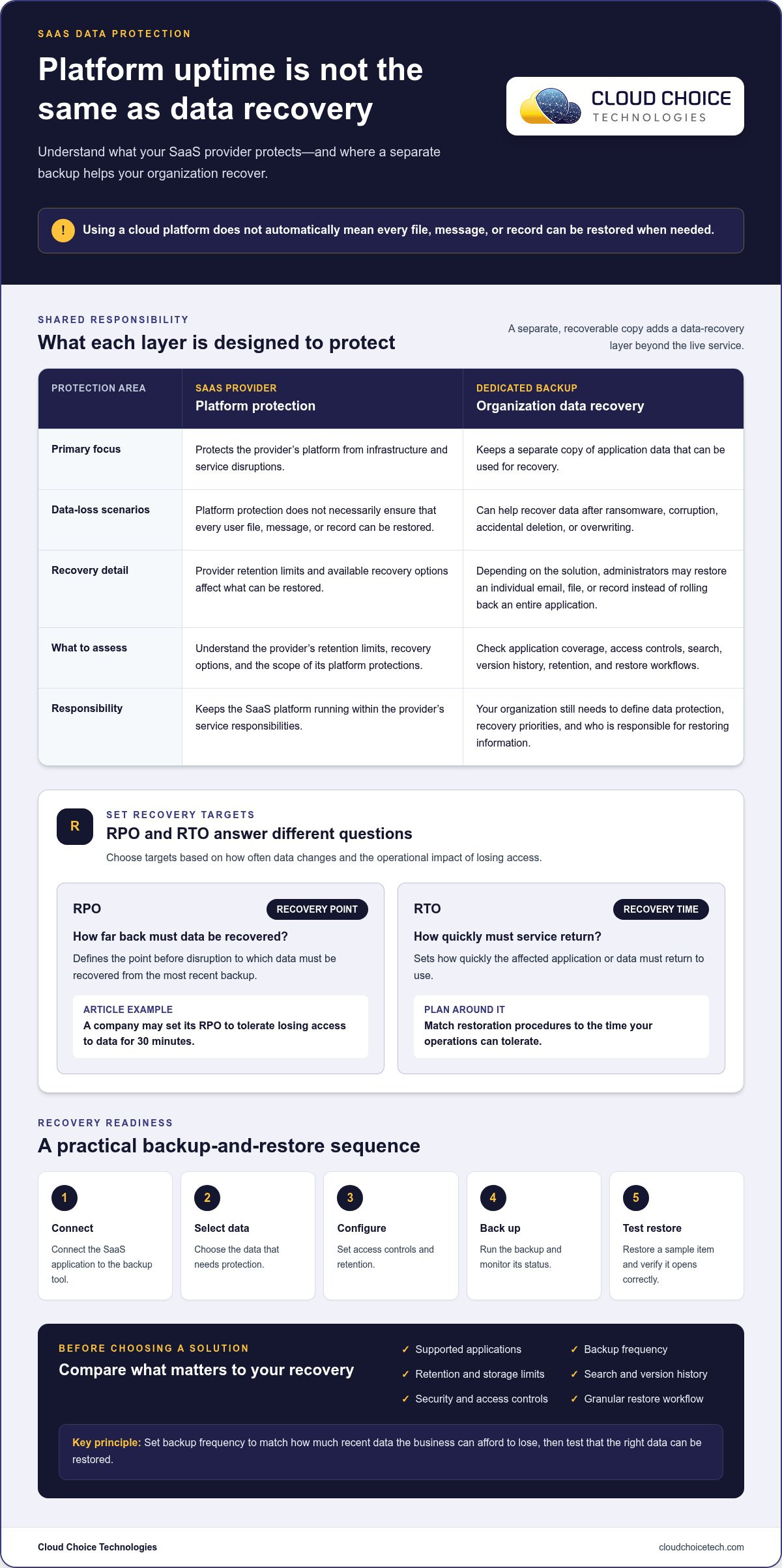
Cloud to cloud backup solutions for SaaS create a separate, recoverable copy of data stored in business cloud applications. SaaS providers generally protect their platforms from infrastructure and service disruptions, while a dedicated backup can help organizations recover data after ransomware, corruption, or accidental deletion. Choose a backup frequency based on how much recent data your business can afford to lose.
Using a cloud platform does not automatically mean every file, message, or record can be restored when you need it. Provider retention limits, recovery options, and your organization’s access and privacy needs all affect whether built-in protections are sufficient. A recovery point objective, or RPO, measures how far back data must be recovered after a disruption. The Centers for Medicare & Medicaid Services defines it as the point before the disruption to which data must be recovered from the most recent backup.
This guide explains how SaaS backup software works, how to set backup frequency and retention policies, and what to assess when planning for recovery and security. You’ll learn how automated backups support a response to data loss and how the shared responsibility model distinguishes keeping a SaaS platform running from protecting your organization’s data.
Key Takeaways
- Set a recovery point objective that reflects how much recent business data your organization can afford to lose.
- Choose backup frequency and retention policies around your recovery needs, data lifecycle, and compliance requirements.
- Automate backups and monitor them so gaps or failures are easier to identify before recovery is urgent.
- Understand what your SaaS provider protects at the platform level and where your organization needs separate data protection.
- Align backup planning with cybersecurity and IT risk management to prepare for ransomware, corruption, or accidental deletion.
How can I protect my SaaS data from ransomware, corruption, or accidental deletion?
Keep a separate backup, set recovery targets, and test restoration before an incident. Cloud-to-cloud backup tools can preserve application data outside the live SaaS environment, but protection depends on what they cover and how recovery is configured. Pair backup planning with practical ransomware response measures and clear responsibility for restoring data.
Recovery Point and Time Objectives
A recovery point objective (RPO) describes how far back data must be recovered after a disruption. According to the Centers for Medicare & Medicaid Services (CMS), it is the point before disruption to which business data must be recovered from the most recent backup. A recovery time objective (RTO) sets how quickly the affected application or data must return to use.
Choose targets based on data-change frequency and operational impact. For example, a company may set its RPO to tolerate losing access to its data for 30 minutes. Match backup frequency and restoration procedures to that tolerance. The best cloud-to-cloud options depend on application coverage, security controls, retention, and how easily teams can restore the data they need.
Accidental Deletion and Overwrite Recovery
Deletion or overwriting can remove or replace useful records in an active SaaS account. A backup should let an administrator find an earlier version, compare it with the current item, and restore the right copy. This can help when someone deletes a shared file or accidentally changes a customer record. Check whether you can restore an individual item without replacing unaffected data.
Backup tools vary in access controls, search, version history, and restore workflows. Compare these features with supported applications, security safeguards, and the visibility administrators have into backup status. Also assess how user count, supported applications, storage needs, retention, and selected features affect the solution’s cost.
Rapid, Granular Data Restoration
Granular recovery restores one email, file, or record instead of rolling back an entire application. This precision can reduce disruption during an incident. Check whether an administrator can search, preview, select, and restore individual items, and whether related content and useful metadata remain intact.
Platform support varies by solution. Confirm coverage for the applications your organization uses, including Microsoft 365, Google Workspace, Salesforce, and Slack. To set up and test a backup, connect the application, select the data, configure access and retention, run a backup, then restore a sample item and verify it opens correctly.
AI-assisted investigation can help surface unusual changes and relevant backup versions, but an administrator should review findings before restoration. According to the California Legislature, this bill would enact the California Consumer Privacy Act of 2018; the enactment year is 2018. For recovery planning, align data backup and recovery with the records and workflows your business needs to restore.
Retention, compliance, and lifecycle management
Retention policies determine which SaaS data stays available, for how long, and when it can be restored. Set them according to business use, privacy needs, and documented recovery priorities.
Data Retention and Regulatory Compliance
Start by mapping applications, data categories, and the teams responsible for each record. Then define retention rules for active files, archived content, and data scheduled for deletion. Dedicated backup software can retain older versions longer than the limited deleted-data retention offered by some SaaS providers.
GDPR and HIPAA are examples of regulations for which backups can help organizations retain and retrieve older data versions. The General Data Protection Regulation was implemented in 2018. A backup supports retrieval, but it does not by itself establish compliance; align retention policies with applicable obligations and internal privacy practices.
For compliance, assess where SaaS data is stored, how it is protected, and how disaster recovery works. Confirm that administrators can find and restore the relevant version without exposing unrelated records.
Long-Term Retention and SLA Compliance
Long-term retention helps preserve older records after they leave everyday use. Separate active information from archived data, and document why each category remains available. For example, a team may need to retrieve a historical project file while keeping routine working folders easier to manage.
Assess service-level agreements (SLAs) alongside the backup’s practical recovery process. Review stated service commitments, support processes, retention controls, and restoration responsibilities. Judge an SLA against your continuity needs, rather than treating it as proof that every recovery scenario is covered.
When evaluating a backup solution, consider storage practices, disaster recovery, security, privacy safeguards, retention policies, and support. Compare these capabilities with your internal compliance requirements and expected data growth.
Backup Frequency, Retention Periods, and Storage Limits
Backup plans differ in frequency, retention periods, and storage limits, so compare the details for each application. Set frequency according to how often data changes and how much work could be lost between copies. Match retention duration to the older versions your organization may need to retrieve.
No single schedule or storage allowance suits every SaaS environment. Assess current storage, expected growth, lifecycle policies, security needs, and available IT resources. Then estimate how these factors affect backup scope and ongoing storage demand.
To put the plan into practice, assign an owner to each application and record its retention rules. Review settings when teams adopt applications, change workflows, or archive projects. Test a restore from an older version and confirm the recovered data remains usable.
These steps connect compliance with business continuity: teams can retrieve needed records while making deliberate data lifecycle decisions. A written policy for each application also clarifies which data remains active, what moves into long-term storage, and how recovery supports resilience.
Automated backups, monitoring, and ransomware prevention
Automation makes SaaS data protection more consistent, while monitoring helps teams spot backup failures and unusual changes. Neither prevents every ransomware incident, but both can support a faster, more controlled response.
Ransomware attacks generated USD 567 million in 2022, USD 1.1 billion in 2023, and USD 983 million in 2021. These figures make preparation essential for organizations using cloud applications. Automated backups create recoverable copies on a defined schedule, reducing reliance on employees remembering manual exports.
Configure each application separately. For Google Workspace, identify the accounts and data to protect, set backup frequency according to how often data changes, and establish retention rules. Apply the same review to other business applications. Confirm that backup jobs complete successfully and generate alerts for failed connections, delayed tasks, or unexpected changes to protected data.
Monitoring provides visibility between scheduled recovery tests. Regularly review job status, account coverage, storage growth, and access activity. An enterprise team might assign someone to investigate failed jobs and document the resolution. This helps distinguish a temporary service interruption from an ongoing protection gap.
Automated copies can help recover data after accidental deletion, corruption, or ransomware encryption. They do not stop an attacker from compromising a SaaS account, so pair backups with access controls and a response process. If a shared file becomes encrypted, restrict affected access, identify a clean version, and restore only the necessary data. A focused restore can limit disruption to unaffected applications and users.
Ransomware detection and remediation require careful investigation. Compare affected items with earlier versions, assess the timing and scope of changes, and preserve relevant evidence before restoring. Automated alerts may reveal unusual deletion or modification patterns, but administrators should review the findings before acting. This reduces the risk of restoring compromised data or overwriting valid work.
Use this practical review for each protected application:
- Confirm automated jobs cover the intended users, records, and files.
- Review failure alerts and assign responsibility for resolving them.
- Test restoration of a sample item and verify its contents.
- Document who can approve recovery during a ransomware incident.
Backup monitoring and threat detection address different risks. Monitoring confirms that copies are being created, while security controls help identify suspicious activity. A cyber risk analysis can help an organization map exposed applications, access weaknesses, and recovery dependencies. Revisit the analysis when teams add SaaS applications or change workflows.
SaaS backup and the shared responsibility model
Google and Microsoft maintain platforms designed to keep their services available. That infrastructure resilience is different from giving your organization complete control over every file, message, or record. In Microsoft 365, for example, service availability and recoverable copies of a particular user’s deleted content address separate needs. The shared responsibility model helps teams identify where provider safeguards end and their own data management must begin.
SaaS providers generally maintain backup systems to prevent end-user outages and downtime, including disruptions involving infrastructure, networks, hardware, or software. These safeguards support the platform itself, but may not provide the retention settings, granular restores, or independent recovery process your organization needs for critical business data. For example, a functioning Google Workspace account does not automatically mean every deleted item can be retrieved for as long as your team needs.
Define responsibilities for each application. Record which provider protections support service availability and which organizational controls address user actions, retention, and recovery. The U.S. Census Bureau presentation identifies unmet cloud-supplier SLAs as an inherited or assumed risk. Use this as a prompt to examine service commitments and establish a separate recovery plan, rather than assuming an SLA covers every data-loss scenario.
- Provider: Maintains the SaaS service and its supporting infrastructure.
- Organization: Sets access permissions and decides which data requires additional protection.
- Backup process: Preserves recoverable copies and defines how teams restore them.
- Business owner: Identifies critical applications and approves recovery priorities.
Attacks expose why these roles matter. If a compromised account deletes Microsoft 365 records, platform availability may continue while the organization still needs those records restored. Separate backup copies and defined access controls can give administrators another recovery path. Assign named owners to investigate alerts, authorize restores, and coordinate user communications. Those steps turn shared responsibility into an operational plan.
Review responsibilities whenever your organization adds a SaaS platform or changes how teams use it. For each application, document provider protections, organizational responsibilities, retention settings, and recovery steps. Then test the process with a sample item. A failed restore can expose unclear permissions, missing coverage, or a mismatch between provider commitments and business continuity needs.
Managed IT services can help coordinate application coverage, permissions, and recovery procedures across business systems, bringing those responsibilities into a consistent operational framework.
Cloud Choice Technologies: Managed IT Services
Cloud Choice Technologies helps businesses strengthen the IT oversight behind SaaS data protection with Managed IT Services, Cybersecurity, Remote Support, and Cyber Risk Analysis. Turn to the team when application coverage, access controls, or recovery responsibilities need clearer coordination.
Managed IT Services can help organize application oversight and support consistent technology management. Cyber Risk Analysis helps identify risks across business systems, including how SaaS access and data protection fit into your broader security approach. Remote Support helps employees address technology issues that affect their work.
By bringing application oversight into managed IT services, organizations can coordinate SaaS responsibilities with their wider business technology management. Contact Cloud Choice Technologies to discuss your organization’s IT and security needs.
Make SaaS data protection part of daily operations
A backup plan works best with a clear owner, a regular review, and a place in everyday IT decisions. Treat it as an ongoing process, not a one-time configuration. When your team adds applications or changes how it handles business records, revisit the plan and keep responsibilities clear.
At your next planning session, assign responsibility for application coverage, backup status reviews, and recovery decisions. Document who can authorize a restore and how staff should report missing or altered data. These steps make cloud to cloud backup solutions for SaaS a practical part of business continuity, rather than a tool that sits untouched until an incident.
Cloud Choice Technologies can help organizations align technology oversight and security with their business needs through Managed IT Services, Cybersecurity, and Remote Support. If you’re ready to discuss the next step for your organization, contact Cloud Choice Technologies. A deliberate plan puts your team in a stronger position to respond with clarity and keep moving forward.
Frequently Asked Questions
What is SaaS backup software?
SaaS backup software creates and manages recoverable copies of information stored in online business applications. It can protect content that an application’s recycle bin or version history does not retain for as long as your organization needs. For example, an administrator might use it to locate a former employee’s project files after the account is closed, depending on the backup’s coverage and retention settings.
What is SaaS recovery?
SaaS recovery means returning application data to a usable state after it becomes unavailable, altered, or deleted. Recovery might involve restoring a single item, such as a customer record, or bringing back a broader set of information a team needs. A practical recovery plan identifies who can approve a restore and how staff will access recovered information.
What is cloud-to-cloud backup for SaaS, and how does it work?
Cloud-to-cloud backup copies data from one cloud service to a separate cloud backup environment. The connection typically uses authorized access to read selected application data and preserve copies according to configured settings. For example, a business can protect shared files in a cloud productivity suite without downloading each file manually. Application permissions and selected data determine what the backup captures.
How do SaaS backup tools handle point-in-time recovery, granular restores, and cross-platform recovery?
Point-in-time recovery lets an administrator select a preserved version from an earlier backup. A granular restore targets a specific item, while cross-platform recovery moves recovered information to a different supported application or destination. For example, a team could restore one contact record rather than an entire address book. Check that the tool preserves useful metadata and supports the destination format your workflow requires.
What data security, encryption, compliance, and data residency requirements apply to SaaS backups in the US?
Requirements depend on the information involved, applicable obligations, and business agreements. Before selecting a backup approach, assess encryption protections, administrator access controls, audit records, storage locations, and deletion processes. For regulated or sensitive information, map where data travels and who can access it. Document these controls alongside your organization’s compliance policies, and review them when applications or data-handling practices change.
What are the risks of relying on SaaS providers’ native backup and retention features alone?
Native features may not retain deleted information as long as your organization needs or provide the restore options teams expect. A user might empty a recycle bin, overwrite a shared document, or lose access after an account change. These events can create gaps between platform availability and your recovery needs. Compare native protections with real examples from your workflows, including deleted accounts and accidentally altered records.