Cloud Migration Services for Coral Springs Small Businesses
A cloud move can create as much disruption as it removes if the plan ignores how your business actually works. A cloud migration company serving small businesses should start with your systems, data, security needs, and day-to-day operations, then build a migration plan around them.
Cloud services can support flexible access and collaboration, but moving everything at once isn’t always the right approach. Some businesses benefit from a phased migration or hybrid setup, keeping selected systems local while moving other workloads to the cloud.
This article explains what cloud migration, deployment, and implementation involve, what affects cost optimization, and how to assess the right approach for your business. You’ll also see how cloud migration services can help plan a controlled transition, align cloud resources with business needs, and keep security in view from the start.
Key Takeaways
- Match cloud capacity to actual workloads so your business can scale without paying for resources it doesn’t need.
- A hybrid approach can keep sensitive data or legacy systems on-premises while moving other workloads to cloud services.
- Plan deployment around system dependencies, data movement, security, and business operations to support a controlled transition.
- Use a phased implementation when applications can’t move easily, and align each stage with your business priorities.
- Managed IT, cybersecurity, remote support, and cyber risk analysis can help Coral Springs businesses address technology and security needs around a cloud transition.
Scalability and cost optimization
Scalability lets cloud resources expand or contract with business demand. An accounting firm, for example, may need more capacity during reporting periods and less afterward. Identify these workload patterns before choosing cloud capacity. That helps avoid paying for idle resources or leaving essential software short of capacity. A provider can compare application usage before recommending infrastructure changes.
Cost planning starts with an inventory of workloads, users, storage, and dependencies. Match each workload to its requirements: a file-sharing system may need dependable access, while an archive may need storage more than frequent retrieval. Review software licensing, storage, backups, and data transfers together. A seemingly low-cost design can become inefficient if it duplicates services or requires constant manual support.
Hybrid cloud can balance flexibility with control. A business might keep sensitive data or legacy systems on local infrastructure while moving collaboration tools to cloud services. An architecture or engineering team, for example, could retain large CAD files locally and use cloud-based tools to collaborate. This lets teams scale selected workloads without forcing every application into the same environment.
- Review demand: Identify which systems need extra capacity and when.
- Right-size resources: Match cloud capacity to each workload’s actual needs.
- Reduce overlap: Look for duplicate storage, software, or services across environments.
- Plan for growth: Choose an approach that can handle new users and workloads.
Resilience also affects the value of a cloud design. Cloud backups and failover plans can help maintain operations when storms or power outages disrupt local servers. Disaster recovery planning should identify which systems need restoring first and how staff will access them. These decisions shape cloud resources and backup capacity, so include them in cost planning from the start.
Security and compliance needs also influence where workloads belong. A hybrid environment can be designed around obligations such as HIPAA, FERPA, or SOX. That does not make it automatically compliant: the design must account for the organization’s specific requirements and controls. A managed approach can coordinate resources, software, backups, and oversight as the business changes. The goal is an environment that supports growth while keeping sensitive systems and ongoing expenses under control.
Hybrid cloud combines on-premises infrastructure with cloud services, allowing Florida businesses to keep sensitive data or legacy systems local while using cloud services for flexibility and scalability. To make that approach useful for cost planning, decide which workloads need to remain local and which can use cloud services, then assess the capacity each requires. Treat that division as a deliberate design choice rather than moving every application in the same way.
Review the balance as business needs change. When a workload’s requirements shift, reconsider where it belongs and whether its resources still fit its role. Document the reasons for each placement, including sensitivity, legacy dependencies, and the need for flexibility or scalability. This gives the organization a practical basis for adjusting resources without assuming every system belongs in the same environment. A considered hybrid design can support growth, retain local use where needed, and keep the overall setup aligned with business priorities.
Cloud migration and deployment
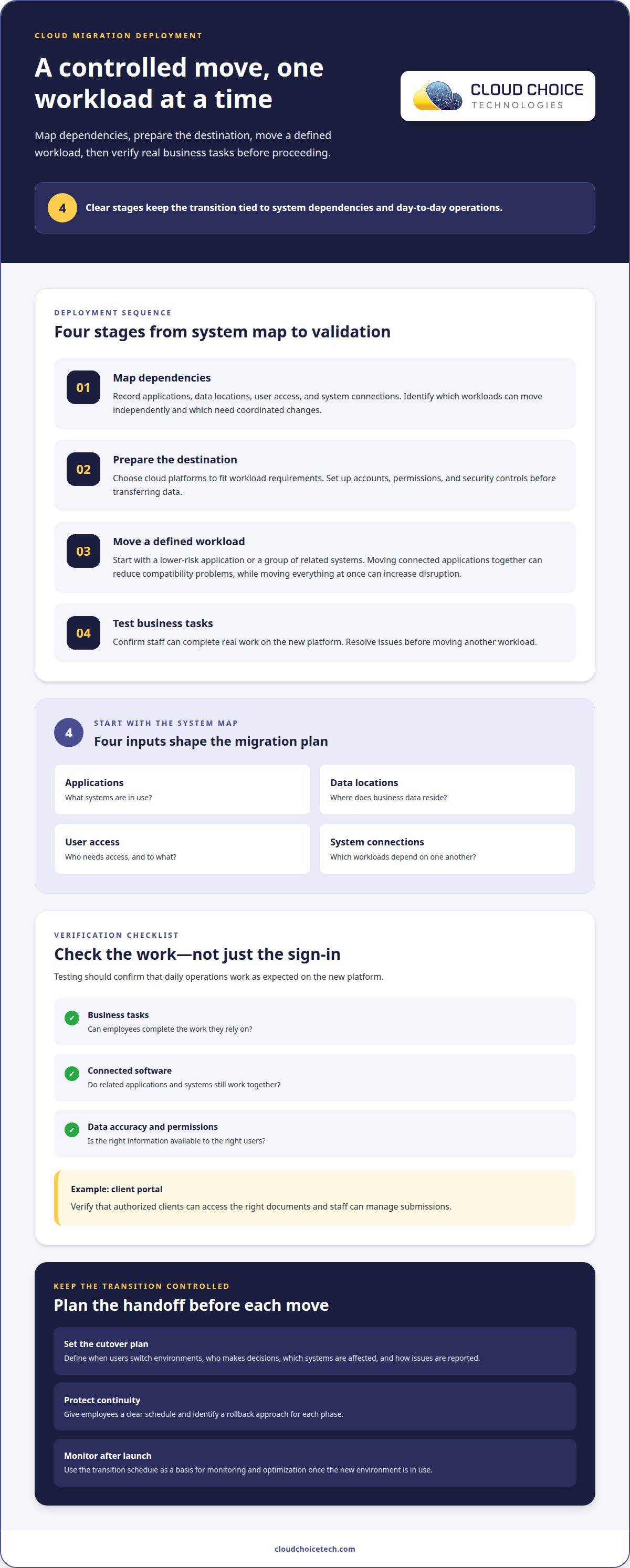
A sound deployment begins with a system map, not a server move. The migration team records applications, data locations, user access, and system connections. These dependencies shape the plan for a small business, revealing which workloads can move independently and which need coordinated changes.
Next, the team selects cloud platforms based on workload requirements. A client portal may need secure external access, while an internal application may rely on existing databases or devices. The deployment plan should account for connections, user permissions, and data transfer. These decisions shape cloud solutions around real operations instead of forcing every system into one model.
Migration sequencing matters. Moving connected applications together can reduce compatibility problems, but shifting every workload at once can increase disruption. A phased deployment can begin with a lower-risk application, confirm access and performance, and then proceed to systems with more dependencies. Each phase needs a defined owner, a rollback approach, and a clear way to inform affected employees about planned changes.
- Map dependencies: Record which applications share data or require specific access.
- Prepare the destination: Configure accounts, permissions, and security controls before transferring data.
- Move a defined workload: Transfer one application or group of related systems.
- Test business tasks: Confirm staff can complete real work on the new platform.
Testing should cover business tasks, not just a successful sign-in. For a client portal, confirm that authorized clients can access the right documents and staff can manage submissions. Also test connected software, data accuracy, and permissions. If a task fails, resolve the issue before moving another workload. These checks offer a practical way to assess a provider’s deployment process.
Cutover planning defines when users switch environments and how the team will handle problems. Identify the decision-maker, affected systems, and issue-reporting process. A clear schedule tells employees where to work during the transition and gives the team a basis for monitoring and optimization after launch.
Deployment is complete when the new environment supports daily operations. Document system ownership, access procedures, and outstanding tasks. For a small business, these records help staff manage routine changes without relying on informal instructions. Regular reviews can show whether cloud platforms still fit the business’s applications, users, and security needs.
Cloud migration and implementation
Providers assess systems, dependencies, security, and business priorities before moving workloads. Project timing depends on scope, data volume, application complexity, and testing needs.
Professional cloud migration steps
The provider maps applications, data, user access, and system connections, then identifies which workloads can move and which should remain on-premises. This review guides the migration sequence and clarifies how the client’s infrastructure supports daily work.
Next, the provider prepares the cloud environment, plans data transfers, and schedules each change. A phased approach can suit legacy applications that cannot move readily. The team migrates a defined workload, tests essential tasks, and resolves issues before proceeding. Look for clear responsibility, documented rollback decisions, and tests that reflect real operations.
Typical migration timeline
There is no single timeline for every small business. Moving a few cloud-ready applications differs from migrating legacy software, linked databases, and extensive data. Assessment, application dependencies, transfer capacity, testing, and business schedules all affect duration. A provider should organize these factors into phases with milestones tied to completed work.
For example, a professional services firm might move employee collaboration tools while keeping a specialized application on existing infrastructure. Staff access, connected data, and the application’s operating requirements shape the sequence. Each workload needs preparation and validation, so the overall schedule depends on how those pieces fit together.
Implementation also establishes how the environment will run after migration. Document access procedures, system ownership, and support responsibilities. For remote employees, test whether users can reach the tools required for their roles. Monitoring helps identify performance or access issues after launch, while proactive maintenance supports ongoing operations.
Include recovery planning in the implementation design. Identify which systems need restoring first after a disaster and how teams can resume essential work. A business might keep records on local infrastructure while using a cloud platform for client appointments. This design connects technical choices to service delivery and continuity needs.
- Map dependencies: Identify applications that exchange data or rely on shared systems.
- Plan phases: Group workloads by readiness, risk, and business importance.
- Validate results: Test access, data accuracy, and essential client workflows.
- Prepare operations: Document ownership, recovery priorities, and support responsibilities.
Where legacy applications cannot readily move to the cloud, a phased modernization using hybrid cloud can provide a practical migration approach. It allows businesses to retain applications that are not yet ready to move while planning changes to the wider environment.
Hybrid cloud use cases include financial organizations keeping accounting systems on-premises while using cloud-based reporting and business intelligence dashboards. Healthcare organizations may retain electronic medical records locally while using cloud-based telehealth platforms. In both cases, locally hosted systems work alongside cloud services.
Cloud migration for small businesses
The right migration partner fits your systems, security needs, and support expectations. Whether you operate locally or on a nationwide scale, compare providers by their relevant experience and how they plan, secure, and support a migration.
Provider reviews and industry experience
There isn’t a single provider that can be called the best based on reviews alone. Look for providers that serve your business’s operating area and have relevant small-business experience. Reviews are more useful when they describe communication, issue resolution, and how the provider handled business systems during a transition. Ask how the provider’s experience relates to your applications and the support you’ll need after migration.
Small-business migration support may include planning, cloud setup, security, and ongoing IT management. As a trusted cloud migration company coral springs for small business, Cloud Choice Technologies tailors these services to fit your unique business environment.
Cloud platform expertise
Microsoft 365, Azure, AWS, and Google Cloud address different needs, so compare providers on experience with the platform your workloads require. Microsoft 365 may center on email and collaboration, while Azure, AWS, or Google Cloud may host applications and infrastructure. Ask how the provider will manage identity, permissions, integrations, and data movement for your chosen environment.
Platform expertise should include practical support after deployment, not just initial configuration. Choose an approach that fits your current applications and future plans.
Certifications and security practices
Check whether provider credentials relate to the platforms and responsibilities in your project, and assess security practices directly. Relevant safeguards include controlled access, multifactor authentication, encryption, activity logging, backups, and a defined incident response process. No single certification guarantees security; implementation and ongoing oversight matter.
Compliance requirements depend on the organization and the information it handles. HIPAA, FERPA, or SOX may apply to businesses with relevant obligations, but they are not universal. Identify the requirements that govern your operations before choosing a cloud design.
Migration risks and mitigation
Data-transfer errors, incompatible software, permission gaps, and poorly timed changes can disrupt a migration. Providers can reduce these risks by mapping dependencies, testing access, staging changes, and documenting rollback decisions. A pilot with a lower-risk workload can reveal issues before more critical systems move.
Ongoing monitoring, backups, and disaster recovery can also be part of post-migration support. Define who handles system alerts, restores data, and supports users after launch. Clear responsibilities help your business understand how cloud operations will be maintained.
Cloud Choice Technologies
Cloud Choice Technologies helps Coral Springs small businesses address the IT and security needs around a cloud transition. Its Managed IT Services, Cybersecurity, Remote Support, and Cyber Risk Analysis can support planning, oversight, and day-to-day technology operations.
A cloud move affects more than where files are stored. Staff still need reliable access to software, business data, and the systems they use to serve customers. Managed IT Services can coordinate technology support as business systems change. For example, a small firm moving selected applications can plan how employees will access them and where support issues should go.
Security deserves attention before and after workloads move. Cybersecurity support helps businesses consider protections for accounts, devices, and data in a cloud environment. Cyber Risk Analysis helps identify risks to address as systems and access patterns change. These considerations matter when a business handles sensitive information or relies on remote work.
Remote Support can help resolve user and technology issues without requiring every problem to be handled on-site. This is useful when employees work from different locations or encounter access issues after a system change. Clear support processes also show staff where to turn when an application behaves differently or a login fails.
Start with the business requirements. Identify the applications employees rely on, the information that needs protection, and the systems that must remain available during a transition. Then align those needs with a security and support approach. Cloud Choice Technologies can help businesses consider these operational and risk-management needs through its managed IT services, cybersecurity, remote support, and cyber risk analysis.
Whether you’re planning a move or managing an existing cloud environment, a conversation can clarify the IT and security considerations involved. Contact Cloud Choice Technologies to discuss your business’s needs.
Frequently Asked Questions
What cloud migration services do Coral Springs providers offer for small businesses?
Providers may help assess business systems, plan a migration, configure cloud environments, and support security and ongoing IT management. The right scope depends on the applications and data involved. For example, a business moving email and shared files has different needs from one modernizing its core applications. Cloud Choice Technologies offers cloud solutions, alongside managed IT and cybersecurity services for business technology environments.
How much does cloud migration cost for a small business in Coral Springs?
There isn’t one standard migration price; the amount depends on the project’s scope and is provided after a quote request. Key factors include the number and complexity of applications, data volume, security requirements, and whether systems need to operate in a hybrid environment. Ongoing cloud management and backup needs can also affect the overall project. A clear scope helps connect the proposed work to the business’s actual requirements.
Are there Florida or federal compliance requirements for small businesses moving data to the cloud?
A hybrid cloud design can be tailored to address requirements such as HIPAA, FERPA, and SOX. A cloud environment is not automatically compliant; its design must account for the business’s specific obligations and controls.