Cloud Computing Providers for South Florida Businesses
Cloud migration can reduce business costs when it replaces infrastructure expenses that no longer fit your needs. The right provider should connect its proposed setup to your workloads, security priorities, and continuity requirements.
It’s reasonable to look for lower technology costs without disrupting daily operations. A sound migration plan accounts for your current systems, the work required to move them, and the support needed afterward.
This article explains how cloud migration may affect spending, what to compare in provider listings, and why uptime commitments and redundant power deserve close attention. It also explores how cloud solutions can support businesses across locations, offering a practical framework for evaluating options and planning your next move.
Key Takeaways
- Estimate cloud savings by identifying which on-site systems and maintenance tasks a migration could replace.
- Use provider listings as a starting point, then compare each option’s solutions against your business workloads and requirements.
- Look beyond uptime claims: understand what the commitment covers and how redundant power and recovery plans support continuity.
- Account for your current systems when planning migration timing, since their condition can affect the work involved.
- For South Florida operations, weigh cloud capabilities alongside security, support, and business continuity needs.
How Can Migrating to the Cloud Save My Business Money?
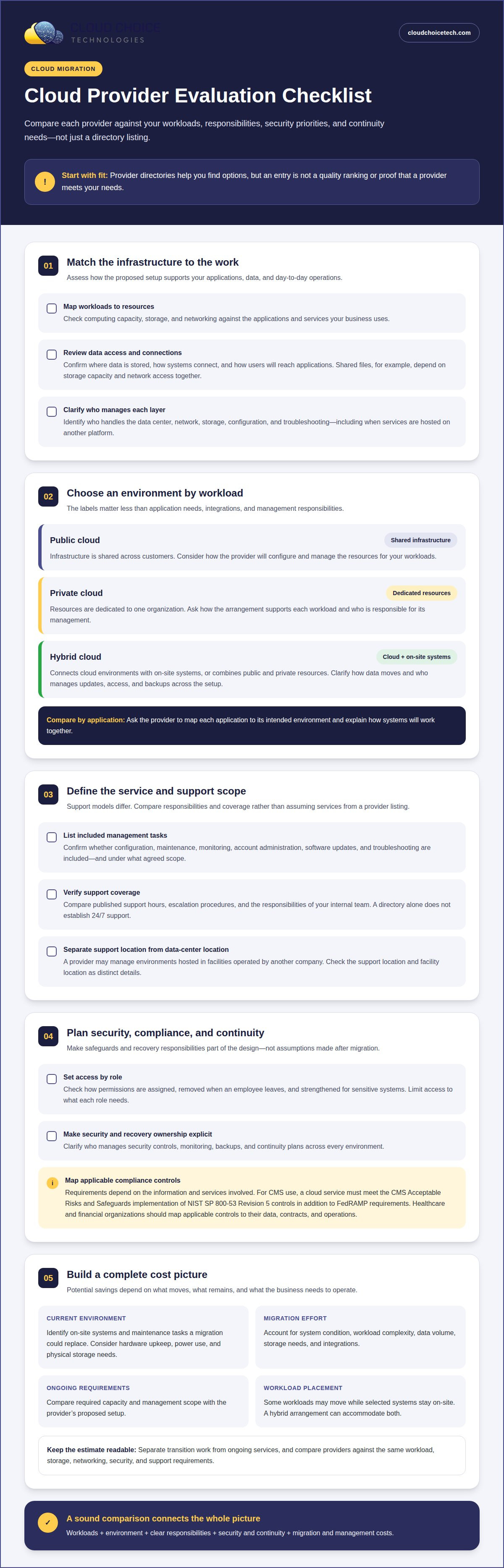
Cloud migration can reduce costs when it replaces infrastructure expenses that no longer fit your business. Moving a lightly used server workload to appropriately sized cloud resources may reduce hardware upkeep, power use, and physical storage needs. Savings depend on what you move, the capacity your operations require, and which systems must stay on-site. A hybrid arrangement can keep selected workloads local while moving other applications and storage to managed cloud environments.
Managed services can consolidate routine infrastructure work. A provider may handle configuration, maintenance, and monitoring within an agreed scope. Clarify which tasks are included, such as account administration, software updates, and troubleshooting. Managed IT and cybersecurity services can also bring technology oversight together with access controls and threat response, helping you distinguish responsibilities handled internally from those managed externally.
A cloud provider with a local presence may offer closer coordination, while a major hyperscaler typically provides a broader range of platforms. Local providers may rely on third-party data centers, and hyperscaler environments require careful configuration and usage management. Either model can create risk if responsibilities, security controls, and continuity plans are unclear. The right choice depends on your workloads and your organization’s capacity to manage the environment.
Compliance requirements depend on the information and services involved, not simply where a business operates. According to the Centers for Medicare & Medicaid Services, for CMS use, a cloud service must meet the CMS Acceptable Risks and Safeguards implementation of NIST SP 800-53 Revision 5 controls in addition to FedRAMP requirements. Healthcare and financial organizations should map applicable controls to their data, contracts, and operations before selecting a service.
Migration and managed-cloud costs depend on the condition of your current systems, workload complexity, data volume, storage needs, integrations, and ongoing management scope. Migration timing also depends largely on the state of your existing systems. The price varies by situation and is provided after a quote request; factors include migration work, workload requirements, and the management services selected. Separating transition work from ongoing services makes planning clearer.
Provider listings alone don’t establish which companies offer 24/7 support or operate local data centers. Compare published support coverage, escalation procedures, facility locations, and continuity arrangements. A provider may manage cloud environments hosted in facilities operated by another company, so distinguish the location of support from the location of the data center.
Identity and access management can limit unnecessary access without making work harder. A provider can assign permissions by role, remove access when an employee leaves, and apply stronger authentication to sensitive systems. For example, limiting finance staff to finance applications avoids granting broad access by default. Include these controls in migration planning alongside monitoring and recovery needs, so the new environment supports efficient operations and appropriate safeguards.
Cloud service provider listings across Florida
Provider directories can help businesses find cloud platforms, infrastructure specialists, and managed support options. A directory entry is a starting point, not a quality ranking or proof that a provider fits your needs. Compare each company’s platform experience, service scope, and support responsibilities with your systems and priorities before narrowing your options.
Cloud Infrastructure Services
Cloud infrastructure can include data-center capacity, computing resources, storage, and networking that connect users to applications. A provider may manage these components or coordinate services hosted by another platform. Review where data is stored, how systems connect, and who handles configuration. For example, a business with large shared files should assess storage capacity and network access together.
Ask how the proposed infrastructure will support your operations. A custom setup may combine cloud resources with existing systems, while automated processes can handle routine tasks such as provisioning access. Clarify which organization manages each layer, including the data center, network, and storage. That division shapes troubleshooting and your staff’s responsibilities.
Public, Private, and Hybrid Options
Public cloud uses infrastructure shared across customers, while private cloud dedicates resources to one organization. Hybrid cloud connects cloud environments with on-site systems or combines public and private resources. Each model affects workload placement and management. For example, a company might keep a specialized application in its current environment while moving collaboration tools to a public cloud.
Choose based on workload requirements, integration needs, and management responsibilities, not labels alone. Ask providers to map each application to its intended environment and explain how data moves between systems. A sound plan identifies who manages updates, access, and backups across the hybrid setup. These details help optimize cloud services without creating disconnected systems.
For a small business, the right provider is one whose platform, support scope, and management approach fit its applications and internal capacity. Compare providers against the same requirements, including storage, networking, security responsibilities, and migration support. A business with limited technical staff may prioritize hands-on administration, while one with an internal IT team may need a narrower service scope.
Microsoft 365 and Azure are distinct services, even when one provider supports both. Microsoft 365 covers productivity and collaboration applications; Azure provides cloud infrastructure and platform capabilities. Clarify which tasks the provider handles, such as account administration, configuration, or ongoing management. This distinction helps businesses already using Microsoft tools define responsibilities and avoid service gaps.
AWS, Microsoft Azure, and Google Cloud are major platform names you may see in provider directories. Providers may specialize in one platform or work across several, so assess their experience with the platform your applications require. A listing that names all three doesn’t, on its own, explain service depth or support scope.
Platform as a Service (PaaS) gives teams a managed environment for building and running applications without managing every underlying infrastructure component. A provider may help configure that environment and connect it with databases or other services. Before choosing a PaaS arrangement, clarify which layers remain your responsibility, including application code, data, and access controls.
For day-to-day technology operations alongside cloud workloads, managed IT services can help coordinate user support and system management. Document your platforms, support needs, and responsibility boundaries to compare options consistently.
Uptime guarantee and redundant power
An uptime guarantee describes a provider’s contractual availability commitment for a defined service. It doesn’t automatically cover every application, internet connection, or device your business uses. Read the service-level agreement (SLA) to identify the measured service, measurement period, exclusions, and remedies. A leading provider should explain those terms clearly, including what happens when an outage affects your business.
Distinguish the provider’s infrastructure availability from your entire operating environment. For example, a cloud server may remain available while an office internet connection fails, preventing staff from reaching it. An application may also become unavailable because of a software issue, even when its hosting infrastructure is working. Map each critical service, from email to accounting, to its network dependencies and support responsibilities.
Redundant power reduces reliance on a single electricity source. A data center may use battery-based uninterruptible power supplies (UPS) to bridge brief interruptions, alongside generators for longer disruptions. Ask how power paths are separated and what happens if a component fails. Redundancy matters most when backup equipment, fuel, maintenance, and transfer procedures work together as a tested system.
Network redundancy follows the same principle. Multiple network paths can help maintain connectivity if one route is disrupted, but your business still needs a working connection to reach cloud services. Consider a South Florida office that loses its primary internet circuit: a secondary connection can preserve access if it uses a genuinely separate route and supports the required applications.
Use these steps to assess a provider’s uptime commitment:
- Identify which servers, storage, and applications the SLA covers.
- Review scheduled maintenance exclusions and incident reporting procedures.
- Understand how downtime is measured and what remedy the agreement provides.
- Trace power, network, and application dependencies for critical operations.
- Ask how continuity plans are tested and who coordinates restoration.
A comprehensive continuity plan also distinguishes high availability from backup. Redundant servers can keep a service running through certain equipment failures, but they don’t replace recoverable copies of business data. Backups can help restore information after deletion or corruption, while restoration time depends on the recovery process and system dependencies. Define which applications need rapid access and which data needs separate recovery protection.
Choose scalable safeguards that match the business impact of interruption. A scheduling system may tolerate a short outage; a transaction platform may require stronger continuity arrangements. Document acceptable downtime, staff access needs, and recovery priorities before comparing proposals. Data backup and recovery planning can complement availability measures by addressing how systems and information return after disruption.
South Florida cloud solutions
Compare South Florida providers by reviewing cybersecurity controls, uptime terms, and the exact work included in each service plan. Through Cloud Choice Technologies, businesses in Miami, Fort Lauderdale, and West Palm Beach gain access to comprehensive cloud offerings, which can include hosted infrastructure, application platforms, migration, and managed support.
Security, Uptime, and Service Plans
A useful comparison starts with responsibilities, not a provider’s broad security claims. Check whether the plan covers identity controls, security monitoring, software updates, and incident coordination. For example, a business using Microsoft 365 and a separate accounting platform needs clarity about who secures each environment. A written scope helps expose gaps between cloud hosting and the business’s day-to-day cybersecurity.
Compare uptime commitments by their measurement, covered services, exclusions, and remedies. A platform’s availability commitment may not cover a local internet failure or an application managed by another vendor. Ask how a provider handles those dependencies. If your company has remote staff, clarify whether network access and account support are included in the plan or remain separate responsibilities.
Service plans also differ in how much management they provide. One may cover infrastructure administration, while another includes user support, security monitoring, and coordination with application vendors. Look for a defined escalation path and clear responsibilities. If a login issue interrupts access to a business platform, staff should know who handles account access and who addresses the application itself.
Assess security through specific controls and operating procedures rather than labels such as “enterprise-grade.” Review access management, data protection, monitoring, and the process for responding to suspicious activity. A provider should explain how those measures apply to the systems in scope. For businesses handling regulated information, align platform selection and service responsibilities with the organization’s compliance obligations.
Compare proposals against the same practical scenario: an employee cannot access a critical cloud application while security monitoring detects unusual account activity. Identify which team responds, how the issue is escalated, and what communication the business receives. This shows whether security and uptime commitments work together in the service plan.
Services Across South Florida Cities
Miami, Fort Lauderdale, and West Palm Beach businesses may need cloud migration, hosted applications, cloud infrastructure, or support for Microsoft 365 and Azure. The right mix depends on the business’s existing platform, application needs, and staff workflows. A professional services firm, for example, may prioritize secure document access, while a retailer may focus on availability for sales systems.
City names alone don’t show that a provider operates a local data center or delivers on-site support. Distinguish the service location from the infrastructure location, then identify where data is hosted and how support reaches your team. For businesses with offices in multiple cities, consistent account policies and centralized administration can simplify access across locations.
Cloud solutions can combine dedicated resources with shared platforms, depending on application requirements. A company running a specialized enterprise application may need a distinct hosting arrangement, while collaboration tools may suit a standard cloud platform. Map each workload to its security, integration, and support needs before choosing a plan.
To make the comparison practical, list the systems, users, and business processes the provider would support. Then match each item to the proposed platform and service responsibility. For security-focused guidance on cloud environments, explore cybersecurity services.
Cloud Choice Technologies
Cloud Choice Technologies helps South Florida businesses address the IT and security needs surrounding cloud decisions. Its Managed IT Services and Remote Support can support day-to-day technology operations, while Cybersecurity and Cyber Risk Analysis help identify and address security concerns. These services are relevant when cloud plans involve unclear responsibilities, access risks, or gaps in ongoing support.
For example, a business preparing to move applications can use cyber risk analysis to understand security priorities, then align technology support with its operating needs. A business already using cloud platforms may benefit from managed IT support and cybersecurity oversight across its environment. The next step depends on where your current systems create the greatest operational or security concerns.
Contact Cloud Choice Technologies to discuss your business’s IT and security needs.
Make Your Cloud Decision Actionable
Choose your next step around one business priority: controlling operating costs, improving access, or reducing technology risk. Define what success means for that priority, then connect it to the systems and workflows your team depends on. A cloud computing provider in South Florida should be able to explain how its proposed approach supports those goals and where your business retains responsibility.
Cloud Choice Technologies offers Managed IT Services, Cybersecurity, and Remote Support to help businesses manage the technology and security work involved in cloud decisions. These services can suit teams that need ongoing IT oversight, closer attention to security, or help resolving support needs. Start with your current environment and desired outcomes, rather than a one-size-fits-all migration plan.
Bring your priorities and current technology concerns into the conversation. Contact Cloud Choice Technologies to discuss a practical path forward for your business. A well-planned decision can make your technology a more dependable foundation for what comes next.
Frequently Asked Questions
What cloud computing providers serve South Florida?
South Florida businesses can use public-cloud platforms directly or through managed service providers that support business systems. The distinction matters: a platform operator supplies underlying cloud resources, while a managed provider can help coordinate configuration, access, and ongoing IT support. For example, a company with limited internal IT capacity may value help managing accounts and applications, while a business with dedicated technical staff may prefer more direct platform control.
How can a South Florida cloud provider help a business evaluate its needs and choose the right solution?
A cloud provider can assess your current systems, business priorities, user requirements, and security concerns before recommending an approach. For example, a company preparing to move financial applications can identify which users need access and what protections those accounts require. Cloud Choice Technologies offers Cyber Risk Analysis to help businesses understand risk as part of technology planning. Explore cloud services relevant to your business environment.
Which cloud provider is best for small businesses in South Florida?
The right provider’s platform, support scope, and management approach should match your business’s applications and internal capacity. Compare migration support, storage, networking, and security responsibilities.