Challenges of Managing a Remote Workforce: IT Risks and Solutions in 2026
What if the biggest remote-work risk isn’t one device or one cyber threat, but the gaps between them? The challenges of managing a remote workforce IT leaders face often connect: limited visibility makes devices harder to secure, unclear access rules increase exposure, and slow support leaves employees stuck when systems fail. Distributed work can be productive, but only when technology is managed as a connected whole.
It’s reasonable to want employees to work smoothly from anywhere without adding unnecessary security friction. The answer is a practical approach that gives teams reliable access, protects company data, and makes it clear where employees turn for help. This guide explains how to address the core IT challenges of remote work, from device oversight and cybersecurity safeguards to responsive support and recovery planning. You’ll also see how clear processes work together to reduce uncertainty, support day-to-day productivity, and prepare your business to respond when something goes wrong.
Key Takeaways
- See why the challenges of managing a remote workforce IT go beyond employee productivity and require coordinated oversight of systems, security, support, and recovery.
- Assess how remote access, managed devices, cloud tools, and data protection depend on one another, without assuming every risk will become an incident.
- Use a practical framework to inventory technology, assign ownership, set support processes, review protections, and plan recovery.
- Understand how managed IT can bring system monitoring, management, and employee support into a more consistent operating approach.
- Consider a free Network Security Analysis, which includes a technology assessment with white-hat testing, as a starting point for identifying areas to review.
Why Remote Workforce IT Challenges Affect More Than Employee Productivity
Flexible work gives employees more choice about where they work. Businesses still need reliable, secure access to the systems people depend on every day. Those goals can work together, but they require oversight beyond simply providing a laptop or login. The challenges of managing a remote workforce IT leaders face involve access, device visibility, employee support, and business continuity, all of which influence how smoothly work gets done.
Remote workforce IT management is the coordination of technology oversight, employee support, security, and recovery for people working outside a shared office. Treating these responsibilities as connected helps businesses spot where a small issue, such as an account problem or an unmaintained device, could affect a wider workflow. Managed IT services can bring ongoing system oversight and support into one operating approach.
What makes distributed work harder to manage?
Employees may access business systems from different locations, home networks, and devices. That variety makes it harder to maintain consistent setups and understand which devices can reach company information. If an employee can’t tell where to report a login problem, or support lacks basic details about the device, a routine issue can take longer to resolve. A clear support route and consistent technology practices help reduce this avoidable friction.
Cloud tools add flexibility, but access and data protection still need attention. Cloud Computing Security covers considerations relevant to protecting information and access in cloud environments. The aim isn’t to treat every remote connection as a threat. It’s to understand how employees connect, which systems they use, and where appropriate safeguards and oversight are needed.
Which business operations can be affected?
A technical interruption can reach beyond the device where it starts. An employee who can’t sign in may lose access to files, email, applications, or communication tools needed to complete ordinary tasks. If a device issue or account problem remains unresolved, work that depends on that person or system may also be delayed.
Continuity matters, too. Teams need to know how to keep essential work moving and where to turn when access or technology fails. Distributed work changes where IT issues can appear, not the need for dependable systems. Coordinated support, security oversight, and recovery planning give businesses a clearer way to manage disruption without assuming that every risk will become an incident.
How Security, Support, and Cloud Access Create Connected Remote IT Challenges
Remote access, employee devices, technical support, and data protection work as parts of one system. If an employee can’t open a shared file, the cause might be an account issue, a device configuration problem, or a connection failure. Each possibility calls for a clear way to get help, while access controls and oversight help the business manage who can reach company information.
Cloud file sharing and business email make distributed work practical, but they also put important business information within reach from outside the office. Businesses need to understand how employees access these services, which devices they use, and how data is protected. This doesn’t mean every login or device presents an incident. It means assessing potential vulnerabilities and applying appropriate cybersecurity safeguards as part of normal IT management.
Why remote access and data protection need coordinated oversight
Consistent access practices help employees reach the systems their roles require while giving the business a clearer view of how company information is used. Security monitoring and vulnerability identification can help surface areas that warrant attention, but they don’t remove the need for sound processes or informed decisions. Cloud services also need to be considered in that broader picture, since access to shared files and applications depends on both the environment and the people using it.
Remote access should be easy for authorized employees to use and consistently overseen to help protect business systems and information.
How support gaps become operational bottlenecks
When employees don’t know where to report a technical issue, they may lose time trying workarounds or waiting for guidance. A defined support route should make it clear how to describe the problem and what information will help resolve it, such as the affected device, account, or application.
Remote technical assistance addresses an employee’s reported issue. Proactive monitoring and IT system management take a broader view, helping maintain oversight of the technology environment rather than waiting for a user to flag every concern. Managed IT services can bring those responsibilities into a coordinated approach.
These connections explain why the challenges of managing a remote workforce IT can’t be solved by focusing on security or support alone. A practical review considers access, devices, cloud services, and employee assistance together, then identifies where clearer ownership or processes would help.
A Practical Framework for Managing Remote Workforce IT
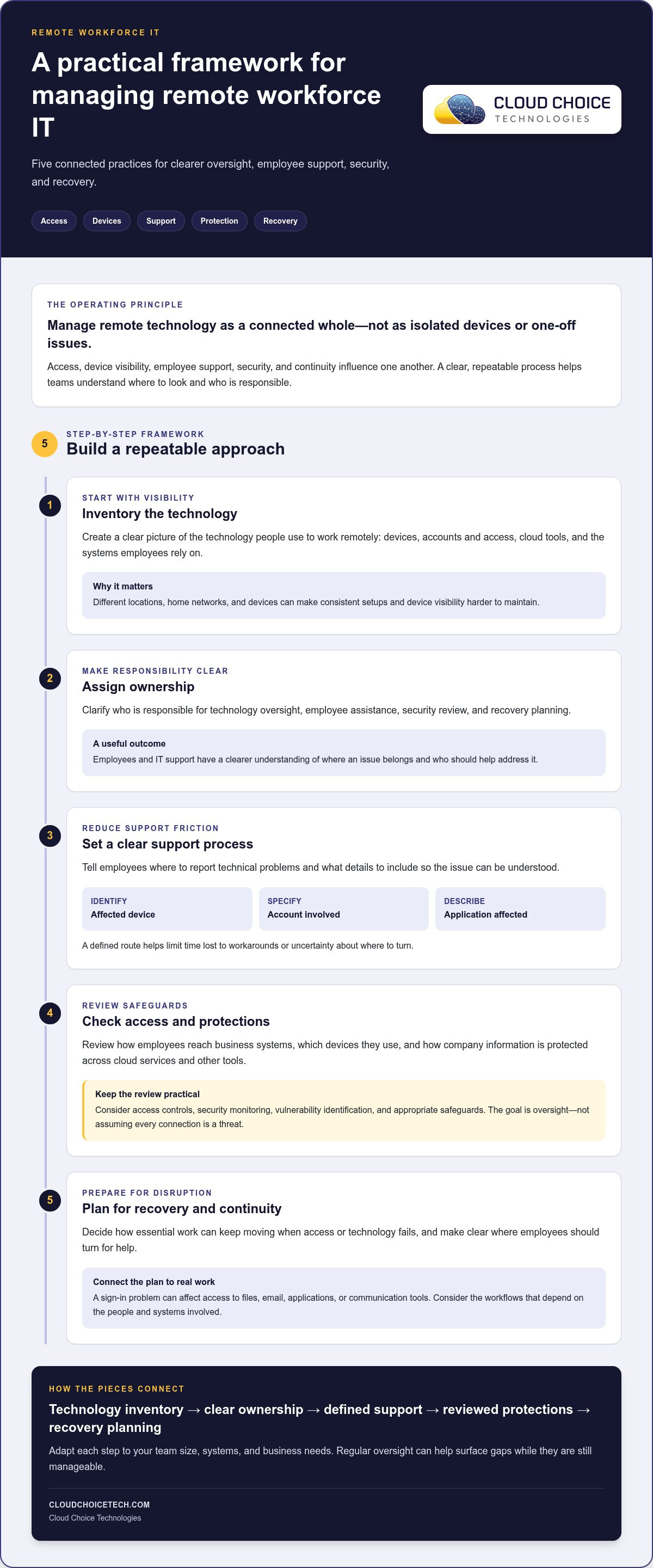
A dependable approach doesn’t require the same tools or staffing at every organization. It does require clear ownership and repeatable processes. Use this framework as a starting point, then adapt each step to your team size, systems, and business needs. Regular oversight helps surface gaps while they’re still manageable, rather than after they interfere with everyday work.
- Inventory systems and devices. Record the business applications, accounts, devices, and services employees rely on. Keep the list useful by noting who uses each system and what work depends on it.
- Assign ownership. Identify who maintains each system, approves access, and makes decisions when an issue arises. Make responsibilities visible so employees and managers know where questions should go.
- Establish support. Set a straightforward way for employees to report technical problems and explain what information to include. Consistent onboarding and offboarding procedures help teams manage changes in access and support as employees join, change roles, or leave.
- Review protection. Consider how devices, accounts, and business information are protected across the systems employees use. Review identified risks and protection practices as part of ongoing IT oversight, and prioritize improvements according to business needs.
- Plan recovery. Decide which business data and systems are essential to resume work, who coordinates recovery, and how employees will receive updates if access is disrupted. Document the process and revisit it when technology or business priorities change.
Set clear ownership for devices, systems, and employee support
Documentation turns scattered knowledge into an operating reference. It should help answer practical questions: Which systems support core work? Who owns each one? How does an employee request help? A small team might keep these details in a concise shared record, while a larger organization may need more structured ownership. Managed IT services can support ongoing oversight and management of business technology.
Build security and recovery into everyday operations
Protection and recovery belong in the same plan. Reviewing security risks can help clarify where safeguards or processes need attention. Recovery planning should account for both the information employees use and the systems they need to access it. Business continuity and recovery planning can help organize how the organization prepares to restore important data and systems, without assuming every disruption will have the same cause or resolution.
The challenges of managing a remote workforce IT become easier to address when each step has an owner and a place in routine operations. Cloud Choice Technologies also offers a free Network Security Analysis that includes a technology assessment with white-hat testing. Request a Network Security Analysis to identify areas your organization may want to review.
How Managed IT Helps Businesses Address Remote Workforce Challenges
Remote work depends on more than employees having working devices. Businesses also need a clear view of their technology, a dependable way to support users, and coordinated attention to security and recovery. Managed IT can bring those responsibilities into one operating approach, helping teams address the challenges of managing a remote workforce IT environment with consistent oversight rather than disconnected fixes.
What ongoing managed IT support can address
Cloud Choice Managed Services include monitoring and full management of IT systems. That broader view complements employee support: assistance can address a reported device or account issue, while ongoing system management helps maintain visibility into the technology employees rely on. Together, these functions give businesses a more organized way to manage distributed work. Managed IT services can also help coordinate technology oversight with cybersecurity considerations, so support needs and potential areas of risk are considered within the same environment.
Cybersecurity, cloud services, and backup and recovery each contribute to remote-work readiness, but they serve related, distinct roles. Cybersecurity helps businesses assess and address security risks. Cloud services support access to business systems and information. Backup and recovery planning focuses on restoring important data and systems if disruption occurs. Coordinating these capabilities can help clarify responsibilities and priorities, but no single service guarantees security, compliance, or uninterrupted operations.
A low-friction next step: assess the current network
Before deciding what to change, establish a clearer picture of the current environment. Cloud Choice Technologies offers a free Network Security Analysis that includes a technology assessment with white-hat testing. The findings can inform a focused discussion about areas to review across business technology and security. An assessment is a useful starting point, not a promise that every risk will be identified or that compliance requirements will automatically be met.
Take a practical first step: Request a free Network Security Analysis.
Make Remote Work Readiness an Ongoing Priority
Remote-work technology needs can change as teams, responsibilities, and business systems evolve. Set a regular point to revisit who owns key decisions, whether employees know how to get help, and whether current safeguards still fit the way people work. This keeps the challenges of managing a remote workforce IT from becoming a collection of disconnected tasks. It also gives leaders a clearer basis for prioritizing improvements without adding unnecessary friction to employees’ day-to-day work.
Start with visibility. A focused review can help you decide what deserves attention now and what belongs in a longer-term plan. Cloud Choice Technologies’ free Network Security Analysis offers a practical starting point for that conversation, without promising that any assessment can eliminate every risk.
Explore your free Network Security Analysis and take a deliberate next step toward a more manageable remote-work environment. With clear priorities and ongoing attention, your team can support flexibility while building more confidence in the technology behind everyday work.
Frequently Asked Questions
Is remote work less secure for a business?
Remote work isn’t inherently less secure; risk depends on how a business manages systems, access, devices, and company data. For example, a well-managed remote setup may have clearer access controls than an inconsistent office-based process. Assess the actual environment, including how employees sign in and share files. Keep security oversight aligned with operational needs, and revisit safeguards as systems or work practices change. No single measure removes all risk.
How can a business support employees who work remotely?
Give employees a clear route for reporting technical issues, such as a support portal or designated help desk contact. Ask them to include useful details, like the affected application, device, and any error message, while avoiding sensitive information in unapproved channels. Managed IT services can connect employee assistance with ongoing technology management. Clear instructions help staff know what to do when a tool or account interrupts their work.
What IT policies should a remote workforce have?
Document how employees access business systems, handle company information, request technical help, and report suspected security issues. For example, explain which approved channel employees should use to report an unexpected sign-in prompt or a lost work device. Keep policies aligned with the systems and workflows people actually use, and make them easy to find. Review them when tools, responsibilities, or business processes change. A policy document alone doesn’t ensure compliance or eliminate risk.
Can managed IT services help a business manage remote employees?
Yes. Managed IT services can support the business technology employees rely on through system monitoring and IT management. They address technology operations, not employee performance, so managers still set expectations and evaluate work. Businesses should also consider how cybersecurity services and recovery planning fit alongside IT support. These capabilities can help organize oversight and preparation, but they don’t guarantee productivity, security, compliance, or uninterrupted operations.
What should a company do if a remote employee cannot access business files?
Have the employee follow the organization’s established IT support process and describe the affected system, what they were trying to access, and any error message. They should avoid trying to bypass security controls, since that can create additional problems or expose information. Support staff can assess whether the issue relates to access or system availability. Employees shouldn’t share passwords or send sensitive files through unapproved channels while seeking help.