Benefits of a Co-Managed IT Model for Lower IT Costs
Lower IT costs don’t have to mean asking your internal team to do more with less. The benefits of a co-managed IT model come from sharing work between in-house technicians and an outside provider, adding support where capacity or expertise is needed without handing over every IT responsibility. Your team retains its role while the provider takes on agreed tasks.
If hiring to fill every skills gap or workload spike feels costly, co-managed IT can supplement your team with targeted support. That may reduce the need to add full-time staff for work that doesn’t require a permanent hire.
This article explains what co-managed IT services are, how shared responsibilities work, and where potential savings come from. It also covers how the model can expand security expertise and ease routine workloads, and why clear responsibilities make the partnership effective.
Key Takeaways
- Define which responsibilities stay with your internal IT team and which are better handled by an external partner.
- Assess how targeted support can address skill gaps and changing workloads without automatically adding permanent staff.
- Identify where outside security expertise and proactive monitoring can strengthen your existing approach.
- Set clear ownership for tickets, updates, and incident response to help prevent overlap and delays.
- Recognize when shared IT support fits your organization and when a broader outsourced approach may be more appropriate.
What are co-managed IT services?
Co-managed IT combines an internal IT team with an outside provider, dividing work according to capacity, skills, and business priorities. Typical responsibilities include system monitoring, routine maintenance, help desk support, cybersecurity, and assistance with larger IT projects.
Dividing IT Responsibilities
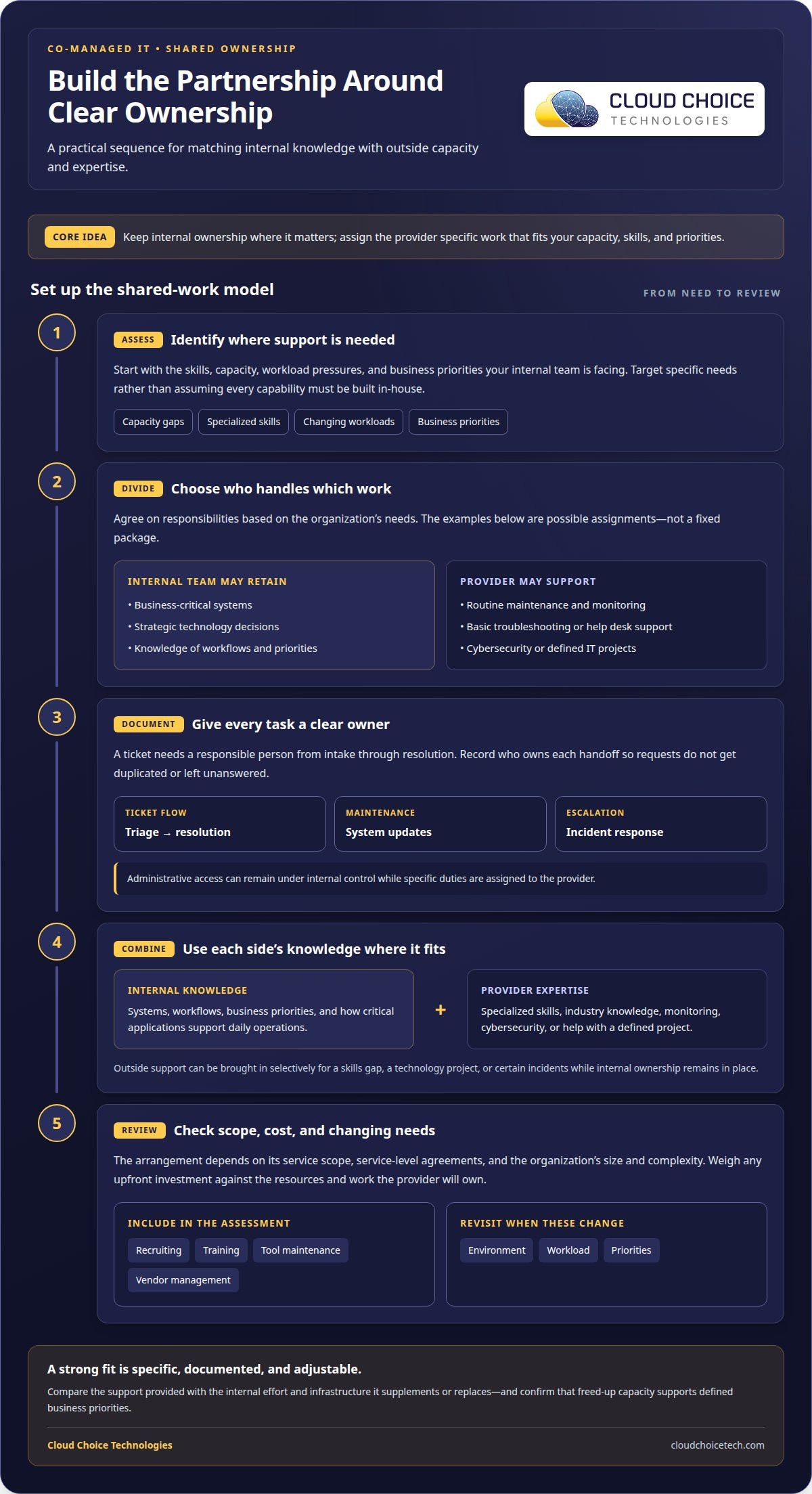
In a co-managed arrangement, the internal team and provider agree who owns each task. Internal technicians might, for example, manage business-critical systems while the provider handles routine maintenance and basic troubleshooting.
Clear ownership matters because every ticket needs a responsible person from intake through resolution. Documenting who handles triage, system updates, and incident response helps prevent duplicate work and unanswered requests. Unlike traditional managed IT services, where a provider manages the organization’s IT infrastructure, co-managed support covers only agreed responsibilities.
Administrative access can remain under internal control. This lets a business retain oversight of its IT operations while assigning specific duties, such as monitoring or help desk coverage, to a provider when internal capacity is tight.
Combining Internal Knowledge and MSP Expertise
The internal IT team understands the organization’s systems, workflows, and priorities. An outside provider can add specialized skills and industry knowledge that may be difficult to maintain in-house, expanding coverage without replacing internal ownership.
For example, internal technicians can explain how a business-critical application supports daily operations, while a provider contributes expertise in system monitoring or cybersecurity. Together, they can identify the right support for a skills gap or technology project.
This model also lets a business draw on outside expertise selectively. The National Institute of Standards and Technology (NIST) recognizes that organizations can handle basic incident response internally and engage third parties for help with certain incidents. This approach can preserve internal control while bringing in external capabilities when needed.
Services Included in the Partnership
Co-managed services are tailored to an organization’s needs rather than delivered as one fixed package. A partnership may cover system monitoring, routine maintenance, basic troubleshooting, help desk support, cybersecurity, cloud migration, or large-scale IT projects.
For instance, a business might keep strategic technology decisions with its internal team and assign daily monitoring to a provider. Another organization may need temporary help with a major project or specialized support for software integration and disaster recovery planning.
The right division depends on required services, existing tools, workforce skills, and business goals. Before work begins, document who handles each ticket type, when incidents are escalated, and who applies system updates. Clear boundaries make shared work more predictable and help the provider support the internal team without obscuring accountability.
Cost efficiency
A co-managed partnership can help control IT spending by adding support where it’s needed rather than building every capability internally. One benefit of a co-managed IT model is the ability to scope a provider’s work around specific tasks, skills, or workload pressures. For example, an internal team might retain responsibility for core systems and bring in outside help for monitoring or a defined technology project. Leaders can match resources to operational needs instead of treating every gap as a permanent hiring requirement.
Hiring is one area where this model can change the budget equation. A full-time specialist adds ongoing salary and benefits, even when the need is limited to a particular task or temporary surge. Contract-based support can provide expertise for that work without a lengthy employee search. If a company is struggling to fill a systems administrator role, external support may address an immediate capacity gap while hiring plans continue.
Cost control depends on what the agreement includes. The scope of services, service-level agreements, and the organization’s size and complexity all shape the arrangement. A smaller environment with a narrow support need differs from a complex operation requiring broader coverage. The partnership may require an upfront investment, so weigh setup needs against ongoing resource requirements and the work the provider will own.
Co-managed support can also reduce the need to build or maintain infrastructure for every capability in-house. A business may gain access to enterprise tools through a provider instead of creating its own supporting systems. If a provider handles routine maintenance, for example, internal staff can spend more time improving a business-critical process or planning a technology change. The benefits of a co-managed IT model are clearest when freed-up resources support defined business priorities.
Operational efficiency affects the value of the arrangement, not just the staffing budget. Proactive maintenance and monitoring can help identify issues before they interrupt work, while clear task ownership reduces duplicated effort. Documented escalation paths help internal staff and the provider coordinate when a threat requires a response. Revisit the service scope as the environment, workload, or priorities change.
To assess the financial impact, compare the partnership’s coverage with the internal effort and infrastructure it replaces or supplements. Include recruiting, training, tool maintenance, and vendor management in that assessment. Then track whether assigned work stays current and internal capacity shifts toward priority projects. For support that can be scoped around your operational needs, explore managed IT services.
Expanded cybersecurity expertise and proactive monitoring
Co-managed IT can address skills and staffing gaps by adding external expertise and monitoring capacity to an existing team. Internal staff retain organizational knowledge, while a provider can contribute specialized security skills and investigate alerts.
Proactive Monitoring Capacity
Proactive monitoring adds capacity to review system activity, detect potential threats, and investigate alerts before a problem disrupts work. Some co-managed providers offer 24/7 monitoring, extending coverage beyond the hours an internal team can manage alone.
For example, if an alert appears while internal technicians are focused on a system upgrade, an assigned provider can investigate it. Agree on escalation steps so findings reach the right person for action.
Added coverage can help the internal team identify recurring issues, too. If monitoring repeatedly flags the same endpoint or account, the team can prioritize a focused review rather than treating each alert as an isolated event.
Addressing Skills and Staffing Gaps
A co-managed arrangement gives an organization access to specialized expertise without requiring every skill on its internal payroll. That flexibility matters when hiring is difficult or a project requires knowledge the existing team uses only occasionally.
For instance, a business planning a security review can involve external specialists while internal staff explain its environment and priorities. This helps ensure the review reflects actual workflows, not just technical findings.
Provider expertise can supplement a less experienced team or help address rapid growth. Rather than leaving a complex task with staff who lack the relevant background, the business can assign it to people with appropriate experience.
Security work often spans monitoring, threat detection, and response. A provider can add capacity to investigate alerts and help the internal team interpret them. The organization still needs clear decision-making and escalation responsibilities, especially when a potential incident affects business operations.
Specialized support can focus on defined needs rather than every security activity. An internal team might, for example, seek help reviewing security gaps, strengthening endpoint protections, or assessing a new system before launch. The provider brings focused expertise; the internal team connects recommendations to business priorities and existing technology.
This approach is useful when a business needs external knowledge but wants to retain internal oversight. A cybersecurity assessment, for example, can identify areas requiring attention and help teams prioritize work. Cybersecurity services can support organizations seeking expertise for security risks and defenses.
The advantage is flexibility: support can shift as hiring needs, projects, and threats change. A business might need specialized input during a major technology rollout, then redirect the partnership toward monitoring or security improvements. Defined responsibilities and an agreed response path help both teams act on findings while preserving clear ownership.
How does co-managed IT improve IT team productivity and reduce workload?
Co-managed IT can improve productivity by shifting routine work away from internal specialists, giving them more time for strategic priorities. An outside provider can also add help desk capacity when ticket volume rises and adjust support during quieter periods. This helps match coverage to actual workload instead of leaving the same staff to absorb every surge.
Consider a senior engineer whose week is consumed by help desk requests. In an illustrative scenario, a backlog takes 40% of that engineer’s week. Assigning Tier 1 requests, such as password resets and common troubleshooting, to an MSP can return time for higher-level work. The internal team still handles tasks that need its knowledge of the organization’s systems.
Routine requests are only part of the pressure. One or two internal IT staff may struggle to cover emergency calls, off-hours maintenance, and continuous uptime without burnout. Most MSPs offer 24/7 monitoring and help desk support, which can provide another layer of coverage. The specific division depends on agreed responsibilities and escalation procedures.
- Delegate Tier 1 tickets and recurring user support.
- Use a shared ticketing system to make active workloads visible.
- Keep strategic initiatives with internal staff when they require business context.
A shared ticketing system helps both teams see open requests and workload trends in real time. If incoming tickets spike after a system change, the MSP can provide added support while internal technicians address the underlying project. Clear ticket ownership also helps prevent duplicate troubleshooting or requests sitting without an assigned responder.
Coverage matters during staff absences, too. A co-management partner can help cover internal IT staff during sick or vacation time, keeping routine requests moving. For a small team, that support can prevent essential maintenance from being pushed aside whenever someone is unavailable.
Co-managed support can also make room for digital transformation projects, cybersecurity strategy, and technology innovation. Internal staff can plan a system improvement while the provider handles employee support and recurring operations. To assess the arrangement, track whether routine tasks stay current and internal staff gain time for strategic projects.
A critical system outage at 2 a.m. on a Friday illustrates why responsibilities and escalation paths matter. The internal team and MSP need to know who receives the alert, who investigates, and who communicates next steps. To shift routine IT work and strengthen ongoing support, explore IT management and support.
Cloud Choice Technologies: Managed IT Services
Cloud Choice Technologies helps businesses that need added IT capacity, remote support, or stronger cybersecurity oversight. Its business IT management support can address day-to-day technology needs, while cybersecurity and cyber risk analysis help address security concerns. This support can be useful when internal staff are stretched, recurring IT work needs attention, or the business wants a clearer view of its technology risks.
Start by identifying where your team needs support and which responsibilities should remain internal. Cloud Choice Technologies provides managed IT services, cybersecurity, and remote support for businesses. Contact Cloud Choice Technologies to discuss your organization’s IT requirements.
Put a Clear IT Partnership in Motion
Turn the idea of shared IT support into a practical plan by starting with your most pressing need: a growing support queue, a security concern, or a project competing for your team’s time. Define what internal staff should retain and where an outside provider can contribute. This gives both sides a clear starting point and connects the benefits of a co-managed IT model to your business priorities.
Cloud Choice Technologies offers managed IT services, cybersecurity, and remote support to help businesses address day-to-day technology needs and security concerns. Support can start with a focused need, then align with your team’s responsibilities and operational priorities.
Bring your current IT challenges and goals into the conversation. Contact Cloud Choice Technologies to discuss a practical next step for your team. A clearer plan can help you move forward with greater confidence.
Frequently Asked Questions
How does co-managed IT work?
Co-managed IT works through an agreed arrangement between a business’s internal technology staff and an outside provider. The teams define how requests enter the workflow, who can access systems, and when issues move to another owner. For example, a provider may receive employee support requests while internal staff handle decisions about a specialized business application. Regular communication keeps both teams aligned as systems and priorities change.
How is the co-managed IT model beneficial to MSPs?
Co-managed IT can help an outside provider serve organizations that want to retain internal IT staff rather than fully outsource technology operations. The provider can expand its customer base and offer defined services. The model can also let a provider assign some work to a customer’s internal team when appropriate, reducing the need for provider staff to perform certain on-site tasks.
How Do You Know Co-Managed IT Is Working?
Look for smoother handoffs, fewer ownership questions, and clearer communication during incidents. When a staff member reports a problem, for example, both teams should know who is investigating and where updates will appear. Review recurring escalations, user feedback, and whether agreed service expectations are being met. If the same issue repeatedly causes confusion, adjust the workflow or clarify responsibilities.
What are the advantages of co-managed IT?
Co-managed IT lets a business add external capacity while keeping internal knowledge and decision-making close to its operations. It can also provide access to tools and expertise that would be difficult to maintain internally. A company preparing for a major technology change can bring in focused support while its own team preserves system context and keeps business needs central.
What are the disadvantages of co-managed IT?
The main drawbacks are coordination demands and unclear accountability. If an internal technician and provider each assume the other owns an update, the task can be delayed or duplicated. Different tools may also create friction if they don’t work well together. Documented role boundaries, compatible workflows, and shared records help reduce these risks. Without them, added support can create more management work instead of easing it.
What challenges does co-managed IT address?
Co-managed IT can help organizations that struggle to hire technology talent, face rapid growth, or have tight timelines for adopting new systems. It can also address a shortage of specialized skills or an inexperienced internal team. A growing business, for example, may need expertise for a technology rollout before it can build permanent capacity. Shared support can cover that need as the organization’s workload and resources evolve.