
Securing Employee Mobile Devices: A Practical 2026 Guide
What if you could protect company data on employee phones without turning personal devices into an IT headache? Securing employee mobile devices for work starts with clear boundaries: employees need practical access to business tools, while the organization needs a reliable way to reduce risk if a device is lost, compromised, or targeted by phishing.
It’s reasonable to worry that strict controls will frustrate staff or intrude on personal privacy. The answer isn’t to treat every phone as company property. Define which devices and apps can access work information, explain the safeguards employees are expected to follow, and make the rules easy to understand.
This guide shows you how to build a workable mobile security program, from setting policies for personal and company-owned devices to protecting accounts and responding when a phone goes missing. You’ll learn which controls to consider and how employee training can reduce everyday risks without adding unnecessary friction. Mobile security works best as part of a broader cybersecurity and managed IT approach, with protections that support data security and business continuity.
Key Takeaways
- Define which work accounts and data employees can access from mobile devices, and set clear expectations for personal versus company-owned phones.
- Make securing employee mobile devices for work practical by prioritizing core safeguards such as strong authentication, screen locks, current software, and trusted apps.
- Use a step-by-step rollout to identify devices, assess data sensitivity, communicate policies, and schedule regular reviews.
- Connect device ownership, employee guidance, technical controls, and support so mobile security remains manageable as work needs change.
- Cloud Choice Technologies offers a free Network Security Analysis that includes a technology assessment with white-hat testing.
Why securing employee mobile devices for work starts with access and ownership
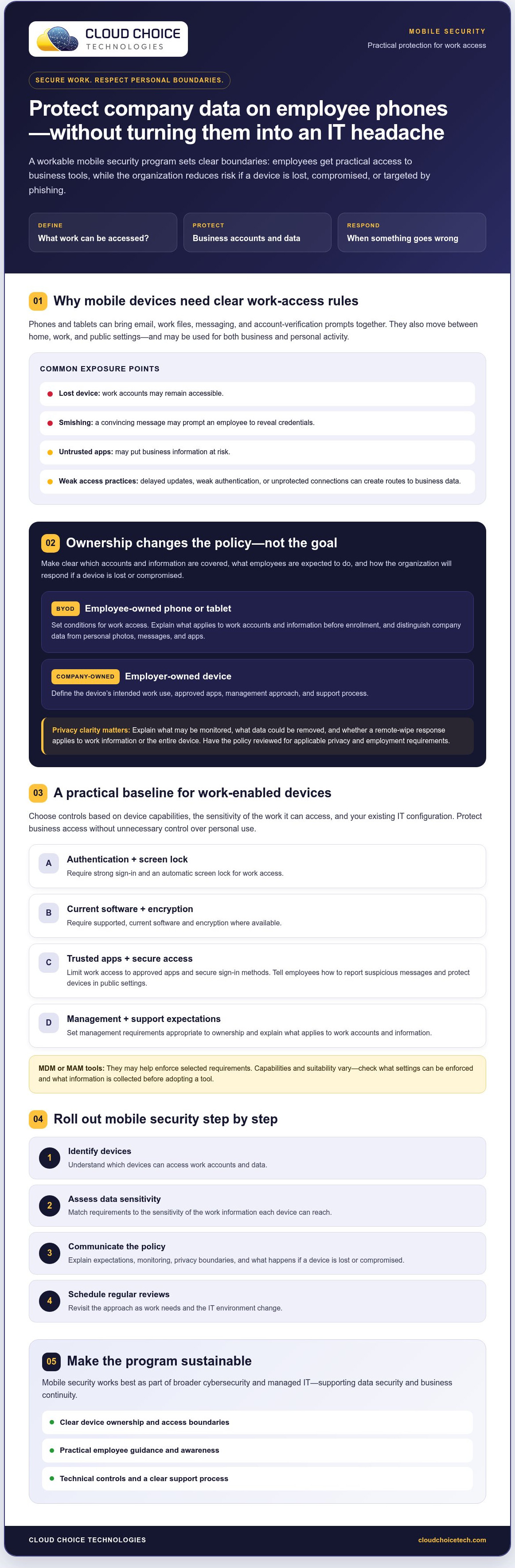
Mobile-device security for work is the set of policies and safeguards that protects business accounts, data, and access on phones and tablets. The goal isn’t to restrict every device. It’s to help employees work while making clear what information they can access, who owns the device, and what happens if something goes wrong.
A phone can bring email, work files, messaging, and account-verification prompts together in one place. That convenience also creates exposure. A lost device may leave work accounts accessible. A convincing smishing message can prompt an employee to reveal credentials, while an untrusted app may put information at risk. Delayed software updates can leave known weaknesses unaddressed. Signing in without strong authentication or using an unprotected connection can create another route to business data. For a broader mobile security overview, see Wikipedia’s summary of common concepts and countermeasures.
What makes phones and tablets different from office computers?
Mobile devices move between home, work, and public settings, and employees may use the same screen for business and personal activity. That makes clear access rules especially important. Mobile safeguards complement broader business cybersecurity; they don’t replace it. Account protection, employee awareness, and the organization’s overall security practices still need to work together.
BYOD or company-owned: why device ownership changes the rules
With bring-your-own-device (BYOD), the employee owns the phone or tablet, while the organization sets conditions for accessing work accounts and data. A company-owned device belongs to the employer, which can define its intended work use and support process. Either way, securing employee mobile devices for work starts with making those boundaries explicit.
Policies should explain which accounts and information are covered, what employees must do to protect access, and how the organization will respond to a lost or compromised device. They should distinguish company information from an employee’s personal photos, messages, and apps. This helps employees understand that protecting work access doesn’t mean unrestricted access to their personal lives.
Be direct about monitoring and remote-wipe terms. Explain what may be monitored, what data could be removed, and whether a response applies to work information or the entire device. Have the policy reviewed for applicable privacy and employment requirements before rollout. Clear notice reduces uncertainty and gives employees a practical understanding of what to expect.
Which mobile security controls protect work without overreaching?
Choose controls according to the device’s capabilities, the sensitivity of the work it can access, and your existing IT configuration. The aim is consistent protection for business access, not unnecessary control over an employee’s personal phone.
| Control | BYOD device | Company-owned device |
|---|---|---|
| Authentication and screen lock | Require strong sign-in and an automatic screen lock for work access. | Set and communicate the same baseline requirements. |
| Software and encryption | Require supported, current software and encryption where available. | Keep software current and enable available encryption. |
| Apps and access | Limit work access to trusted, approved apps and secure sign-in methods. | Define approved apps and secure access for the device’s work role. |
| Management | Explain what applies to work accounts and information before enrollment. | Set management and support expectations for the company device. |
Set a clear baseline for every work-enabled device
Require a screen lock, strong authentication, supported software, and encryption where available. Tell employees which apps are approved for business use, how to report a suspicious message, and how to protect a device in public settings. For example, they should avoid leaving an unlocked phone unattended and use trusted methods to access work systems.
Mobile-device-management (MDM) or mobile-application-management (MAM) tools may help enforce selected requirements. Their capabilities and suitability vary, so assess them against your environment before adopting them. Don’t assume a tool separates work from personal data in the way your policy intends. Check which settings it can enforce and what information it collects before deciding whether it fits your BYOD approach.
Be transparent about work-data monitoring
Employees should know what IT can see or remove before they enroll a device or receive work access. Explain whether management applies to work accounts, business apps, or company information; what device details may be collected; what support IT can provide; and whether remote removal affects work data, personal content, or both. Don’t promise that personal content is invisible or untouched until you’ve verified the tools and written policy. Have monitoring and removal terms reviewed for applicable privacy and employment requirements.
For BYOD, keep requirements focused on protecting company access and information. For company-owned devices, define the organization’s management expectations clearly. If you’re reviewing how these controls fit your wider security posture, Cloud Choice offers a free Network Security Analysis that includes a technology assessment with white-hat testing.
How to roll out employee mobile-device security step by step
A phased rollout makes securing employee mobile devices for work easier to manage and less disruptive. Start by understanding how employees use phones and tablets. Then introduce controls, test them, and refine the policy as needs change.
- Inventory devices and work access. List the device types employees use, the business accounts and apps they access, and the work tasks they perform on mobile. Note which devices are personal and which are company-owned.
- Assess information sensitivity and risk. Identify what business information employees access from each device and how sensitive it is. Use that assessment to prioritize protections. Security controls can reduce risk, but they don’t establish compliance on their own.
- Assign responsibilities. Decide who approves access, maintains the policy, handles employee support, and coordinates security decisions. Check existing support processes so employees know where to turn with access problems or a lost device.
- Write the policy in plain language. Explain enrollment requirements, software updates, approved apps, how to report suspicious messages, and what employees should do if a device goes missing. For BYOD, describe work-data access, monitoring, and any remote-removal practices before employees enroll.
- Pilot the proposed controls. Test the policy and technical requirements with a small group that reflects different device types and work needs. Ask what causes confusion, blocks essential tasks, or raises privacy concerns. Refine the rules before wider adoption.
- Communicate, launch, and review. Explain changes before enforcing them, provide a clear route to request help, and schedule policy reviews. Use employee feedback, incidents, and changes in devices or work access to decide what needs updating.
This sequence connects mobile rules to the organization’s broader priorities. For more context, see this guide to business cybersecurity strategy. Cloud Choice also offers a free Network Security Analysis, including a technology assessment with white-hat testing, to help identify areas for review.
How managed IT and cybersecurity support a sustainable mobile security program
A mobile security policy only works if someone keeps it aligned with how people actually work. Ownership, written rules, technical safeguards, and employee support need to function as one ongoing program. As devices, work apps, and access needs change, regular reviews help identify where policies need clarification or adjustment.
Signs that your program needs closer attention include unclear responsibility for work-enabled devices, different rules across teams, or uncertainty about what to do when a phone is lost. Employees also need a dependable route to ask for help when a security requirement interrupts work. A clear support process makes policies easier to follow and helps the organization respond consistently.
How managed IT and cybersecurity fit
Cloud Choice’s Managed Services includes monitoring and full management of IT systems. Its managed IT services can support the ongoing work of maintaining security practices, while remote IT support and the IT & Network Help Desk give employees a way to seek assistance. These services don’t imply a specific mobile-device-management or mobile-application-management product. Confirm device-management requirements and capabilities before including them in a plan.
Cyber Security & Protection includes ransomware protection, white-hat testing, vulnerability identification, and data-privacy tools. These services can support wider cybersecurity efforts, while the organization remains responsible for defining device ownership, employee policies, and how work access should be handled.
What can a Network Security Analysis help review?
Cloud Choice offers a free Network Security Analysis that includes a technology assessment with white-hat testing. It can provide a starting point for discussing an organization’s technology and security needs, including how mobile and desktop security fit into existing practices. An assessment can help identify areas to examine; it isn’t a guarantee of security or compliance.
For a sustainable program, use findings, support questions, and employee feedback to inform the next policy review. If you’re evaluating how to keep protections workable as needs evolve, discuss your mobile and desktop security and support needs with Cloud Choice. Securing employee mobile devices for work is an ongoing responsibility, not a one-time setup.
Build a mobile security program your team can sustain
Securing employee mobile devices for work doesn’t require choosing between company protection and employee privacy. Start by setting clear boundaries for BYOD and company-owned devices, then apply practical safeguards based on the work data employees access. Explain monitoring and remote-removal policies upfront so everyone understands how work information is handled.
A workable program also needs regular attention. Inventory devices and access, test proposed rules with employees, provide a clear route for support, and revisit the policy as work needs change. These steps help keep security controls useful rather than burdensome.
Cloud Choice’s free Network Security Analysis includes a technology assessment with white-hat testing. Cloud Backup & Disaster Recovery includes mobile and desktop security and antivirus/anti-malware. Use an assessment to discuss your organization’s security needs and identify areas for review, without treating it as a guarantee of security or compliance.
Request your free Network Security Analysis and take a practical next step toward protecting company data while keeping work moving.
Frequently Asked Questions
What is the best way to secure employee mobile devices for work?
Start with clear rules for work access, then apply safeguards that match the device and the information it can reach. Require screen locks, strong authentication, supported software, and encryption where available. Limit work access to trusted apps, and teach employees how to report suspicious messages or a lost device. For BYOD, explain monitoring and remote-removal practices upfront. Review the policy regularly so controls remain practical as work needs change.
Should employees use personal phones for work?
They can, if the organization defines and communicates the conditions for work access. A BYOD policy should specify which accounts, apps, and business information employees may access, along with required safeguards and available support. It should also explain how the organization handles work data if a phone is lost or access ends. Consider whether the device’s capabilities and the sensitivity of the information make personal-phone access appropriate for each role.
Can an employer monitor an employee's personal phone?
What an employer can see depends on applicable requirements, the written policy, and the tools in use. Before employees enroll a personal device, explain what information may be collected, whether management applies to work accounts or apps, and what remote removal could affect. Don’t promise that personal photos, messages, or apps are inaccessible unless you’ve verified the tools. Have monitoring terms reviewed for applicable privacy and employment requirements.
What should employees do if a work phone is lost?
Report the loss to the designated IT or security contact as soon as possible, and follow the organization’s response instructions. Include when and where the phone was last seen and whether it may have been unlocked. IT can assess work-account exposure, take steps to restrict access, and determine whether remote removal is appropriate and available. Employees shouldn’t wait to see if the phone turns up before reporting it.
Is public Wi-Fi safe for accessing work accounts on a phone?
Public Wi-Fi can expose work activity to risks, especially if the network is untrusted or impersonates a legitimate hotspot. Prefer a trusted, secured connection for work accounts. If public Wi-Fi is unavoidable, follow your organization’s approved secure-access instructions, verify the network, and avoid opening sensitive information if you can’t confirm the connection is protected. Never ignore browser or app security warnings, and report unusual sign-in prompts to IT.
Does a small business need mobile device management?
Not every small business needs a dedicated mobile-device-management tool. The right approach depends on device ownership, business risk, work-data sensitivity, and existing IT capabilities. MDM or mobile-application-management tools may enforce selected controls, but confirm what they can manage and how they handle personal data before choosing one. Cloud Choice offers a free Network Security Analysis with a technology assessment and white-hat testing to help review technology and security needs.