
IT Budgeting and Forecasting for SMBs: A Practical 2026 Guide
What if your IT budget could absorb change instead of being thrown off by it? IT budgeting and forecasting for SMBs can feel like guesswork when service commitments, projects, security needs, and growth plans all compete for cash. Without a clear view of current commitments and upcoming needs, businesses may delay important decisions or leave essential technology underfunded.
A reliable plan starts with what you already spend, then connects each investment to a business priority. Separate recurring costs, such as ongoing support and software, from project-based spending, such as expansion or upgrades. Use contracts, invoices, and renewal details to identify commitments, then review the assumptions behind planned spending. This makes it easier to see where money goes and what needs attention.
This guide will help you build a practical IT budget around current needs, forecast changes before they become urgent, and weigh technology spending against business goals. You’ll learn how to assess existing costs, plan for cybersecurity and other changing requirements, and create a review process that keeps decisions grounded as priorities shift. The result is a clearer view of what your business needs now and what it may need next.
Key Takeaways
- Use IT budgeting and forecasting for SMBs to connect technology spending with operating priorities, security, continuity, and growth.
- Build your budget from current records, then separate recurring commitments from project-based spending.
- Compare baseline, growth, and disruption scenarios to make assumptions visible and easier to revise as needs change.
- Assign clear owners for spending assumptions, approvals, actuals, and updates when business priorities shift.
- Include cybersecurity in your planning; Cloud Choice Technologies offers a free Network Security Analysis to help inform that work.
What IT Budgeting and Forecasting Means for an SMB
An IT budget is a plan for the technology spending an SMB expects to make over a defined planning period. An IT spending forecast is an evolving outlook that updates those expectations as business conditions and assumptions change. The budget sets a working plan; the forecast helps leaders adjust it. Neither can make every expense predictable, but together they make decisions more deliberate.
Technology planning connects spending to operating priorities: keeping essential work running, managing security risks, meeting compliance-related technology needs, and supporting planned growth. This resembles capital budgeting, where organizations assess major investments in light of business goals. For an SMB, that could mean weighing a planned system upgrade against a hiring plan or expansion. The key is to fund technology based on what the business needs to achieve, not simply repeat last year’s allocations.
What belongs in an SMB IT budget?
Start with the systems the organization actually uses and the commitments required to operate them. Common categories include recurring support and managed services, cybersecurity, cloud services, and compliance-related technology needs. Then list project-based spending separately: a planned upgrade, a new system, or technology needed for expansion should not be hidden among ongoing operating commitments.
Choose categories that reflect your environment and priorities. Use contracts, invoices, service records, renewal details, and project plans to identify what is already committed and what is planned. Check that each cost is recorded once, and distinguish confirmed obligations from estimates. For security planning, a free Network Security Analysis can help inform an understanding of technology and security needs.
Why create a forecast as well as a budget?
Business needs move. A change in headcount, operations, or growth plans may affect systems, support, and security requirements. A forecast gives leaders a way to update expectations when those changes arise, rather than treating the original budget as fixed.
Document the assumptions behind each estimate, such as expected staffing or the timing and scope of a project. When actual spending differs from the plan, those notes help explain whether the cause was a changed priority, a revised timeline, or an unanticipated need. Review assumptions alongside actuals and update the outlook as circumstances shift. For a broader overview of how managed services can support technology planning, see this managed IT services executive guide.
How to Build an SMB IT Budget from Current Needs
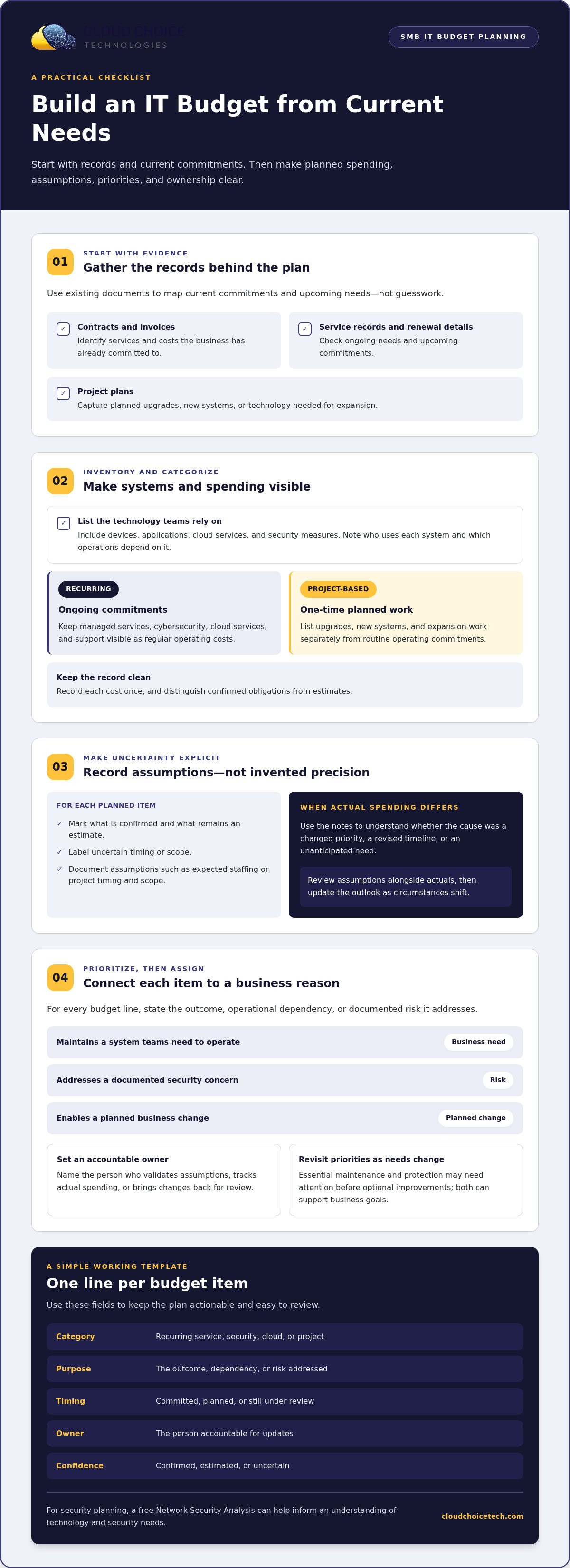
A useful budget starts with evidence, not guesswork. Gather contracts, invoices, service records, and project plans, then use them to map current commitments and upcoming needs. In IT budgeting and forecasting for SMBs, this groundwork helps leaders distinguish known obligations from estimates and make priorities visible.
- Inventory the systems. Record the technology your teams rely on, including devices, applications, cloud services, and security measures. Note who uses each system and which operations depend on it.
- Categorize spending. Group ongoing managed services, cybersecurity, cloud services, and support separately from one-time projects, upgrades, and expansion work.
- Record assumptions. For each planned item, identify what is confirmed and what is still an estimate. Label uncertain timing or scope instead of filling gaps with unsupported values.
- Prioritize by need and risk. Connect each item to a business outcome, operational dependency, or documented risk. Essential maintenance and protection may need attention before optional improvements, though both can support business goals.
- Assign an owner. Name the person responsible for validating each assumption, tracking actual spending, or bringing changes back for review.
Separate recurring services from one-time projects
Keep regular operating commitments visible so leaders can understand what the business expects to sustain. List project work separately. For example, expanding into a new facility may create distinct technology needs that shouldn’t be hidden inside routine support. Cloud-related costs also deserve clear categories; this managed cloud security guide offers broader context for planning around cloud services and security.
Prioritize spending by business need and risk
For each budget line, state the reason it matters. Does it maintain a system teams need to operate, address a documented security concern, or enable a planned business change? Cyber risk analysis can help leaders understand risks and weigh priorities, but it can’t guarantee that all risk will be eliminated. Revisit priorities as business plans and conditions change.
A simple working template can keep the plan actionable. Use one line per item and record:
- Category: recurring service, security, cloud, or project
- Purpose: the outcome, dependency, or risk addressed
- Timing: committed, planned, or still under review
- Owner: the person accountable for updates
- Confidence: confirmed, estimated, or uncertain
For help assessing security needs as you build the plan, explore Cloud Choice Technologies’ free Network Security Analysis.
How SMBs Can Forecast IT Spending When Needs Change
A forecast can’t prevent every surprise. Its value is different: it makes the assumptions behind expected spending visible, so leaders can revise them as staffing, operations, or technology needs shift. For IT budgeting and forecasting for SMBs, use scenarios to consider plausible changes without pretending to know exactly when they’ll happen or what they’ll cost.
| Scenario | Assumptions to review | Planning response |
|---|---|---|
| Baseline | Current staffing, systems, and planned work remain broadly as expected. | Track commitments and compare actual spending with the plan. |
| Growth | Hiring, system use, or business expansion increases technology needs. | Identify which services, capacity, or projects may need adjustment. |
| Disruption | An unexpected operational change, security need, or compliance task affects priorities. | Review timing, dependencies, and available response options. |
These scenarios aren’t predictions or assigned likelihoods. They’re practical prompts for testing assumptions. A growing team may need additional access or support; expanding systems may change cloud requirements; new security concerns or compliance work may shift priorities. Note what would trigger a plan update, such as an approved hiring change or a newly identified risk.
Track assumptions, changes, and actual spending
For each material assumption, record its source, accountable owner, and review date. Compare actual spending with the plan, then explain meaningful differences in plain business language: a project moved forward, staffing changed, or an identified need altered the scope. Forecast variance signals a need to review assumptions, not automatic planning failure. If the same changes recur, reconsider priorities, timing, or service arrangements.
Plan for security, compliance, and continuity needs
Include cybersecurity and recovery planning as part of protecting business operations, not only as a reaction to an incident. Compliance-related technology needs can also affect planning; assess them against the organization’s actual obligations without treating a budget item as a guarantee of compliance. If employees use AI tools, include the work needed to manage and monitor that use in your planning. For more context on security planning, read this business cybersecurity strategy.
Make security assumptions easier to assess with Cloud Choice Technologies’ free Network Security Analysis, which includes a technology assessment and white-hat testing.
Turn the IT Forecast into a Practical SMB Action Plan
A forecast only helps if someone uses it to guide decisions. Set a leadership review cadence that matches your planning cycle and the pace of change in your business. Assign clear owners: one person maintains assumptions, decision-makers approve material changes, and a designated owner tracks actual spending and updates the outlook when priorities shift. That structure makes IT budgeting and forecasting for SMBs an ongoing management process, not a document that goes untouched after approval.
Decide when to revisit the plan
Review the forecast on a regular schedule that works for your organization, and revisit it sooner when a meaningful change occurs. Useful triggers include expansion, a new system, significant security findings, or recurring differences between forecast and actual spending.
Set decision boundaries in advance. Routine spending that fits an approved plan can follow the established process; changes that affect major priorities, timing, or risk should go to leadership for review. Update the assumptions that changed rather than rebuilding the entire forecast without cause. This keeps the plan current and usable while preserving a clear record of what changed and why.
Get support for technology planning
Managed IT services can make support spending easier to plan when they use a fixed-fee arrangement, because the business can account for that commitment in advance. This can improve predictability, but it doesn’t guarantee a particular financial outcome. Cloud Choice Technologies’ Technology Planning Services can support planning when expansion changes technology needs. Align that work with your owners and review process so technology decisions remain connected to business priorities.
Security belongs in the action plan, too. A free Network Security Analysis, including a technology assessment and white-hat testing, can provide a practical starting point for understanding technology and security needs. Use the findings to inform priorities and decide whether the forecast assumptions should change.
To explore how managed services can support planning and ongoing IT needs, read the managed IT services guide. You can also learn about the free Network Security Analysis as you turn your forecast into clear next steps.
Make Your IT Plan Ready for What’s Next
Strong IT budgeting and forecasting for SMBs starts with a clear view of current commitments and the business needs behind them. Separate recurring services from project spending, document assumptions, and revisit the forecast when staffing, expansion, security needs, or priorities change. A variance isn’t automatically a failure; it’s a signal to review what changed and adjust the plan.
Managed IT can also help make support spending more predictable through fixed-fee arrangements. Cloud Choice Technologies reports potential savings of up to 75% compared with in-house technicians, and 40% compared with hourly technical contractors in the stated example involving four servers and 30 computers. These figures are comparisons, not a guaranteed result for every business.
For a practical starting point, Cloud Choice Technologies offers a free Network Security Analysis with a technology assessment and white-hat testing. Explore managed IT services and request a free Network Security Analysis to help inform your technology planning. With clear assumptions and regular reviews, your IT plan can support confident decisions as your business evolves.
Frequently Asked Questions
What is IT budgeting and forecasting for an SMB?
IT budgeting and forecasting for an SMB combines a spending plan with an updated outlook for future technology needs. The budget outlines expected spending over a planning period, while the forecast changes as assumptions about staffing, operations, security, or projects shift. Together, they help leaders connect technology decisions to business priorities and compare expectations with actual spending. They guide decisions, but they can’t make every cost predictable or prevent unexpected changes.
How do you create an IT budget for a small business?
Start by listing the systems and services your business relies on, then gather relevant contracts, invoices, service records, and project plans. Group ongoing commitments separately from one-time projects or upgrades. For each item, record its purpose, expected timing, and owner. Mark known commitments separately from estimates, and document uncertain assumptions rather than filling gaps with guesses. Prioritize items based on business goals, operational dependencies, and identified risks.
What should an SMB include in its IT budget?
Include the technology spending needed to operate and protect your actual business environment. Common categories include ongoing IT services and support, cybersecurity, cloud services, and compliance-related technology needs. Keep planned projects, upgrades, and expansion-related work distinct from recurring commitments so leaders can see both clearly. Your categories should reflect the systems your teams use and the outcomes the business needs, rather than copying another organization’s budget structure.
How often should a small business update its IT forecast?
Set a review schedule that fits your business’s planning cycle and the pace of change, rather than relying on a universal timetable. Compare actual spending with the forecast during scheduled reviews, and revisit assumptions sooner if a meaningful change occurs. Triggers might include expansion, a new system, a material security finding, or recurring differences between projected and actual spending. Update the affected assumptions and priorities without rebuilding the entire forecast unnecessarily.
How can an SMB make IT costs more predictable?
Build a clear record of recurring commitments, project estimates, and the assumptions behind each forecast. Review actual spending against that plan and investigate patterns such as changing system needs or repeated project delays. Fixed-fee managed IT arrangements can make support spending easier to plan by establishing a recurring commitment. They don’t remove every variable, so keep estimates distinct from confirmed obligations and adjust the outlook when business needs change.
Can managed IT services help with IT budgeting and forecasting?
Yes. Managed IT services can help an SMB plan ongoing technology management and support needs, while a fixed-fee arrangement can make support spending more predictable. Cloud Choice states that fixed-fee managed IT can save up to 75% versus in-house technicians and 40% versus hourly contractors in an example involving four servers and 30 computers; these are comparisons, not guaranteed outcomes. Its free Network Security Analysis includes a technology assessment and white-hat testing.