
How to Choose a Cloud Solutions Company for Your Business
What if moving more systems to the cloud creates more complexity instead of less? Choosing a cloud solutions partner starts with a practical question: which systems actually benefit from moving, and how will they stay secure and available? It’s reasonable to look beyond broad promises. Your business needs clear answers about service scope, data protection, recovery, and ongoing oversight.
This guide explains how to assess those essentials before committing to a cloud approach. You’ll learn how to match business needs with cloud services, consider security and backup together, and distinguish specific responsibilities from vague claims. Cloud Choice Technologies supports cloud file sharing, Exchange email, virtualization, and online backup, with cybersecurity, backup and recovery, and ongoing IT management as part of a broader plan. A free Network Security Analysis can also provide a practical starting point for identifying current technology risks.
Key Takeaways
- Define what your business needs from the cloud before moving systems, then match services to practical requirements such as file sharing, email, virtualization, or online backup.
- Look for a provider that clearly explains service scope and ongoing oversight, not one that relies on broad promises.
- Separate cybersecurity, backup, and disaster recovery by purpose. Backup can support recovery after data loss, but it doesn’t replace security measures.
- Consider cloud services alongside managed IT support, security, and backup so your systems have coordinated oversight.
- A free Network Security Analysis can help identify technology risks as a practical starting point for evaluating your needs.
What a Business Cloud Solutions Company Should Actually Deliver
A business cloud solution is a service that lets an organization access, host, share, or protect its systems and data through cloud-based resources. It’s broader than a single storage product. Cloud computing can take different forms, so the practical question is which services support your operations and how they fit together. For a foundational overview, see What is cloud computing?
Clarity matters when evaluating a cloud solutions company coral springs: the provider should define what each service does, which business need it addresses, and where ongoing system management begins.
Which business needs can cloud services support?
Start with the work your team needs to do, not a list of cloud features. Cloud file sharing gives staff a way to access business files across work contexts. Exchange email supports business email. Virtualization is another distinct cloud service, while online backup focuses on protecting data by keeping backup copies. These services serve different purposes, so they shouldn’t be treated as interchangeable.
For example, a company that needs shared access to working documents may prioritize file sharing. A business looking for email may consider Exchange. If protecting data is the concern, online backup addresses a different need than sharing files. Cloud Choice Technologies’ cloud services include file sharing, Exchange email, virtualization, and online backup. The right scope depends on the systems and information your business relies on.
Where do cloud services end and managed IT begin?
Cloud services describe the cloud-based systems themselves. Managed Services address ongoing operational work: Cloud Choice Technologies’ Managed Services monitor and fully manage IT systems. Those are related, but distinct, responsibilities. A cloud service may provide the environment or function your business uses; management provides continuing oversight of the wider IT systems.
Before making a decision, map each need to an owner. Identify which systems will use cloud services, what data they handle, and who is responsible for monitoring and managing the environment over time. This keeps the scope concrete and helps prevent assumptions that selecting a cloud service automatically covers every operational or security task. Clear ownership makes it easier to spot gaps, plan support, and choose a setup that fits actual business needs rather than adding unnecessary complexity.
How to Evaluate Cloud Solutions for Security, Recovery, and Business Needs
Start with the business problem, not a catalogue of features. “Cloud selection should begin with business requirements, not a feature checklist.” When evaluating cloud services, look for clear explanations of what each proposed service covers, which operational need it addresses, and what support sits around it.
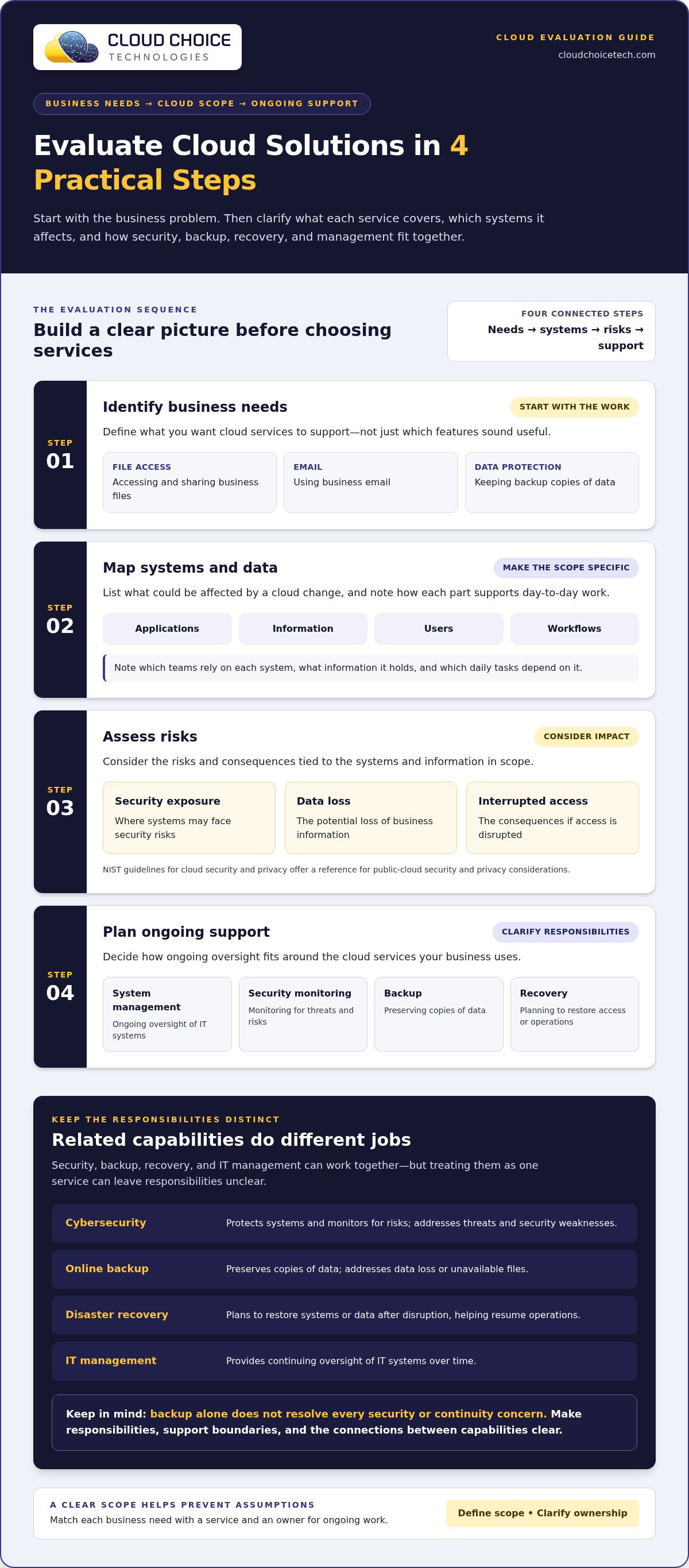
Use this sequence to build a practical evaluation:
- Identify business needs. Define the work you want cloud services to support, such as accessing files, using email, or protecting data.
- Map systems and data. List the applications, information, users, and workflows that could be affected by a cloud change.
- Assess risks. Consider security exposure, data loss, and the consequences of interrupted access. NIST’s guidelines for cloud security and privacy offer a useful reference for understanding public-cloud security and privacy considerations.
- Plan support. Decide how ongoing system management, security monitoring, backup, and recovery fit into the overall approach.
Map workloads, users, and day-to-day dependencies
Make the map specific enough to guide decisions. Note which teams rely on each system, what information it holds, and which daily tasks depend on it. Email, file access, and virtualized systems can serve different workflows, so their operational requirements may differ too. This inventory helps separate essential functions from features that sound useful but don’t address your business’s actual work.
Assess security, continuity, and support together
Evaluate these needs separately, then check how they connect. Security monitoring helps address threats; backup preserves copies of data; recovery planning focuses on restoring access or operations after disruption; and IT management oversees systems over time. Backup alone doesn’t resolve every security or continuity concern. A clear scope should make responsibilities, support boundaries, and the relationship between these capabilities understandable. Review how data backup and recovery fit your needs, and consider this discussion of managed cloud security services as you assess security oversight.
Cloud Choice Technologies offers a free Network Security Analysis as a practical first step for identifying technology risks. Use the findings to inform your evaluation, not as a guarantee of security or compliance.
Cloud Security and Backup: Address Risks Without Overpromising
Security, backup, and recovery work together, but they solve different problems. Treating them as one service can leave important responsibilities unclear. When comparing cloud solutions, a useful first step is to distinguish what protects systems from what helps restore data or operations after disruption.
| Capability | Purpose | What it addresses |
|---|---|---|
| Cybersecurity | Protect systems and monitor for risks | Threats and security weaknesses |
| Online backup | Preserve copies of data | Data loss or unavailable files |
| Disaster recovery | Plan to restore systems or data after disruption | Resuming operations following an incident |
How cloud security differs from backup and recovery
Security measures and monitoring aim to reduce exposure to threats. Backup preserves recoverable data, while recovery planning addresses how systems or data may be restored after disruption. Backup and cybersecurity serve different purposes: one keeps copies for recovery, while the other helps protect systems from threats.
A backup can be valuable after data loss, but it doesn’t prevent a breach or replace protective measures. Carnegie Mellon University’s cloud security best practices offer additional context on protecting cloud environments. Cloud Choice provides Cyber Security & Protection and Cloud Backup & Disaster Recovery, without promising that either eliminates risk or guarantees a particular recovery outcome.
What compliance-focused businesses should understand
Organizations with HIPAA/HITECH-related requirements should treat technology safeguards as part of a broader compliance effort. Cloud Choice’s proprietary audit and security-monitoring solutions can support that work, but they don’t guarantee regulatory compliance or replace an organization’s responsibilities. Define what the technology support covers, who owns related tasks, and how those responsibilities fit the organization’s processes. Cybersecurity services can be considered alongside those requirements.
Clear boundaries matter. Document which measures address security, which preserve data, and how recovery planning fits into continuity needs. To take a practical first step, request a free Network Security Analysis to help identify technology risks.
How Cloud Choice Connects Cloud Services With Ongoing IT Support
A cloud environment works best when its services, oversight, security, and data protection fit the way the business operates. The key is to understand how each capability contributes and who is responsible for it. Cloud services provide particular business functions; ongoing management, cybersecurity, and backup address related but distinct needs.
What Cloud Choice's relevant services cover
Cloud Choice’s Cloud Services include file sharing, Exchange email, virtualization, and online backup. Each supports a different business function, so the right combination depends on the systems and data your team uses. Managed Services add an operational layer: they monitor and fully manage IT systems, helping keep responsibility for ongoing oversight clear.
Security and backup complement that work without doing the same job. Cybersecurity focuses on protective measures, while backup helps preserve data for recovery. Neither should be treated as complete protection on its own. Businesses can use this distinction to map each need to the appropriate capability and identify where responsibilities connect. For a broader look at how managed IT relates to security and scalability, read the executive guide to managed IT services.
A practical first step for assessing business needs
Before changing systems or adding services, gather a clear picture of what your business depends on. List key systems, the data they handle, and the operational questions you need answered. Then consider whether your priorities center on cloud access, security oversight, ongoing IT management, or data protection. This gives a security discussion a practical business context.
Cloud Choice offers a free Network Security Analysis to help surface network security considerations. It can be a useful starting point for identifying areas to examine and deciding what questions to address next. An analysis is not a guarantee of security or regulatory compliance, but it can help clarify your current needs.
Request the free Network Security Analysis to take a practical first step toward assessing your network security needs.
Make Your Next Cloud Decision With Confidence
A cloud decision doesn’t have to begin with a sweeping change. Start by identifying the business outcome you want, the systems that matter most, and the risks you need to understand. That gives your team a practical basis for deciding what to address now and what can wait.
Choosing a cloud solutions company businesses can rely on is ultimately about finding a clear fit between your priorities and the support needed to manage them. Keep ownership, security, and continuity in view as your needs evolve. A deliberate first step can reduce uncertainty before larger technology decisions are made.
Cloud Choice Technologies offers a free Network Security Analysis to help surface network security considerations. It can inform your next steps, though it doesn’t guarantee security or compliance. Request your free Network Security Analysis and take a focused step toward understanding your business’s current needs. With a clearer picture, you can move forward with greater confidence and build a cloud approach around the work your business actually depends on.
Frequently Asked Questions
Can a business use cloud file sharing without moving every system to the cloud?
Yes, a business can use cloud file sharing while keeping other systems where they are. A company might use shared cloud files for teams that need access to documents while continuing to rely on existing systems for other work. Before making changes, consider how files connect to daily tasks and who needs access. This selective approach can help match cloud services to specific needs instead of treating a full move as the only option.
Is cloud backup the same as disaster recovery?
No, cloud backup and disaster recovery are related but not identical. Backup preserves copies of data, while disaster recovery focuses on restoring data or systems after an interruption. For example, retrieving a missing file differs from planning how a business will resume using an affected system. A business should understand what its backup covers and what recovery planning addresses. Data backup and recovery can be considered as connected parts of continuity planning.
How should a business prepare before changing its cloud services?
Prepare by identifying the business tasks that depend on the systems being changed and the people who perform them. Note important files, email workflows, and any processes that rely on access to those systems. Then document what must remain available during the change and who will handle questions or issues. This groundwork helps a cloud solutions company coral springs businesses evaluate understand the operational priorities, rather than making decisions based only on technical features.
Does cloud storage alone protect business data from cyber threats?
No, storing data in the cloud does not by itself address every cybersecurity risk. Storage makes data available for use, while security measures focus on reducing exposure to threats and monitoring for concerns. Businesses should consider how users access information, how security responsibilities are assigned, and how data loss would be handled. Cybersecurity services can support a broader approach, but no single measure should be treated as complete protection.
Can cloud services support businesses with different types of systems?
Yes, cloud services can support different business functions, but each system has its own role and dependencies. A business might rely on email for communication, shared files for collaboration, and virtualized systems for other operations. The useful question is how those functions interact and which teams depend on them. Reviewing these connections helps businesses decide where cloud services fit and where continued coordination with existing technology is needed.
What does a Network Security Analysis help a business assess?
A Network Security Analysis helps a business examine network security considerations and surface areas that may need attention. The findings can help clarify which questions to prioritize, such as where security oversight or additional review may be useful. Cloud Choice Technologies offers this analysis free to prospects. It can inform next steps, but it isn’t a guarantee of security or regulatory compliance, and it doesn’t replace an organization’s responsibility to manage its risks.