
Google Workspace Security Hardening Guide 2026
A stronger Google Workspace security posture doesn’t come from changing every Admin console setting at once. It comes from prioritizing the controls that matter most and rolling them out in a sequence your team can manage. This Google Workspace security hardening guide lays out practical steps to reduce avoidable exposure without creating unnecessary friction for employees.
When you’re deciding what to address first, focus on sign-in practices and broad sharing permissions that could expose company data. Start with identity and access, then review external sharing, monitoring, and ownership. Make changes deliberately, test their effect on everyday work, and document who is responsible for keeping each protection current. Google provides security tools, but your organization must configure and review them.
This guide walks through those priorities and explains how to make hardening an ongoing process as your team and systems change. For broader visibility into security gaps, Cloud Choice Technologies offers a free Network Security Analysis that can help connect practical improvements to a more consistent security program.
Key Takeaways
- This Google Workspace security hardening guide helps you prioritize account protection, administrator access, recovery options, and sharing controls.
- Inventory your current setup before making changes, then test high-impact updates with a suitable group to limit workflow disruption.
- Assign clear owners for account access, external sharing, integrations, and security alerts so important controls don’t go unreviewed.
- Schedule recurring reviews and revisit controls when your team, tools, or business needs change.
- A free Network Security Analysis can help identify broader security gaps to address alongside your Workspace hardening work.
Why Google Workspace security hardening starts with identity and access
Google Workspace brings together business email, file storage, calendars, meetings, and collaboration tools. A compromised account can create more than an inbox problem. Depending on its permissions, an intruder may be able to read messages, access shared files, enter collaboration spaces, or use connected services. The potential impact depends on what the account can reach, which makes identity and access a practical place to start.
Google Workspace security hardening is the ongoing work of reducing unnecessary access and exposure while keeping legitimate business workflows usable. It means reviewing settings, permissions, and security processes, not flipping one switch and assuming every threat is covered. This Google Workspace security hardening guide starts with that distinction: stronger configuration reduces avoidable risk, but it isn’t an incident response plan, a backup strategy, or a guarantee against compromise.
What does Google Workspace security hardening mean?
Hardening is a structured review of who can sign in, what they can access, and how information can be shared. The goal is to close gaps without blocking routine work, such as collaborating with an approved external partner. Workspace includes a range of services and features, as summarized in this overview of Google Workspace, but the relevant protections still need to be configured and maintained by your organization.
Keep the boundaries clear. Configuration changes strengthen the environment; incident response addresses a suspected or active security event; backups support data recovery; and a broader security program assigns oversight across people, processes, and technology. These measures work together, but none replaces the others.
Why account and administrator access deserve early attention
Start with least privilege: give each person only the access their role requires. Someone who prepares documents, for example, may not need broad access to sensitive folders or administrative settings. Review permissions when responsibilities change, and remove access when it’s no longer needed. This limits the potential reach of an account if it’s misused or compromised.
Protect administrator access with particular care. Limit administrative privileges to authorized roles, record who owns each administrator account, and review that ownership when staffing or responsibilities change. A current record makes it easier to identify who can make high-impact changes and who should investigate unexpected activity.
Specific controls, names, and availability can vary by Workspace edition and may change over time. Review the current Admin console and account settings before applying a hardening step. For broader vulnerability identification and security oversight, Cloud Choice Technologies provides cybersecurity services and a free Network Security Analysis.
Harden Google Workspace accounts, authentication, and sharing controls
Once you know who has access, review how people sign in and what they can connect to or share. Available controls can vary by Workspace edition and account configuration, so review the current Admin console before making changes. Apply protections in a way that supports approved work rather than creating blanket restrictions employees need to work around.
Strengthen sign-in and administrator protections
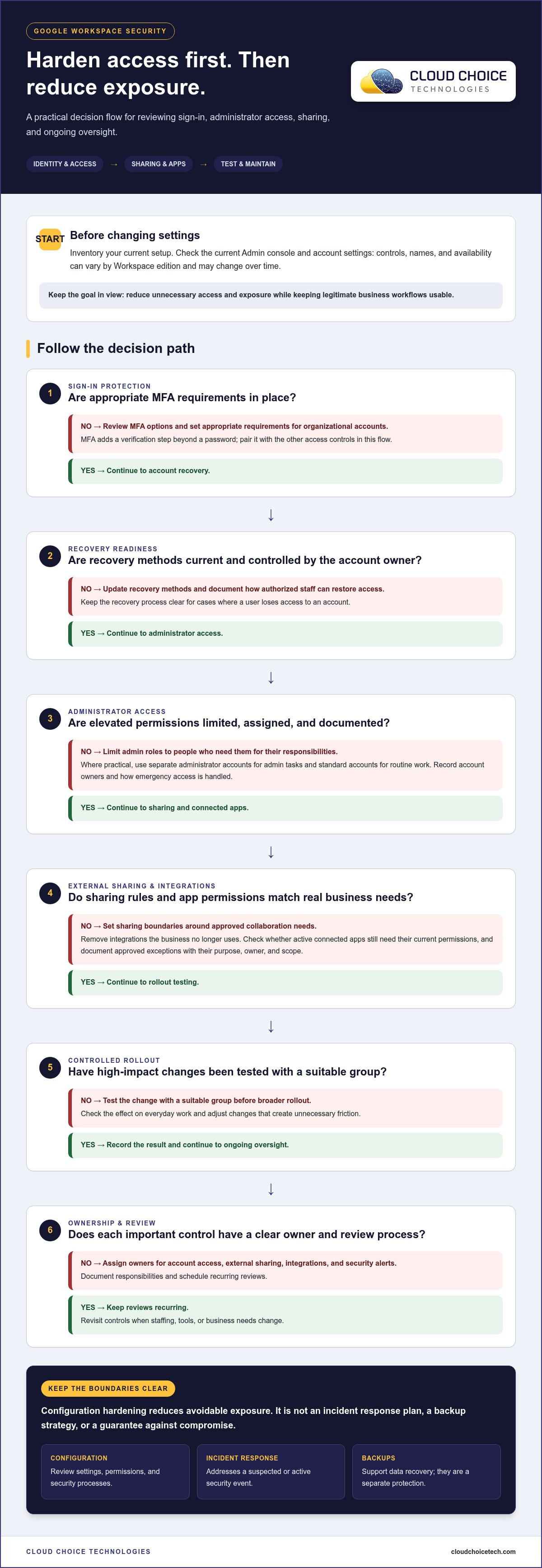
Use this prioritized checklist to focus your review:
- Authentication: Review multifactor authentication (MFA) options and set appropriate requirements for organizational accounts. MFA adds a verification step beyond a password, which can help protect an account if its password is exposed.
- Recovery: Check account recovery methods and confirm they’re current and controlled by the account owner. Document how authorized staff can restore access if a user loses access to an account.
- Administrator roles: Limit elevated permissions to people who need them for their responsibilities. Where practical, use separate administrator accounts for administrative tasks and standard accounts for routine email and collaboration.
- Ownership: Record who is authorized to manage each administrator account and how emergency access is handled. Review the record when roles or staffing change.
Least privilege limits unnecessary access by giving each person and application only the permissions needed for its work. This principle also aligns with the identity-focused approach described in the CISA Zero Trust Maturity Model: access should be deliberate, not assumed. Don’t treat MFA as a complete safeguard; pair it with role reviews and controlled recovery procedures.
Reduce unnecessary sharing and connected-app access
Review external sharing rules against real collaboration needs. Identify which teams regularly work with people outside the organization, then set boundaries that allow those workflows while reducing broad or untracked access. A team may need to share project files with an approved partner, for example, but that doesn’t mean every user needs unrestricted external sharing.
Inspect third-party app access as well. An OAuth-connected app may request permission to view or manage Workspace data, extending access beyond Google’s core tools. Remove integrations the business no longer uses, and check whether active apps still need their current permissions. Keep an exception process: document the business purpose, owner, and scope of approved sharing or app access, then revisit each exception rather than leaving it open-ended.
For help aligning these safeguards with broader cybersecurity protections, consider identity, access, and ongoing oversight together.
Roll out Google Workspace hardening in a controlled, testable sequence
A disciplined rollout lowers the chance that a security improvement will unexpectedly interrupt work. Treat hardening as a cycle: establish a baseline, rank the gaps, make a focused change, test its effects, document the result, and review it again. This practical sequence keeps the Google Workspace security hardening guide useful beyond the initial settings review.
Create a baseline and make changes deliberately
Before changing controls, record the current configuration and how your organization uses Workspace. Capture administrator accounts and roles, key integrations, external-sharing practices, and collaboration workflows that support daily operations. This baseline gives administrators a reference point if a change causes an access issue.
Next, rank potential changes by exposure and business impact. A broad sharing permission that exposes sensitive files may deserve attention before a low-impact preference. Avoid changing several high-impact controls at once; focused updates make it easier to identify the cause of an unexpected result.
For each significant change, document the setting, its owner, the reason for the update, and the intended effect. Note which groups or workflows may be affected. For broader context on maintaining cloud protections, see managed cloud security services.
Validate access, alerts, and user impact after changes
Test first with a suitable group that represents the affected users and workflows. After changing an access or sharing control, verify that people can still sign in, open the files they need, send and receive business email, and use approved integrations. Include an administrator workflow to confirm authorized staff retain the access needed to manage the environment.
Expand the change only after reviewing the results. Ask pilot users to report blocked tasks and unexpected prompts, then compare those reports with the change record. If a legitimate workflow fails, adjust the rule or create a narrow, documented exception rather than broadly loosening the control.
Close the loop by checking available security alerts and audit information for relevant activity. Reporting tools can depend on the Workspace edition and account configuration, so verify current capabilities in the Admin console. Record approved exceptions with an owner and a review date or trigger, such as a role change or the end of a project. Cloud Choice Technologies offers a free Network Security Analysis for organizations assessing broader security needs.
Maintain Google Workspace security with clear ownership and ongoing oversight
Security settings need an owner after rollout. Without one, staffing changes, new applications, and evolving work practices can make earlier decisions outdated. A sustainable Google Workspace security hardening guide therefore needs a review routine, clear responsibility, and a way to connect Workspace findings to the organization’s wider security picture.
Build a repeatable review and response routine
Assign named owners for account administration, access reviews, and decisions about escalating suspicious activity. Schedule recurring checks for user access, administrator roles, external sharing, connected applications, and available security alerts. Revisit those controls when someone changes roles, a workflow shifts, or a new application is introduced. Record findings and unresolved issues so a handoff doesn’t erase important context.
- Account access: Identify who checks whether access still matches each person’s responsibilities.
- Sharing and integrations: Review whether external access and connected apps still support approved business needs.
- Alerts and follow-up: Name who reviews relevant security information and who decides when an issue needs further attention.
Use a consistent record for decisions, exceptions, owners, and follow-up actions. Bring relevant observations into broader cyber risk analysis and security-monitoring processes instead of treating Workspace as isolated from other business systems.
When to add managed security and IT oversight
Internal ownership can work well when someone has the time, technical knowledge, and continuity to keep reviews on track. Supported oversight can help when responsibility is unclear, access exceptions keep accumulating, or the team can’t consistently review security findings. The right approach depends on available expertise and capacity, but accountability must remain explicit either way.
Cloud Choice Technologies’ managed services include monitoring and management of IT systems, while its cybersecurity support includes security monitoring and vulnerability identification. These broader capabilities support ongoing oversight without implying a Google Workspace-specific audit. For organizations assessing wider security needs, Cloud Choice Technologies offers cybersecurity support and a free Network Security Analysis as a practical starting point.
Keep the process active: assign owners, schedule reviews, track exceptions, and revisit decisions as the business changes. That steady discipline helps protections stay relevant without turning every security update into an operational disruption.
Make security hardening part of how your business changes
Security decisions shouldn’t sit untouched while your organization grows, changes roles, or adopts new tools. Treat each change as a prompt to check whether access and protections still fit the way people work. This keeps hardening practical: strengthen safeguards without letting yesterday’s settings create tomorrow’s friction.
A Google Workspace security hardening guide is most valuable when it leads to an ongoing habit, not a one-time project. Set a date for the next review, make ownership clear, and give your team a simple way to surface access problems or unexpected activity. Consistent reviews build confidence, while periodic reassessment helps keep protections aligned with business needs.
If you want a broader view of potential security gaps beyond Workspace, take a practical next step with Cloud Choice Technologies. Request your free Network Security Analysis to assess your organization’s security needs and identify areas for attention. Use the findings to set priorities your team can sustain and keep progress moving with deliberate, manageable steps.
Frequently Asked Questions
Is Google Workspace secure by default for a business?
Google secures the platform, but that doesn’t automatically mean its configuration matches your business’s needs. Your organization still needs to manage account access, sharing, administrator permissions, and connected apps. A default sharing option, for example, may not suit a team handling confidential files. Review the controls available in your Workspace edition and account, then set protections that fit your workflows and risk tolerance.
What should a business secure first in Google Workspace?
Begin with the accounts that could expose the most business data or change important settings. Review administrator access, then check how employees authenticate and recover accounts. Next, look for broad external sharing and third-party apps with access to company information. This sequence gives your Google Workspace security hardening guide a business-focused starting point: address high-impact access paths before less consequential preferences.
Does Google Workspace hardening require multifactor authentication?
Multifactor authentication (MFA) is an important protection to prioritize because it adds a verification step beyond a password. Review the methods and enforcement options available for your organization’s edition and account setup, then plan for users who may need help enrolling or replacing a verification method. Keep recovery procedures controlled, too. MFA reduces reliance on passwords alone, but it doesn’t replace access reviews or an incident response plan.
Can Google Workspace security changes disrupt employees?
They can, especially if a change blocks a sign-in method, external collaborator, or app employees rely on. Before expanding a high-impact setting, test it with users who represent the affected roles. Ask them to complete ordinary tasks, such as opening shared project files or using an approved integration. If something breaks, document the business need and adjust the control narrowly instead of restoring broad access for everyone.
How often should a business review Google Workspace security settings?
Set a recurring review schedule and reassess sooner when a meaningful change occurs. Useful triggers include an employee changing roles, a new third-party app being approved, a team adopting a different sharing workflow, or a suspected security incident. A quarterly review can provide a practical baseline for many organizations, but higher-risk environments may need more frequent checks. Record findings and follow-up owners so reviews lead to action.
What should a business do if a Google Workspace account may be compromised?
Act promptly through your organization’s incident process. Have an authorized administrator secure the account, reset its credentials, and use available controls to end suspicious access. Review recent account activity, sharing changes, email forwarding, and connected apps for signs of misuse. Preserve relevant records, assess which company information may be affected, and notify the internal people responsible for security and business decisions. Don’t assume a password change alone resolves the incident.