
Creating an IT Incident Response Plan: A Practical 2026 Guide
What if a security incident starts while key decision-makers are unavailable and no one knows who should act first? Creating an IT incident response plan means preparing for that uncertainty before it disrupts operations. A technical checklist alone may leave people guessing about authority, communication, and which business services to restore first.
During an incident, unclear responsibilities and delayed updates can slow a coordinated response. A practical plan gives people defined roles and steps to follow, while connecting technical actions to business priorities.
This guide covers the core sections of an IT incident response plan, including roles, escalation, communications, containment, and recovery. You’ll learn how to shape procedures around your systems and risks, coordinate IT with business leaders and other stakeholders, and exercise the plan so it remains useful under pressure. The goal is a decision guide your team can act on when it matters.
Key Takeaways
- Distinguish security events, suspected incidents, and confirmed incidents so your team can respond proportionately without jumping to conclusions.
- When creating an IT incident response plan, define ownership, incident criteria, contact paths, action steps, and accessible documentation.
- Use cyber risk analysis to prioritize scenarios, critical systems, and business dependencies that should shape your response procedures.
- Test the plan with realistic exercises, then use what you learn to refine roles, communications, and recovery steps.
- Review contacts, escalation paths, and access to the plan whenever responsibilities or systems change.
What Is an IT Incident Response Plan, and What Can It Actually Do?
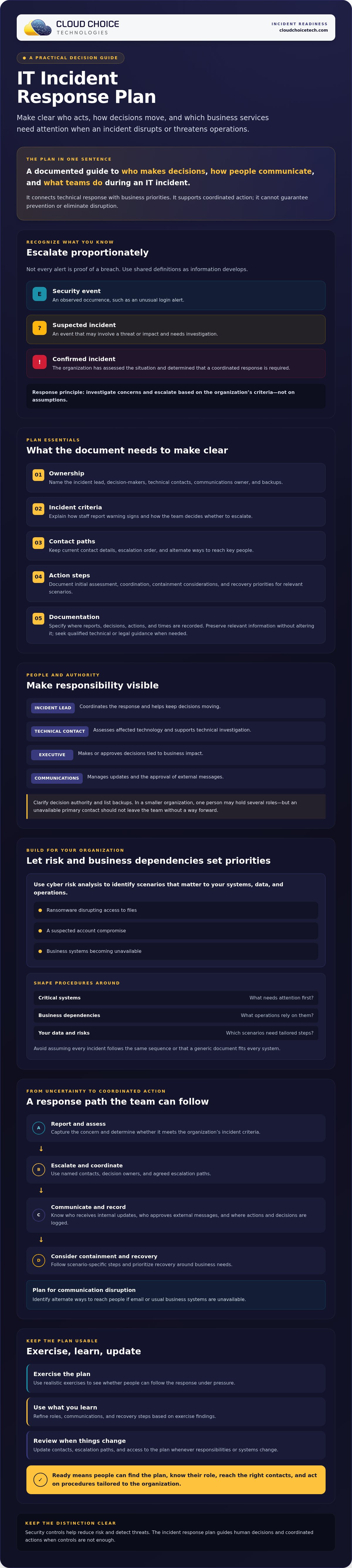
An IT incident response plan is a documented guide to who makes decisions, how people communicate, and what actions teams take when an IT incident disrupts or threatens the organization. It turns preparation into coordinated action instead of leaving employees to guess about roles or next steps. A useful incident response plan (IRP) connects technical response with business priorities, such as which systems and operations need attention first.
Planning supports a more organized response, but it can’t guarantee that an incident will be prevented or eliminate disruption. Cybersecurity controls help reduce risk and detect threats; the plan guides people through decisions and actions when controls aren’t enough. That distinction is central to creating an IT incident response plan your organization can use.
Use clear working definitions as information develops. A security event is an observed occurrence, such as an unusual login alert. A suspected incident is an event that may involve a threat or impact but needs investigation. A confirmed incident is one the organization has assessed and determined requires a coordinated response. The plan should help teams escalate concerns without treating every alert as proof of a breach.
Which situations should an IT incident response plan cover?
Start with scenarios that could affect your own systems, data, and operations. Examples include ransomware disrupting access to files, a suspected account compromise, or business systems becoming unavailable. These situations may require different decisions and actions. Use your organization’s cyber risk analysis and operational dependencies to set priorities, rather than assuming every incident follows the same sequence.
Why does a written plan matter during a security incident?
Stress and uncertainty make informal assumptions unreliable. A written plan assigns responsibility for coordinating decisions, technical investigation, and internal updates, so people know whom to contact and who has authority to act. It should include escalation paths and current contact details, along with a way to reach people if normal communication tools are affected. Security software can alert or block activity, but it can’t replace human judgment, agreed responsibilities, or coordinated procedures.
A technology assessment can help identify risks relevant to readiness. Cloud Choice Technologies offers a free Network Security Analysis with white-hat testing. Its findings can inform risk awareness, but the assessment doesn’t replace a documented and maintained incident response plan.
What Should an IT Incident Response Plan Include?
A usable plan should tell people what to do, who can decide, and how to maintain a reliable record as the situation develops. Keep it accessible and specific to your organization, rather than relying on a generic document that assumes every system or incident is the same.
Use this checklist as a starting point:
- Ownership: Name the incident lead, decision-makers, technical contacts, communications owner, and backups.
- Incident criteria: Explain how staff report a warning sign and how the team decides whether it needs escalation.
- Contact paths: Record current contact details, escalation order, and alternate ways to reach key people.
- Action steps: Document initial assessment, coordination, containment considerations, and recovery priorities for relevant scenarios.
- Documentation: Specify where to record reports, decisions, actions, and times. Preserve relevant information without altering it, and seek qualified technical or legal guidance when needed.
Every workable plan needs named decision owners, so the team knows who can coordinate actions and approve consequential decisions. Tailor the checklist to your systems, risk analysis, data, and operating needs. NIST's Computer Security Incident Handling Guide offers a foundational reference; note that its revision 2 has been superseded by NIST SP 800-61 Revision 3.
Who should have responsibilities in the response plan?
Assign an incident lead to coordinate the response, a technical contact to assess affected technology, an executive decision-maker for business-impact decisions, and a communications owner to manage updates. In a smaller organization, one person may hold several roles. List backup contacts and clarify decision authority so an unavailable primary contact doesn’t leave the team without a way forward.
How should communication and escalation be documented?
State who receives internal updates, who approves external messages, and what conditions trigger escalation. If email or other usual business systems are unavailable, identify alternate methods the organization can use, such as phone calls or a separate communication channel. Store the instructions and contact list somewhere authorized staff can access without relying solely on potentially affected systems.
Notification duties can depend on applicable law, contracts, and the facts of an incident. Confirm specific obligations with qualified legal or compliance advisers rather than relying on a general plan template. Cloud Choice Technologies’ cyber risk analysis can help identify technology risks to consider when setting plan priorities.
How to Create and Test an IT Incident Response Plan
Creating an IT incident response plan works best as a practical sequence shaped by your organization’s technology and business priorities. Start with what you know about your risks, then test whether the procedures make sense to the people who will use them.
- Identify critical systems and dependencies. List key technology, data, and business operations, including which services rely on one another. Note existing technology support arrangements so the plan reflects who can help assess affected systems.
- Prioritize realistic scenarios. Use your cyber risk analysis to select incidents that could meaningfully disrupt your organization. Consider the systems and data involved, operational impact, and dependencies. Don’t copy a generic template unchanged or assume every scenario requires identical actions.
- Assign owners and decision authority. Identify who coordinates the response, who assesses technical issues, who makes business decisions, and who manages communications. Record backups and escalation routes.
- Write usable procedures. Document how staff report concerns, how the response is coordinated, where decisions and actions are recorded, and how the organization will approach containment and recovery. Keep the steps clear enough to follow under pressure.
- Set ownership and access. Name the plan owner, define who approves changes, and state where authorized staff can find the current version, including when usual systems are unavailable.
The linked NIST Computer Security Incident Handling Guide provides a reference for incident handling. NIST SP 800-61 Revision 3 supersedes Revision 2, so consult current NIST guidance when aligning your approach.
How can an organization exercise and improve its plan?
Run a discussion-based tabletop exercise: present a realistic scenario and ask participants what they would do, whom they would contact, and who would make each decision. Follow the handoffs from the initial report through communications and recovery priorities. The aim is to uncover unclear roles, missing contacts, and assumptions that don’t hold up, not to grade individuals.
Record each gap, assign someone to address it, and update the relevant procedure. Set a review schedule that fits your organization, then revisit the plan after exercises, staff or ownership changes, or material technology changes. Confirm that contacts, escalation routes, and access to the current document still work.
A security assessment can help identify technology risks to consider when prioritizing scenarios. Cloud Choice Technologies’ free Network Security Analysis includes white-hat testing. Its findings can inform readiness, but the assessment doesn’t replace a response plan or exercise.
How to Keep Your IT Incident Response Plan Ready and Supported
A plan can become outdated without anyone noticing. Staff leave, responsibilities shift, systems change, and exercises reveal steps that no longer work. Treat creating an IT incident response plan as an ongoing readiness task: assign an owner and update the document when your organization or its technology changes.
When should an IT incident response plan be reviewed?
Review the plan after an exercise, a significant system or organizational change, or an actual incident. The plan owner should confirm that roles, backup contacts, and decision authority are still accurate. Check that escalation paths work and authorized staff can reach the current document, including when routine business systems are unavailable. Set a review schedule that fits your organization’s needs; don’t assume one cadence applies universally or is a regulatory requirement.
Keep response planning distinct from backup and disaster recovery. An incident response plan guides decisions and coordination during a security incident. Backup and disaster recovery procedures address restoring data, systems, and operations. The documents should work together, but neither replaces the other. Make clear where teams can find recovery procedures and how decisions in one process affect the other.
When can managed IT or cybersecurity support help?
Managed IT and cybersecurity support can help an organization understand and manage its technology and security needs. Cloud Choice Technologies’ Managed Services includes monitoring and full management of IT systems. Its Cyber Security & Protection includes ransomware protection, vulnerability identification, white-hat testing, and data-privacy tools. Cyber risk analysis can also help identify technology risks to consider when reviewing plan priorities.
The free Network Security Analysis is a technology assessment with white-hat testing. Its findings can inform security discussions and help identify relevant risks, but an assessment doesn’t establish incident readiness, replace a tested plan, or guarantee compliance.
Keep the plan current, coordinate it with recovery procedures, and make sure people know where to find it. Details about Cloud Choice Technologies cybersecurity support are available online.
Make Your Response Plan Ready for the Real World
A useful incident response plan is more than a document. It gives people clear responsibilities, decision paths, and practical steps that reflect your systems and business priorities. Creating an IT incident response plan also means testing it, learning from gaps, and updating it as your organization changes.
Start by confirming who owns the plan and where authorized staff can find the current version. Then use a discussion-based exercise to check whether contacts, escalation paths, and response procedures work as intended. Keep recovery procedures connected to the plan, while recognizing that incident response and disaster recovery address different needs.
Technology risks can inform those priorities. Cloud Choice Technologies provides Managed Services, Cyber Security & Protection, and cyber risk analysis. Its free Network Security Analysis is a technology assessment with white-hat testing. The findings can help surface risks to consider, but the assessment doesn’t replace a response plan or guarantee readiness.
Frequently Asked Questions
What is an IT incident response plan?
An IT incident response plan is a documented guide for coordinating decisions, communications, and actions when an IT or security incident occurs. It identifies who leads the response, how concerns are escalated, and where teams record decisions and actions. The plan helps people respond in an organized way, but it can’t guarantee that incidents will be prevented or eliminate disruption. It should reflect the organization’s systems, operations, and risks.
What should an incident response plan include?
An incident response plan should include named roles and backups, criteria for reporting and escalating concerns, current contact details, response steps, and a way to document decisions and actions. It should also identify critical systems and business priorities that may shape response and recovery decisions. Adapt these components to your organization’s risk analysis and technology. Keep the current plan accessible to authorized staff, including when usual communication systems are unavailable.
Who is responsible for creating an IT incident response plan?
Organizational leadership should support and approve the plan, while a designated owner coordinates its development and maintenance. IT or cybersecurity staff can document technical procedures, but business leaders and communications, legal, or compliance advisers may also need to contribute, depending on the organization’s needs. Assign decision authority and backup contacts clearly. In a smaller organization, one person may hold multiple responsibilities, provided everyone knows who is accountable for each decision.
How often should an incident response plan be tested?
There isn’t one testing schedule that fits every organization. Set a review and exercise cadence based on your systems, risks, and operating needs, then revisit the plan after an exercise, significant technology or staffing changes, or an actual incident. A tabletop discussion can test whether participants understand their roles, can reach the right contacts, and know how to escalate decisions. Record gaps, assign owners, and update procedures based on what you learn.
Does an incident response plan prevent cyberattacks?
No. An incident response plan doesn’t prevent cyberattacks by itself. Security controls and practices can help reduce risk, while the plan guides people through decisions and coordinated actions if an incident occurs. It can clarify escalation, communication, and response priorities, but it can’t promise that an incident won’t happen or that business operations won’t be affected. Treat prevention, detection, response, and recovery as related parts of broader security readiness.
Can a small business create its own incident response plan?
Yes. A small business can create a plan suited to its own systems, data, risks, and operations without copying a large organization’s procedures. Start by naming a response lead, decision-maker, technical contact, and communications owner; one person may fill multiple roles. Include backup contacts and clear escalation steps. Managed IT, cybersecurity, or cyber risk analysis support may help inform the plan, but the organization remains responsible for defining and maintaining its response procedures.
Request a free Network Security Analysis from Cloud Choice Technologies to help identify technology risks to consider in your response planning.